SAST - Static Application Security Testing
Static Reviewer is the SAST module (Static Analysis Security Testing), part of Security Reviewer suite, built on top of the lessons learned through millions of scans performed since 2001, constantly evolving to match new technologies and threats. It is guided by the largest and most comprehensive set of secure coding rules and supports a wide array of languages, platforms, build environments and integrated development environments (IDEs). Compliant with: OWASP, CWE, SQALE, CISQ, CVE, CVSS, WASC, MISRA, CERT, with DISA-STIG, and NIST references. The Rule Engine with its internal multi-threaded, optimized state machine based on Dynamic Syntax Tree, is the fastest in the market. It does not need any internal or external DBMS to run, and it is fully extensible via XML. Its unique capability to reconstruct an intended layering, makes it an invaluable tool for discovering the architecture of a vulnerability that has been injected in the source code, with very rare cases of False Positives.
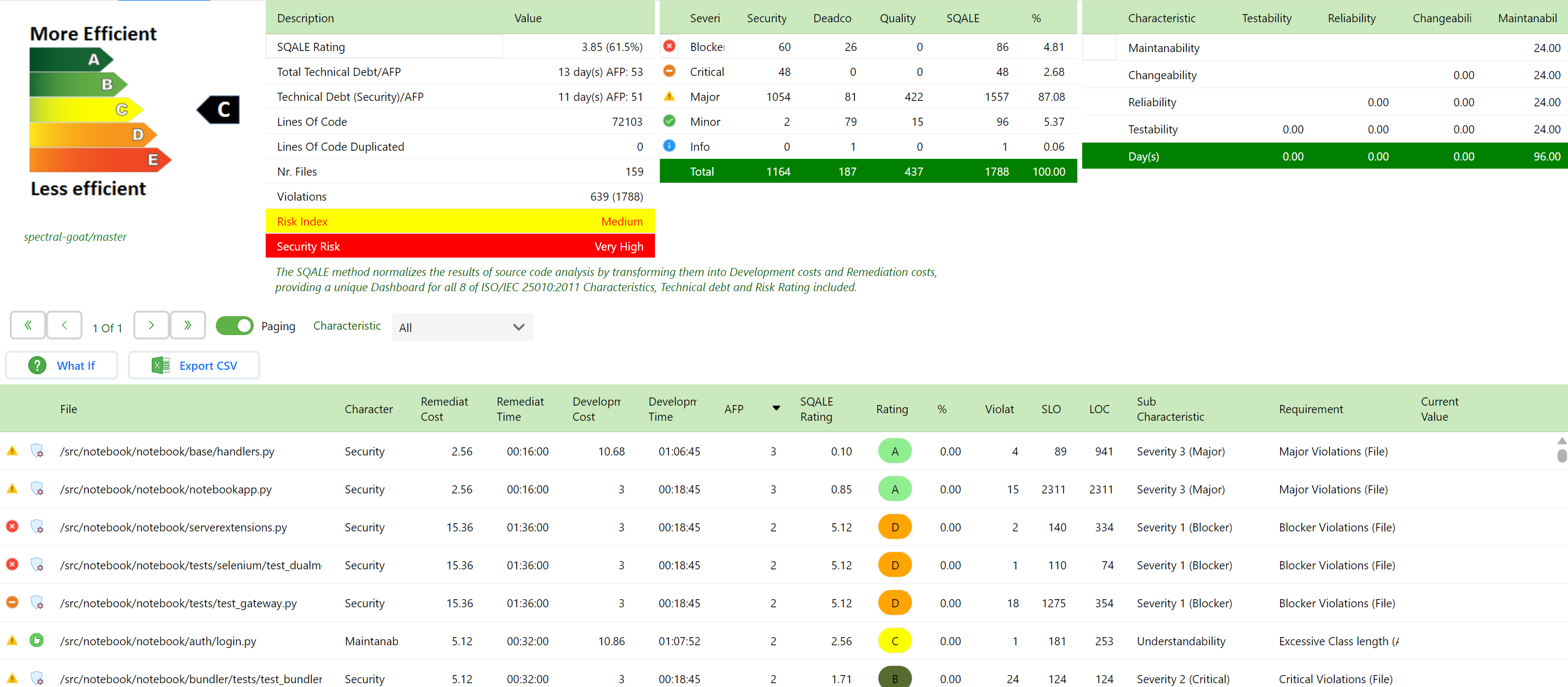
Static Reviewer and Quality Reviewer, released in the Security Reviewer Suite, are provided both On Premise (Desktop, CI Plugins, Maven / Gradle / SBT / SonarQube Plugins, Ant Task and CLI Interface tested with many CI/CD platforms) and in Cloud (our Web App offered in an high-performance European or American Secured Cloud Infrastructure), as Container (Docker, Kubernetes, OpenShift or any other APPC-compliant). Static Reviewer executes code checks according most relevant Secure Coding Standards for commonly used Programming Languages. It offers a unique, full integration between Static Analysis (SAST), Software Composition Analysis and DAST (Dynamic) analysis, directly inside Programmers IDE.
Multi-language scan
Scans uncompiled code and doesn’t require complete builds. Sets the new standard for instilling security into modern development.
An application can be made of different Programming Languages.
Security Reviewer recognizes all programming languages that are composing the analyzed app, as well as the Dominant Language (i.e. the Language with higher LOC).
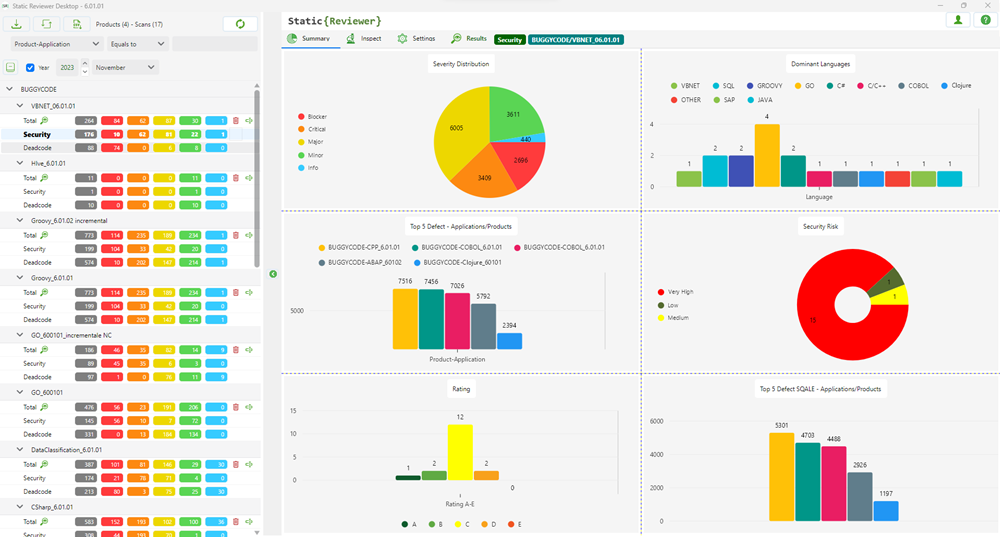
The analysis will be done automatically, by entering Source Code Path, Application (Product) and Engagement (Version).
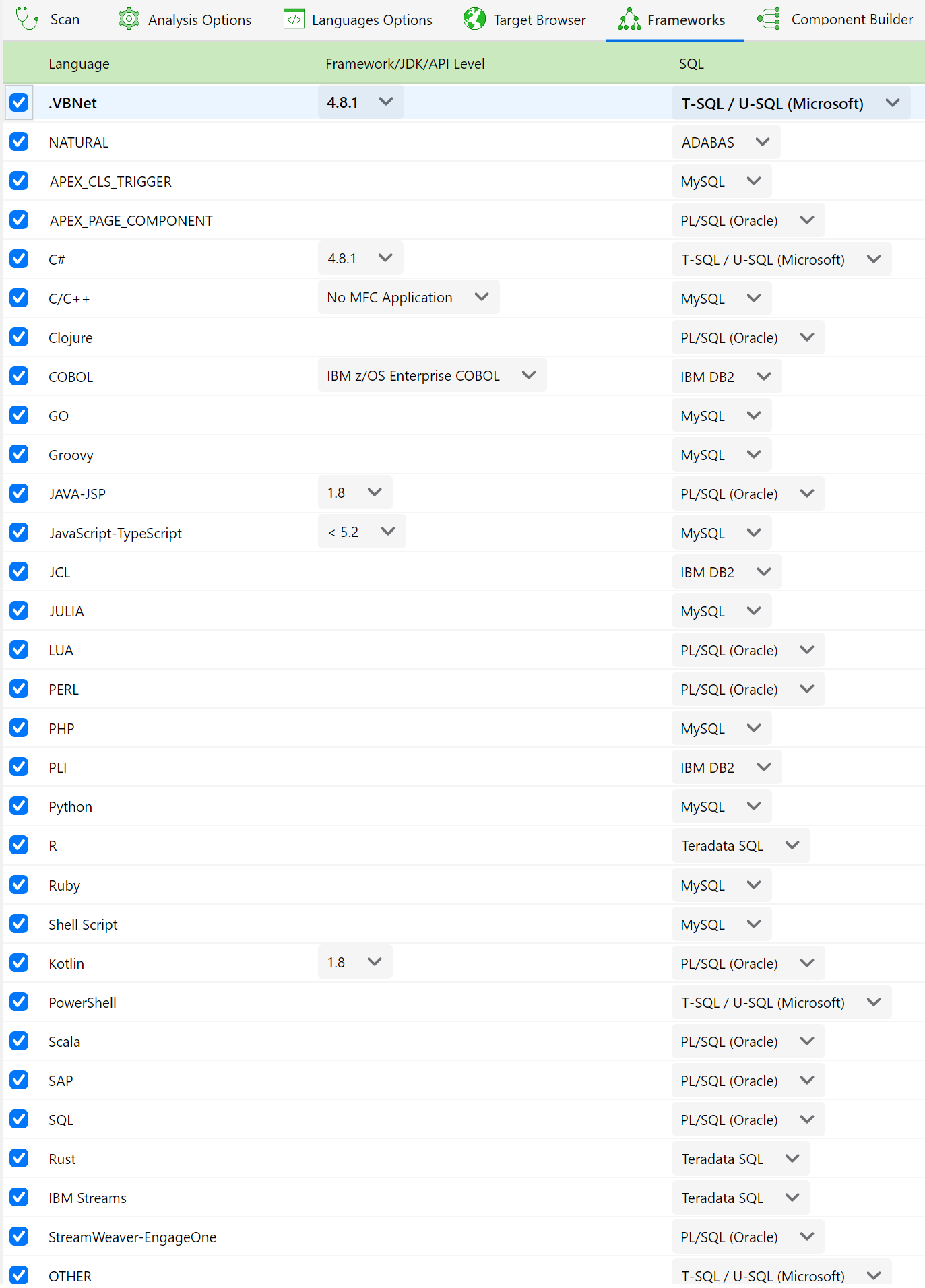
Optionally, you can fine tuning the Analysis by setting Analysis Options and Language Options, for example you may set the API Level, SDK, Frameworks for each Programming Language used in your app.
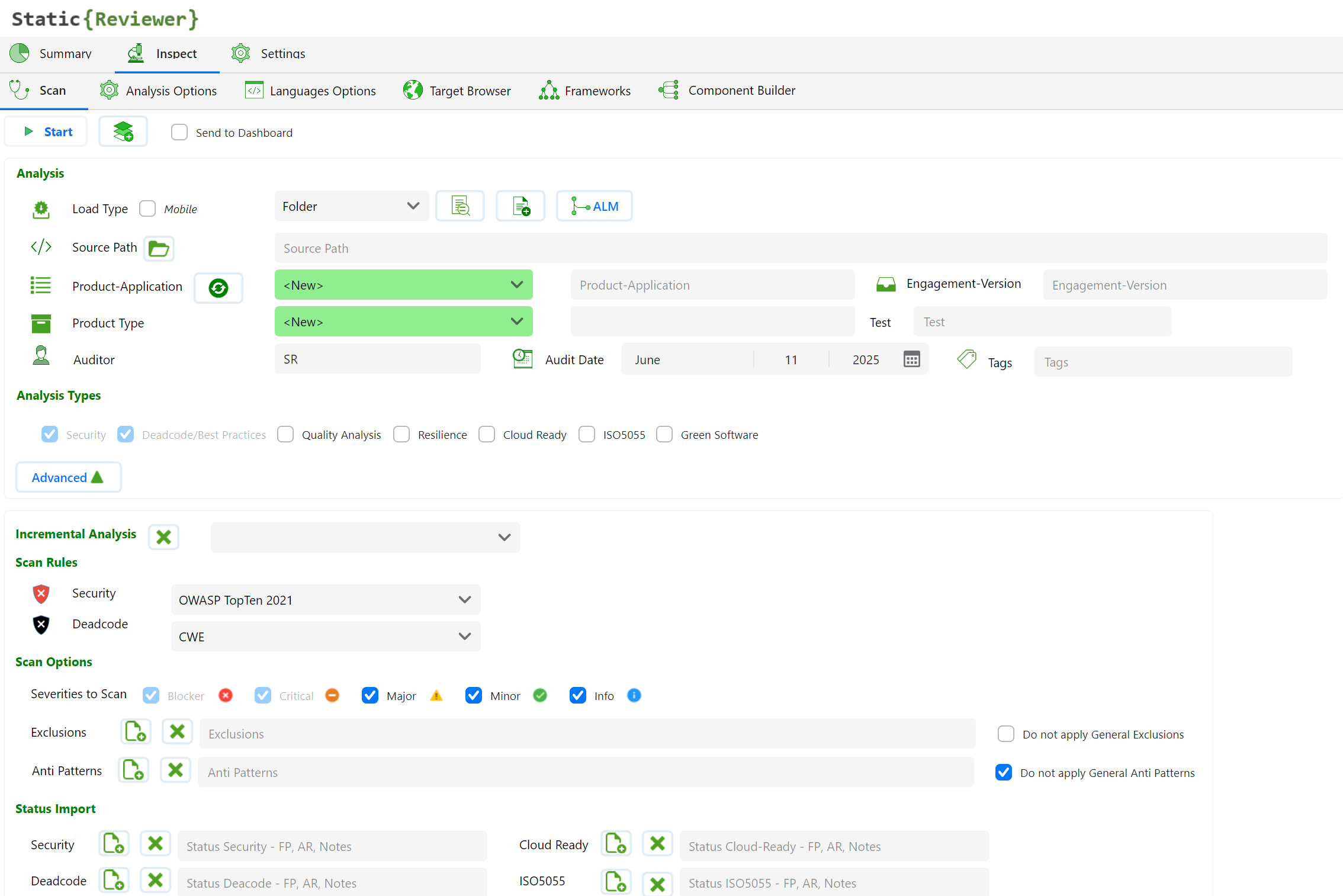
Auditor
Your current username is set to default on Auditor field. You can change this field before scanning.
Audit Date
You can change the Audit Date as you want, selecting the proper date in the calendar.
Exclusion List
You can exclude source files from the analysis, loading a list placed in plain-text file.
Incremental Analysis
You do not have to rescan the entire code base every time. The incremental scan option will automatically scan only the updated files and their dependencies, reporting both previous and current version issues. A combo box will permit you to choose a previous version for doing the incremental analysis. If a previous version exist, an additional option will be display:
Selecting “New and Changed Files only”, analysis’ results will be focused on new and updated files only.
Load Type
You can choose:
Folder. Open a folder containing your source code. This is most useful feature and can scan incomplete, uncompiled source code. When you scan JAVA files, scan is related to HTML, JSP pages, JSF, XML, SQL and JavaScript too; An Open Folder dialog box will appear, please choose the folder where the source code is located. When you scan C/C++ files, you can set Target Platform as well as the Target Compiler, using C/C++ Options Tab settings.
Project. Open Visual Studio Project(s). Visual Studio (2003 to 2015) “.??proj” files: C#, C++/CLI or vb.NET with related HTML, asp, aspx pages as well as JavaScript and XML are supported. SR will search all source files referenced by selected projects, listing them in the Files List frame. Be aware of orphaned files.
ClassPath. In JAVA, optionally you can have a scan based on “.classpath” files, located in every folder to include, for a faster scan.
Component. If you have APM Pack installed, choosing this option Security Reviewer will analyze your application as you structured it using Component Builder.
Ruleset
Choose a Ruleset on related combo box (Security or Deadcode): OWASP Top Ten 2025, OWASP API Security Top Ten 2023, OWASP Top Ten 2021, OWASP Top Ten 2017, OWASP Top Ten 2013, OWASP Top Ten 2010, CWE or your own Custom Ruleset (see related chapter below). If a Mobile app is detected, OWASP Mobile Top Ten 2024 will be automatically set (OWASP Mobile Top Ten 2016 and 2014 are also available). Dead code analysis will use CWE ruleset only. Further than OWASP and CWE, WASC and CVE will be also detected in every analysis. Additionally, PCI-DSS 4.0.1 and 3.2.1, CVSS Base Score 4.0, 3.1, 2.0 and NIST, DIGA, STIG, BIZEC references are added when applicable.
Scan Options
Additional Scan Options are provided for better targeting the scan:
Severity level. You can target the scan to some Severities only.
Dead Code / Best Practices. If disabled, the Dead Code and Best Practices Analysis won’t be executed
Resilience. If disabled, the Software Resilience Analysis won’t be executed
Quality Analysis. If disabled, the Quality Analysis won’t be executed
Do not apply Exclusions. Enabling this option, you skip the Exclusion List
Send to Dashboard. You can choose if the Analysis Results, Logs and Reports will be send to Team Reviewer
Framework – JDK - API Level
In case of .NET source code, if .NET framework cannot be obtained automatically, you can choose which .NET Framework version has been used during development. The same will be done with JDK, API Level (Android) or MFC versions.
SQL
If you have SQL scripts in your Application, choose their SQL Dialect
</> Source Code options
You can choose how many lines will be show on the screen and reports Before and After the line on which a violation was find.
Warning Timeout
Set the proper Timeout in seconds to be applied in the pattern search before generating a Warning. For analyzing complex source code, it is suggested to set Warning Timeout to 50 or over.
Trusted
Enable it your application runs in a Trusted environment. You can choose:
Public Functions (default). You are considering ‘Trusted’ the public functions parameters (console application, dedicated JVM or CLR, dedicated Application Server, etc.)
DB Queries. When results of Data Base Queries have not to be validated
Environment Variables-Properties. When Environment Variables and Property Files are considered affordable (Environment dedicated to system user associated to application)
Socket. When data read as plaintext from a Socket has not to be validated (i.e. read from a local Daemon)
Servlet/WS requests. When Servlet or Web Services requests are considered affordable (for example in case of local servlet or in case of WS-Security)
Apply Exclusion List
If Enabled (default), Exclusion List rules will be applied. If you want to change those rules please refer to related chapter below in this doc.
Max vulnerabilities
In order to reduce the number of vulnerabilities to manage, it is suggested to set Max vulnerabilities per line of code to 1 on the first scan, and then, after some remediation task was accomplished, set it to 5. That permits to be focused on priority code interventions for solving the most important vulnerabilities. If SR will find more vulnerabilities in the same line of code, it will consider the one having higher severity.
.NET Partial Classes
Enabling No Dead Code for Partial Classes avoid to provides a separate processing for .NET Partial Classes, avoid False Positives on Dead Code issues.
Internet
Enable it if you are analyzing an Application exposed to Internet. The rules applied will be more stricted.
Target Browser
If you want to focus your Static Analysis to a specific target browser, select this option. A list of Most important versions of Internet Explorer, Chrome, Firefox, Opera and Safari will be shown:
This will change analysis perspective, focusing on a certain browser vulnerabilities and compatibility issues.
C/C++ Options
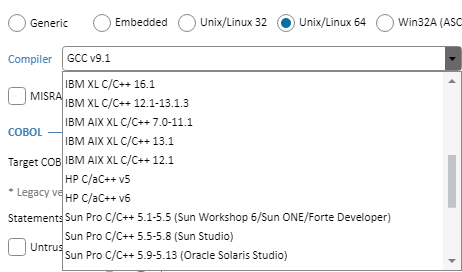
In case of C/C++ source code, you can set C or C++ Options. Further than Windows compilers (Visual Studio, JetBrains Rider and Embarcadero), Security Reviewer supports:
Unix/Linux
Embedded
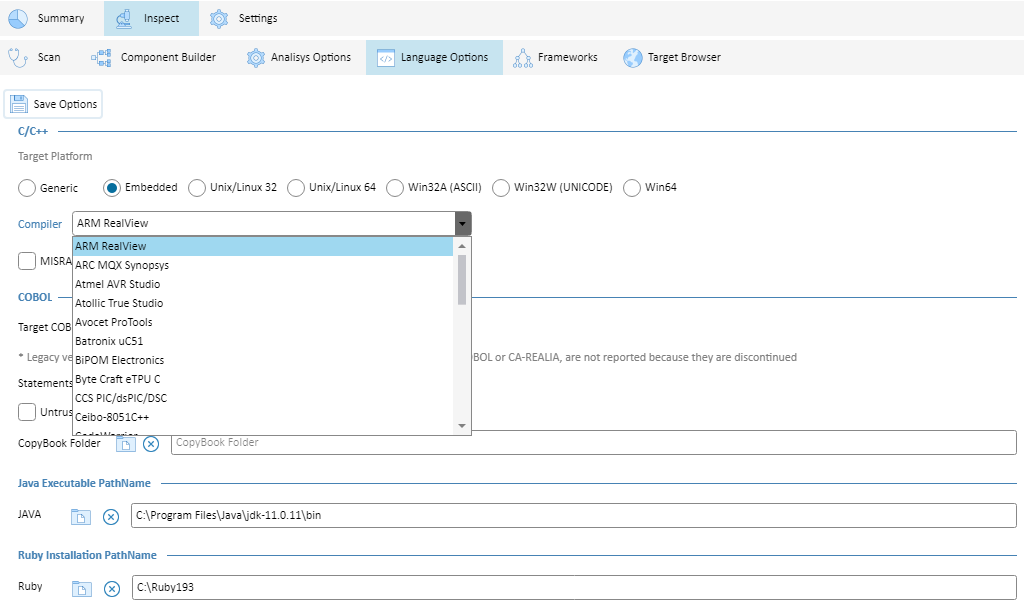
Security Reviewer supports the largest number of C/C+ compilers in the market.
Further, you can enable MISRA and CERT checks. See Compliance Modules section.
COBOL Options
For COBOL applications, you can set:
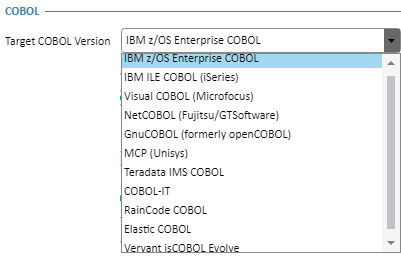
Target COBOL Version. For a precise parsing of the right COBOL Dialect.
Security Reviewer supports the largest number of COBOL platforms in the market.
Secure Code Analysis
Static Reviewer, can run either at Client side or at Server side. You can run it using our Desktop application, Developer's IDE, via command line or using our DevOps CI/CD plugins. Developers can run Secure Code Analysis also at server side via automated integration with our REST API server. See REST API Hardware Requirements for further details.
In case of a medium-large number of users, DevOps CI/CD integration Plugins are suggested. In that case the Secure Code Analysis will run at server side, either on Jenkins Server or Atlassian Bamboo Server. Developers can browse the analysis results either directly on their preferred IDE or or using an internet browser connected to Team Reviewer.
Component Builder
Our Component Builder provides association of a group of source Folders or Files to a Component.
Each Component can be associated to a certain APM Code, Package Code, Outsourcer and Development Team:
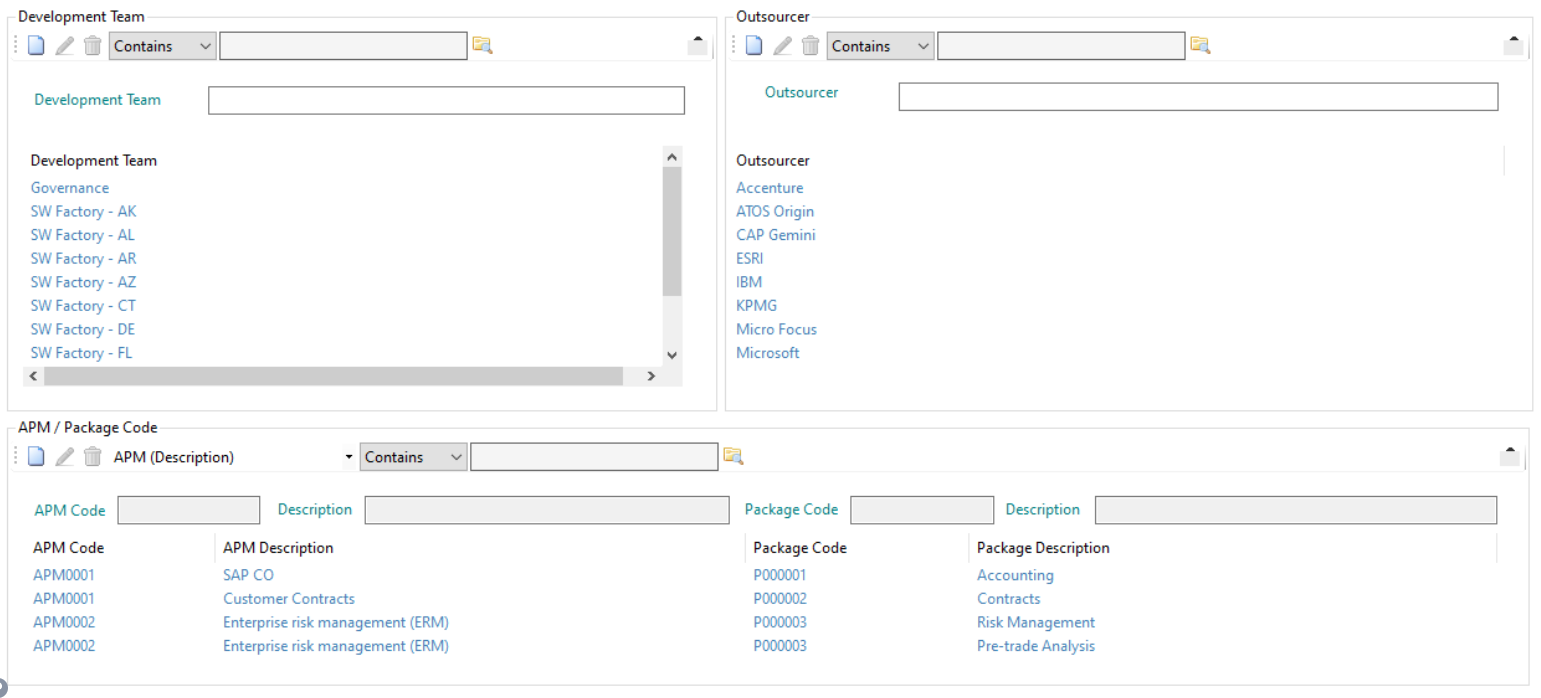
With Component Builder, you can create components. Each Component must have a different name:

You can Modify and Delete (Ignore) existing Components.
When launching a new Static Analysis, you can set the Load Type to Component.
Results
Once the Static Analysis is finished, you can view Results associated to one Component, or to ALL Components:
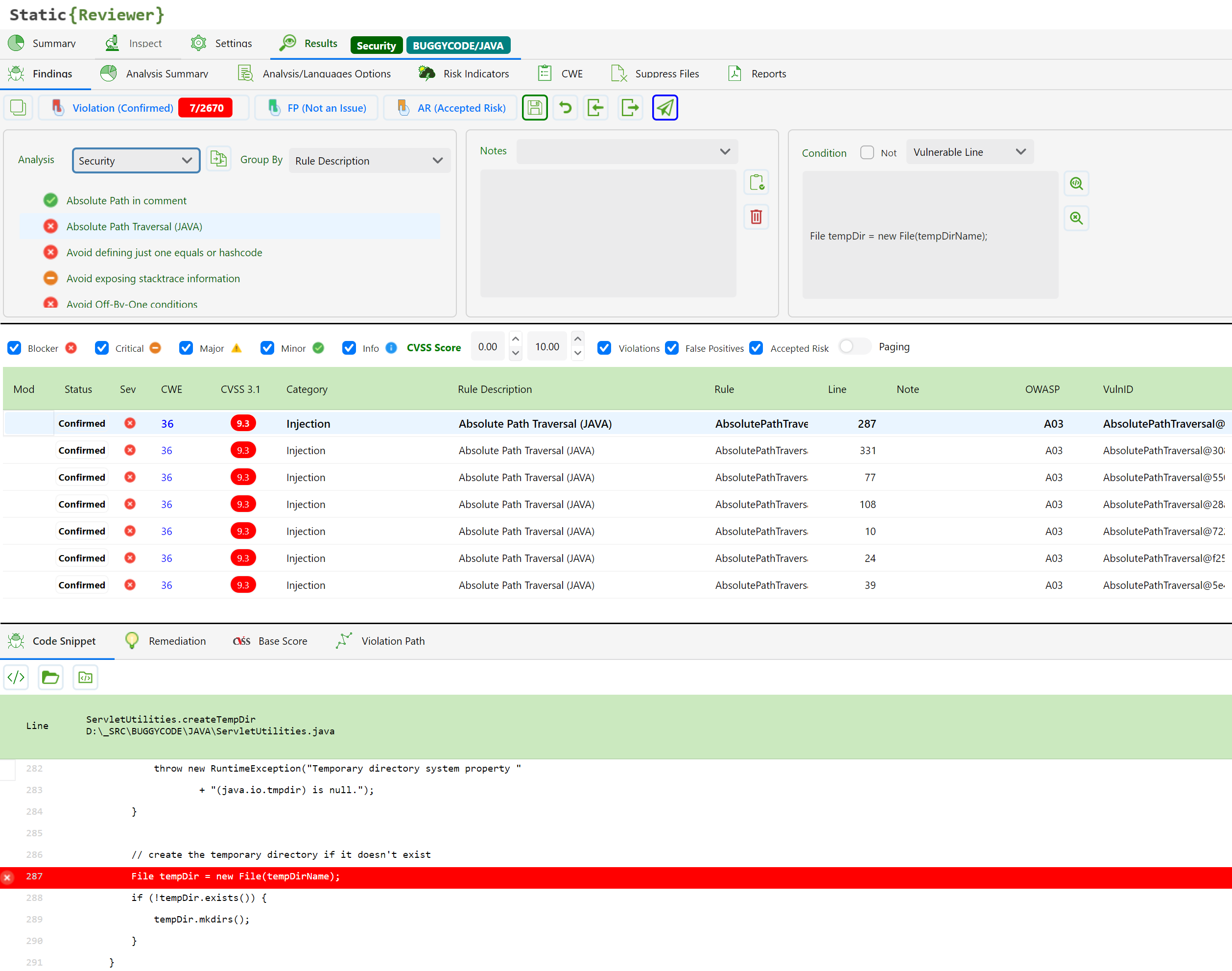
False Positives
You can mark all Component's Vulnerabilities as False Positives, by selecting the Component and pressing Select All:
otherwise you can select single vulnerabilities or a group of them, by pressing CTRL or SHIFT keys.
The vulnerabilities will be marked with FP=Yes. and the Status will be set to Not An Issue.
You can Suppress (Ignore) ex-post one or more Components:
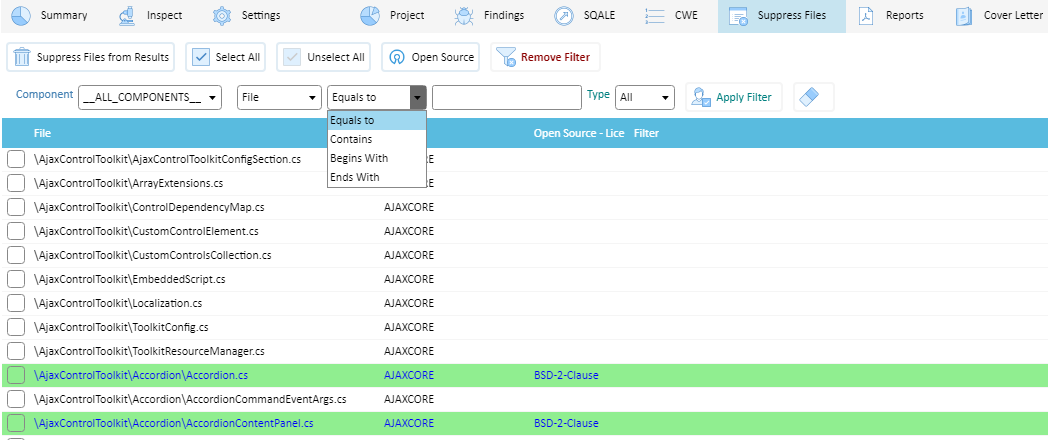
The Suppress is incremental, you can add new suppressions as you want.
In the next Static Analysis, in a new Application/Version, you can import the Exclusion List text file including all suppressions.
Reporting
Security Reviewer Suite provides a complete reporting system.
It provides Compliance Reports about:
Security Analysis Report
Dead Code and Best Practices Report
Software Resilience Report
Quality Metrics Report
SQALE Report
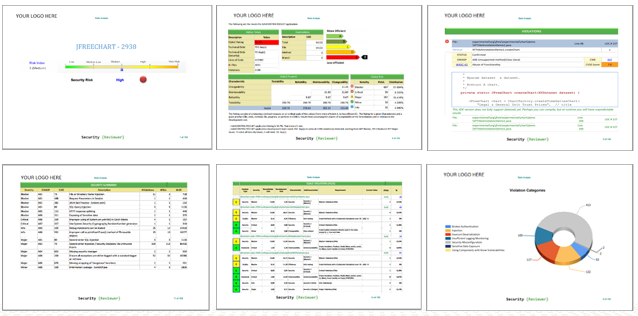
Cover letters are customizable, for ISO 9001 compliance. You can insert two logos, the ISO Responsability chain (Created by, Approved by, Verified By), ISO Template code, a Disclaimer note and Report Confidentiality.
The reports are designed for maximum optimization, for obtaining as small as page number possible.
Using built-in design 9000+ validation rules, during Code Review process it can highlight violations and even suggest changes that would improve the structure of the system. it creates an abstract representation of the program, based on Dynamic Syntax Tree own patented algorithm.
CI/CD Platforms Integrations
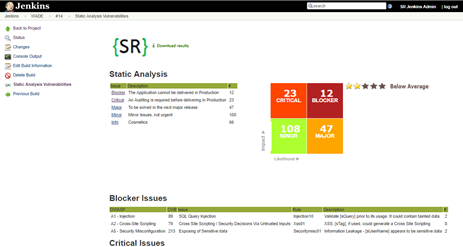
Jenkins (CloudBees ready). See: Software Composition Analysis
Jenkins and Bamboo Plugins are part of Security Reviewer Suite.
Jenkins and Bamboo Plugins rely on user's infrastructure to run and support the respective platforms.
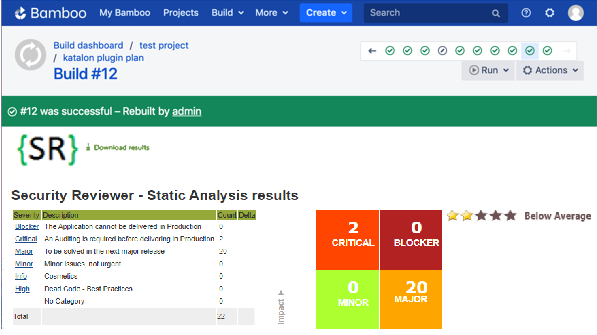
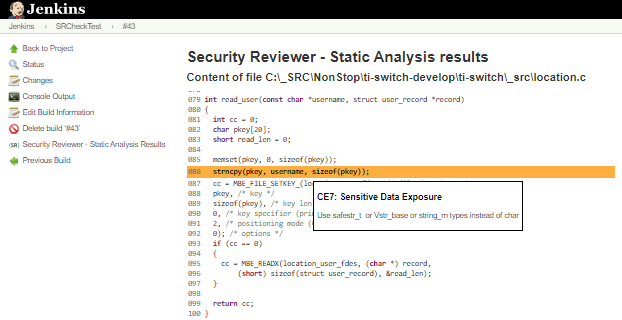
Azure DevOps
Our Azure DevOps (ADO) plugin enables you to integrate the full functionality of the Security Reviewer platform into your ADO pipelines. You can use this plugin to trigger scans running SAST, SCA (IaC Security, Container Security and Software Supply Chain Security included) and DAST (API Security included) scanners as part of your CI/CD integration.
This plugin provides a wrapper around the Static Reviewer CLI which creates a zip archive from your source code repository and uploads it to Team Reviewer for scanning, or scans it locally inside Azure, depending on you needs. The same for SCA: it creates a zip archive with libraries, frameworks, scripts and package configuration files and you can scan them locally, or remoting by uploading to Team Reviewer. This provides easy integration with ADO while enabling scan customization using the full functionality and flexibility of the CLI tool. You can use either Team Reviewer at your premises, or a Cloud Reviewer instance.
Main Features
Configure ADO pipelines to automatically trigger scans running SAST, SCA and DAST scanners
Supports adding a Security Reviewer scans as a pre-configured task or as a YAML
Supports use of CLI arguments to customize scan configuration, enabling you to:
Customize filters to specify which folders and files are scanned
Apply preset query configurations
Customize scan options
Set thresholds to break build
Send requests via a proxy server
View scan results summary and trends in the ADO environment
Direct links from within ADO to detailed Security Reviewer scan results
Generate customized scan reports in various formats (XML, JSON, HTML, PDF etc.)
Generate SBOM reports (SARIF, CycloneDX, SPDX and GitHub)
Supports Team Foundation Version Control (TFVC) and GitHub based repos
Prerequisites
You have a Microsoft account with:
Azure DevOps Services, or
Azure DevOps Server version 2020 or newer
Azure DevOps Build Environment:
Build agent must be version 3.232.1 or later and the agent must be using Node version 20+ (which is the default configuration).
Azure Pipeline
To create a simple pipeline that gets the source code from your Azure repo and runs a Security Reviewer scan on the source code:
In your Azure DevOps console, in the main navigation, select Pipelines .
On the Pipelines screen, click New pipeline.
A new pipeline form opens.
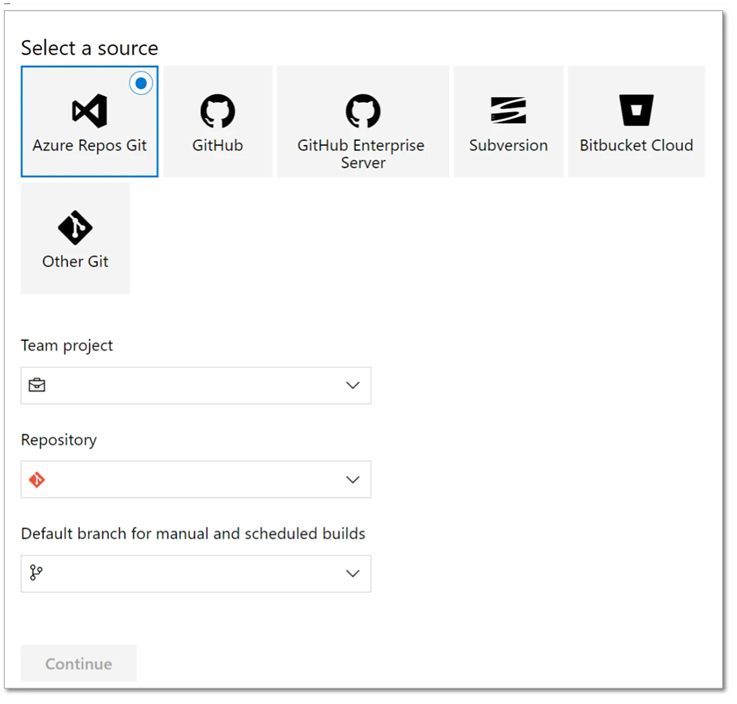
Specify the repo where the source code is located. We will specify an Azure repo using the following procedure:
Click on Other Git and then select Azure Repos Git.
>b. Select the desired Team project, Repository and Default branch from the dropdown lists and then click Continue.
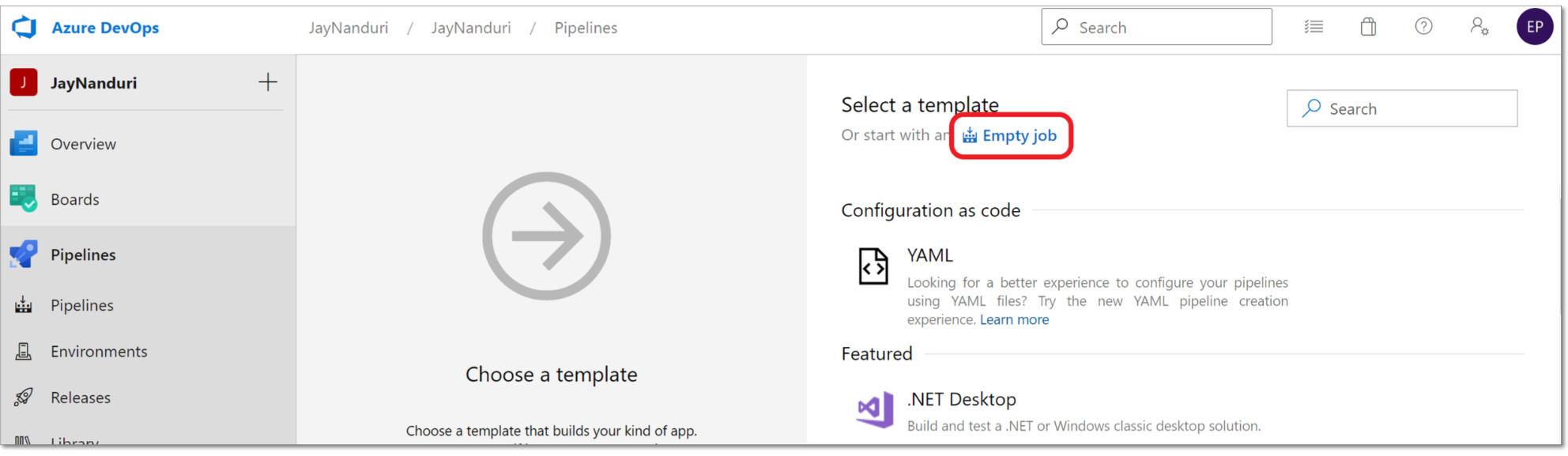
In the Select Template section, click on Empty job.
Click on the “+” button for “Agent job 1” and add Security Reviewer plugin.
Cloud Platforms supported (CI Plugins)
SCM Integrations
You can directly checkout (push) source code from the following SCM platforms:
SubVersion (SVN)
IBM Rational ClearCase
Perforce
Mercurial
AccuRev
The source code will be stored temporary in an encrypted folder and loaded in a secure buffer.
Analysis Results can be stored in the above SCM platforms.
You can do that using our Jenkins plugin or directly from our Desktop app.
File Servers
All our products can work accessing files on local file system, as well as the following File Sharing Systems:
Network File System (NFS)
Samba
FTP, TFTP, SFTP, FTP-S
UNC Paths
Permalinks
Logging
Every operation made by Security Reviewer's products is logged according ISO 27002 chapter 12.4, in different formats:
Requests and Responses log. Our CI Plugins rely on your CI Platform for this kind of logging. See: https://jenkins.io/doc/pipeline/steps/http_request/ and https://confluence.atlassian.com/bamboo/logging-in-bamboo-289277239.html
Audit log. Our CI Plugins rely on your CI Platform for this kind of logging. See: https://plugins.jenkins.io/audit-log and https://confluence.atlassian.com/bamboo/logging-in-bamboo-289277239.html
Application log. Our Ci Plugin write XML cloned as plain-text in the current CI Workspace, using slf4j. Further the application log is written in the standard CI Console Output
Access log. See https://wiki.jenkins.io/display/JENKINS/Access+Logging and https://confluence.atlassian.com/bamboo/logging-in-bamboo-289277239.html
Vulnerability detection log. Two Vulnerability logging ways are provided: Inside Application log (see above) and a separate XML log in the current CI Workspace, using slf4j
The above logs are customizable according the customer needs.
Vulnerability Detection Engines
Static Reviewer maintains its own Vulnerability Detection Engines, implementing specific Analyzers for each of Supported Languages. That means we don’t rely on third-party scanners, lints, analyzers or parsers.
Static Reviewer uses this set of Analyzers to scan code for potential vulnerabilities. It automatically chooses which Analyzers to run based on which programming languages are found in the repository or folder. Security Reviewer writes and maintain itself the detection rules for each Analyzer. Those detection rules will be updated on a monthly-based scheduling.
Each Analyzer processes the code, then uses rules to find possible weaknesses in source code, config files, Iac, web pages and any source-code-related file. The analyzer’s rules determine what types of weaknesses it reports.
A user, using the Admin Kit, can create his/her own rules by adopting the SemGrep Rules Syntax. Those rules may remain privates, for being used in user’s Organization only, or may become public. Once such public rules are verified by Security Reviewer’s technical staff, they will published in the Static Reviewer Community Portal (access reserved to existing Customers).
Supported Programming Languages
Static Reviewer supports the following programming languages:
Standard
(41): C#, Vb.NET, VB6, Classic ASP, ASPX, Java, JSP, JavaScript (client side, server side, Node), TypeScript, Dart, Java Server Faces, Kotlin, Ruby, Python, R, GO, Clojure, Groovy, PowerShell, Rust, HTML5, XML, XPath, C, C++ (see C/C++ Options), Informix ESQL/C, Oracle Forms, Oracle PRO*C, PHP, SCALA, Shell (bash, sh, csh, ksh), Assembly X86-64, Perl, Julia, LUA, SAP (ABAP 4/7, SAP-HANA), DTSX, RDL, RDLC, Oracle BPEL and BPMN.
Traditional
(10): COBOL (see COBOL Options), JCL, RPG, Assembler IBM, IBM Streams Processing Language, PL/I, Adabas NATURAL, Dyalog, GNU APL, Papyrus
Mobile
(7): Android Java, Android C/C++ NDK, Android Kotlin, Objective-C, Objective C++, Swift, Dart.
Low Code
(11): Appian BPM and SAIL, ServiceNow Client-Side/Server-Side/Glide/Business Rules/Jelly, UIPath RPA, Microsoft Flows and PowerApps, Oracle Application Express (APEX), Siebel eScript, Svelte, Camunda, Salesforce APEX, BMC-EngageOne Enrichment (formerly Pitney Bowes StreamWeaver), Microsoft DataBricks, Jupyter Notebooks.
Integration Platforms
(3): TIBCO ActiveMatrix BusinessWorks, BMC Control-M, Oracle ODI
Infrastructure as Code
(5): Dockerfile Security vulnerabilities and Best Practices, Kubernetes misconfigurations, Ansible Tasks, Terraform, BICEP
Cloud
(8): CloudFormation, Microsoft Azure, Google Cloud, Amazon AWS, Oracle Cloud OCP, CloudStack, OpenStack, DigitalOcean
SQL Dialects
(25): PL/SQL, T/SQL, U-SQL, Teradata SQL, SAS-SQL, Adabas SQL, IBM Datastage, ANSI SQL, IBM DB2, IBM Informix, IBM Netezza, SAP Sybase, Vertica, MySQL, FireBird, PostGreSQL, SQLite, Hibernate Query Language, Hadoop PL, HiveQL, CockroachDB, ADABAS, NonStopSQL, BigQuery, InfiniDB.
NoSQL
(36). MongoDB, CouchDB, Azure Cosmos DB, basho, CouchBase, Scalaris, Neo4j, InfiniSpan, Hazelcast, Apache Hbase, Dynomite, Hypertable, cloudata, HPCC, Stratosphere, Amazon DynamoDB, Oracle NoSQL, Datastax, ElasticDB, OrientDB, MarkLogic, RaptorDB, Microsoft HDInsight, Intersystems, RedHat JBoss DataGrid, IBM Netezza, MemCache, BigMemory, GemFire., Accumulo GigaSpaces, Cloudera, memBase, simpleDB, Apache Cassandra, GraphQL.
Mobile DB
(15). SQLite, eXtremeDB, FireBase, Cognito, Core Data, Couchbase Mobile, Perst, UnQlite, LevelDB, BerkeleyDB, Realm Mobile, ForestDB, Interbase, Snappy, SQLAnywhere.
Supported Libraries and Frameworks (Static Analysis)
JAVA: 146 Frameworks, including Spring Framework, Jakarta EE, Quarkus, GraalPy, Micronaut, Helidon, MicroProfile. Embabel, Koog, OpenAI API, GenAI SDK, Antrophic SDK Spring AI, and LangChain4j, MCP Java SDK, Spring AI, Deeplearning4J, Apache Spark MLib, DL4J Spark, Apache OpenNLP, Stanford CoreNLP, Jllama, Deep Java Library (DJL), Weka, Deep Java Library (DJL), Deep Java Library (DJL), SAP Cloud SDK for AI
https://en.wikipedia.org/wiki/List_of_Java_Frameworks
C: 69 Libraries
http://en.cppreference.com/w/c/links/libs
C++: 231 Libraries
http://en.cppreference.com/w/cpp/links/libs
C/C++ Targets:Compilers
Generic: POSIX, c89, c99, c11, c17/c18, c23, c++03, c++11, c++14, c++17, c++20, c++23
RTOS: ARM RealView, ARC MQX Synopsys, Atmel AVR Studio, Atolic Tre Studio, Avocet ProTools, Batronix uC51, BiPOM Electronics, Byte Craft eTPU C, CCS PIC/dsPIC/DSC, Ceibo-8051C++, cmake, CodeWarrior, Cosmic Software, Crossware, ELLCC C/C++, GCC/g++, Green Hills Multi, HigTec C/C++, IAR C/C++, INRIA CompCert, Intel C/C++, Introl C Compiler, Keil ARM C/C++, Mentor GraphicsCodeSourcery, Microchip MPLAB, MikroC Pro, NXP, Renesas HEW, SDCC, Softtools Z/Rabbit, Tasking ESD, Texas Instruments CodeComposer, Z World Dynamic C 32, WDC 8/16-bit, Wind River C/C++
Android NDK: Android Studio, CLang, cmake
QNX: QNX Momentics, IAR Embedded Workbench, ARM RealView, QNX GCC
Unix/Linux 32/64: GCC, g++, IBM XL C/C++, HP C/aC++, Sun Pro C/C++, LLVM CLang
Windows 32/64: GCC, g++, Visual Studio 6.0, Visual Studio 2003-2026, Embarcadero C++ Builder
Python: Top 1000 Python Package Index frameworks including Prophet, Ty, complexipy, Kreuzberg, throttled-py, httptap, fastapi-guard, modshim, Spec Kit, FastOpenAPI, MarkItDown, df2tables, FlashMLA, Flowfile, Gitingest, Memvid, Pandas, NumPy, Scikit-learn, SciPy, Seaborn, Matplotlib, Polars, Flask, Django, BeautifulSoup, OpenCV, Pydantic, PyQt, PySide, Tkinter, Kivy, BeeWare Toga, wxPython, PyGObject (GTK+), Remi, SQLAlchemy
Python AI: Claude Agent SDK, OpenAI Agents SDK, OpenAI Python SDK, Anthropic SDK, LangChain, LlamaIndex, gpt-oss, TensorFlow, PyTensor, PyTorch, Keras, XGBoost, LightGBM, CatBoost, Theano, Hugging Face Transformers, Diffusers, Weight and Biases, Ollama, MCP Python SDK, FastMCP, LangExtract, MaxText, TOON, Deep Agents, smolagents, LlamaIndex Workflows, Batchata, Data Formulator, GeoAI, Agent Development Kit (ADK), Archon, OmniParser, OpenManus, OWL, Parlant, FastAI, NLTK, SpaCy, Optuna, PyCaret, H2O, Eli5, Gensim, OpenNN, CNTK, PyBrain, MXNet, Caffe, Prefect, BentoML, MLFlow
C#: 58 Frameworks
https://en.wikipedia.org/wiki/List_of_.NET_libraries_and_frameworks
VB.NET: 58 Frameworks
https://en.wikipedia.org/wiki/List_of_.NET_libraries_and_frameworks
.NET Open Source Developer Projects
https://github.com/Microsoft/dotnet/blob/master/dotnet-developer-projects.md
Scala: 52 Frameworks (Accord, Akka, AnalogWeb, argonaut, Avro4s, Binding.scala, Chaos, Chill, Circe, Colossus, Dupin, Finagle, Finatra, form-binder, fs2, Gatling, Https4s, json4s, Kafka, Korolev, Lagom, Lift, MacWire, Monix, Monkeytail, MoultingYML, mPickle, Octopus, Pickling, Play, RxScala, Scalatra, ScalaCheck, scala-oauth2-provider, Scala-CSV, SecureSocial, ScalaPB, Scala.Rx, Scalaz, scodec, scrimage, Scrooge, Skinny, Spark,, Spray, spray-json, sttp, Udash, Veto, Widok, Xitrum, youi)
PHP: 35 Frameworks https://en.wikipedia.org/wiki/Comparison_of_web_frameworks#PHP plus Smarty, ESAPI, Wordpress, Magento, TWIG, Aura, Drupal, TYPO3, Simple MVC, Slim, Yii2, PHPixie, celestini, SeedDMS.
JavaScript: 90 Frameworks (ActiveJS, Adonis, Agility, Alpaca, Alpine, Amplify, Angles, AngularJS, AnnYang, Aurelia, Backbone.js, batman, bootstrap, CANjs, cappuccino, choco, conditioner, connect, Cordova-Phonegap, cycle.js, D3, Dojo Toolkit, dopamine, eyeballs, EMBER, Epistrome, ExtJS, Express, Famo.us, feathers, Flutter for React, Gatsby, GIFjs, GridForm, Hapi, introJS, Ionic, joint, JQuery, jwaves, jReject, KendoUI, KnockOut, Koa, Kraken, Locomotive, maria, Meteor, MidWay, Mithril, mochiKit, MooTools, NestJS, NextJS, node.js, Nuxt, OpenUI5, Parallax, PlastronJS, Polymer, Preact, qooxdoo, qUnit, Qwik, ReactJS, RequireJS, Sails, sammy, Socket.IO, script.aculo, serenade, snack, SnapSvg, SolidJS, somajs, sproutcore, stapes, Svelte, SVG, togetherJS, UIZE, underscore, vue, YUI3)
TypeScript: 21 Frameworks (Analog, Angular, Astro, Express, Flutter for React, Ionic, Loopback, Meteor, NativeScript, Nest, Next, plottable, Qwik, React, Redux, Remix, SolidStart, Stencil, SvelteKit, WebPack)
Kotlin: 17 Mobile Frameworks (Anko, ararat, blue-falcon, CodenameOne, Flutter for Android, Ionic, kotgo, kotlin-core, Kotlin Multiplatform Mobile, Kotson, Lychee, NativeScript, React Native, rx-mvi, Splitties, themis, Xamarin), 10 Web Frameworks (HexaGon, Javalin, Jooby, Ktor, Kweb, Spark, Spring Boot, Tekniq, Vaadin-On-Kotlin, Vert.x for Kotlin)
Ruby: 25 Frameworks https://en.wikipedia.org/wiki/Comparison_of_web_frameworks#Ruby plus Cuba, Grape, Hobo, Ramaze, Raptor, pakyow, Renee, Rango, Scorched, Lattice, Vanilla, Harbor, Salad, Espresso, Marley, Bats, Streika, Gin, JRuby.
Go: 19 Frameworks (Beego, Buffalo, Echo, FastHTTP, Fiber, Gin/Gin-Gonic, Gocraft, Goji, Gorilla, Go-zero, Iris, Kit, Kratos, Mango, Martini, Mux (HttpRouter), Net/HTTP, Revel, Web.go)
Julia: 34 frameworks. Pluto, Flux, IJulia, DifferentialEquations, Genie, Makie, JuMP, Gadfly, Gen, Plots, DataFrames, MLJ, Knet, Zygote, UnicodePlots, Mocha, BeautifulAlgorithms, ModelingToolkit, Symbolics, AlphaZero, Revise, Distributions, Dash-bootstrap-components, CUDA, Optim, BrainFlow, TensorFlow, Franklin, DSGE, Yao, Oceananigans, ForwardDiff, DiffEqFlux, Javis
Android JAVA: Flutter for Android + 47 Mobile Development Frameworks: https://en.wikipedia.org/wiki/Mobile_app_development
iOS Objective-C and Swift. Flutter for iOS + Objective-C Awesome Frameworks, Swift Awesome Frameworks
Dart. Flutter + Awesome Dart Frameworks.
AI-generated code detection
Generative AI engines (GenAIs) and Large Language Models (LLMs) are emerging as viable tools for software developers to automate writing code. These engines and LLMs are trained on publicly available, free and open source (FOSS) code.
AI-generated code can inherit the license and vulnerabilities of the FOSS code used for its training. It is essential and urgent to identify AI-generated source code, as it threatens the foundation of open source development and software development and raises major ethical, legal and security questions.
Based on the SCA Reviewer track record of creating industry-leading FOSS code origin analysis tools for license and security, Static Reviewer delivers a new approach to identify and detect if AI-generated code is derived from existing FOSS with a new code fragments approximate similarity search.
We believe that AI-generated code identification is essential to ensure responsible use of that code while enjoying the productivity gains from Generative AI for code. There is a massive potential for misuse, malignant or illegal use of such code, and identifying AI-generated code will enable safer, efficient and responsible use of GenAIs to help build better software for the next generation internet, faster and more efficiently.
Our model receives a code document (e.g. files or PR diffs), semantically chunks it, and generates a classification for each chunk. our model was trained on a large, curated corpus based on public GitHub repositories, paired with a carefully tuned set of AI-generated code from a diverse pool of leading AI coding models. Its architecture was designed with the parameter capacity to recognize subtle latent features inherent in AI-generated code.
For each chunk, the model produces one of three classifications: AI-generated, human-authored, or abstain. By default, it abstains when the chunk does not contain enough signal—for example, when it consists only of import statements.
At a chunk size of 3,000 characters, we achieve an Accuracy Rate of 95% with an abstain rate of 5%.
AI Stability
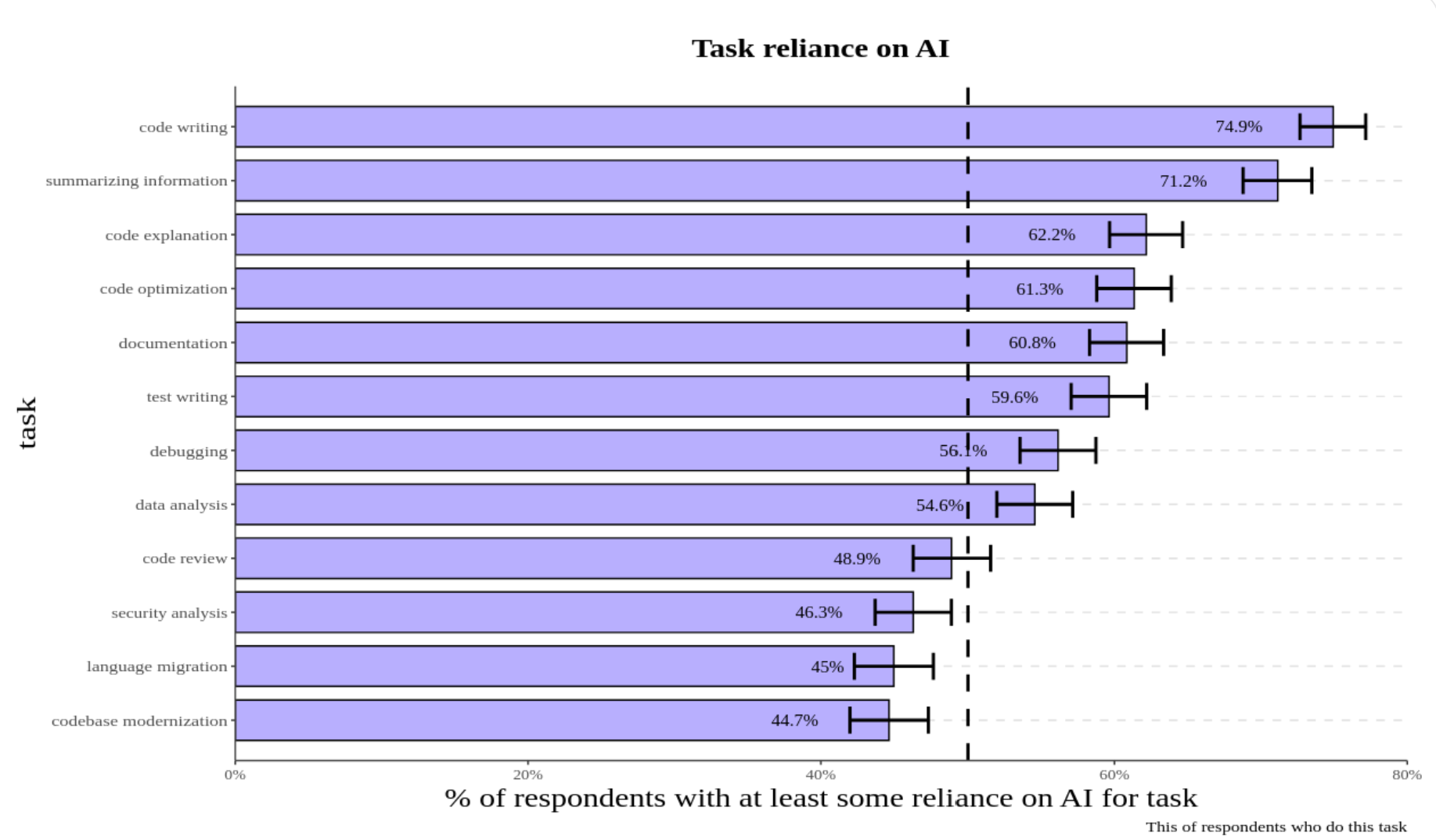
Google’s DORA 2024 research found that every 25% increase in AI adoption correlates with a 7.2% decrease in delivery stability and 1.5% decrease in throughput. Research shows individual developers have widely different results dependent upon experience and task complexity. Less experienced developers working on simpler tasks show the greatest productivity gains but also increased quality issues. A McKinsey research shows that Beginner developers use Generative AI for the following:
Generating code
Pair programming
Refactoring code
Providing templates
Adding comments
Summarizing code
Writing “readme” files
Troubleshooting bugs/issues
Code reviews
Experienced developers working on more complex tasks show minimal gains. METR performed a controlled study with 16 experienced developers working in familiar codebases on real-world tasks and found they were 24% slower when using AI tools, contradicting both expert predictions and their own expectations.
AI-deprecated SDKs
It was detected that an high percentage of GenAI code is still based on old, deprecated APIs (google-generativeai, OpenAI deprecated endpoints and langchain_openai, Antrophic() types , MistralAI client), and we setup a bunch of GenAI dedicated security rules for detecting such deprecations, further than full-supporting OWASP Top 10 for LLM.
For example, AI Code Generation is irrecoverably breaking the google-genai ecosystem due to deprecated API Patterns, both in Python genai-SDK and NPM genai as well as in GO genai, in JAVA-genai and finally in genai.NET SDK. The shift from the google-generativeai package to google-genai involved not just a rename but a complete architectural refactoring of the API. The legacy GenerativeModel class and its associated workflow have been replaced by a new Client -> get_model -> start_chat paradigm.
The same breaking changes happened with OpenAI and Antrophic SDKs. A Snyk study demonstrated it using CoPilot.
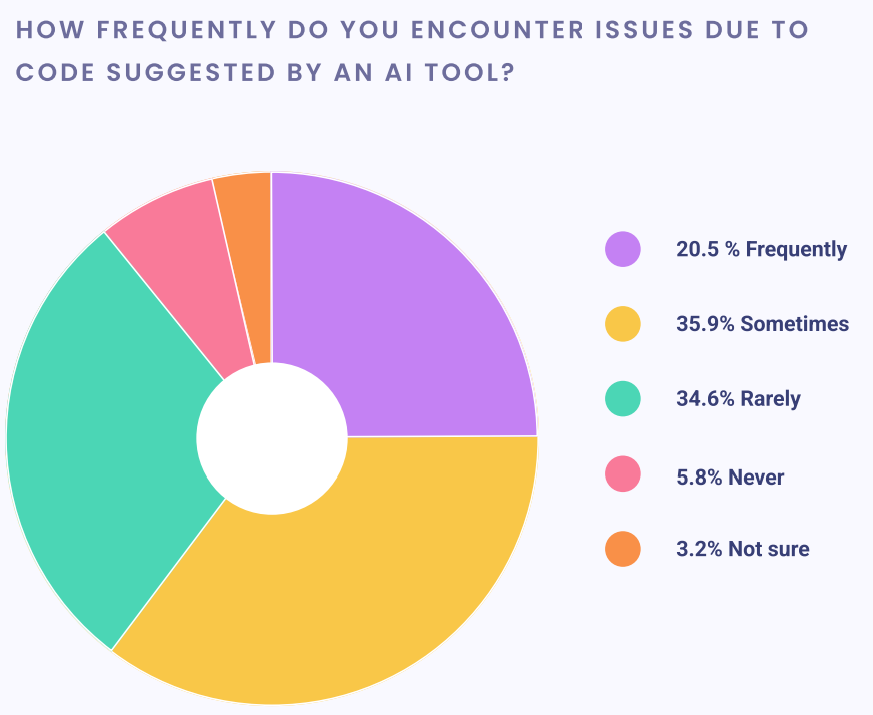
AI code generation tools (including Google's, OpenAI and Antrophic own models) appear to have no knowledge of this new architecture. They are pervasively and confidently generating code based on the old, non-existent API patterns.
This is a catastrophic feedback loop that will likely prevent the AI deprecated SDK from ever gaining meaningful adoption without direct, manual intervention.
The AI's Entrenched, Obsolete Knowledge: AI models are trained on a vast corpus of data where the old GenAI libraries and its old patterns are dominant and well-established. The AI's understanding of "how to use GenAI API" is fundamentally tied to these deprecated structures.
Generation of "Hallucinated," Broken Code: When a developer asks for assistance, the AI doesn't just use the wrong import; it "hallucinates" a complete, plausible-looking but non-functional implementation based on objects and methods that no longer exist. This is far more dangerous than a simple compilation error, as it sends the developer on a futile debugging journey.
The Semantic Weakness of the New Name: As previously analyzed, the choice of the generic name google-genai makes it incredibly difficult for the new, correct patterns to gain traction and relevance in future training data. It lacks the descriptive power to stand out from the noise
The consequences of using deprecated APIs are significant. A Snyk survey from 2023 found that over 50% of organizations experienced outages or security issues due to AI-generated code with outdated APIs. Studies also show that AI tools like GitHub Copilot and ChatGPT generate correct code only 46.3% and 65.2% of the time, respectively (Bilkent University). Imagine you’re building a web app with the requests library in Python, and your AI assistant suggests a deprecated parameter from version 2.28.0 instead of the current 2.30.0. Your app fails, and you spend hours debugging — hardly the productivity boost you were promised.
Static Reviewer checks if you are using the up-to-date APIs with correct parameters and suggest version-specific documentation and code examples straight from the source.
From Machine Learning to LLM
Static Reviewer used Machine Learning algorithms to feed off the hundreds of millions of anonymous audit decisions from Security Reviewer expert customers. These decision models were actively used and developed for Cloud Reviewer, but were also technologies that can be automatically applied on-prem to Static Reviewer results.
Our SAST solution has evolved from traditional machine learning (ML) to incorporate large language models (LLMs) to improve its effectiveness, primarily by reducing false positives and understanding code context better than traditional tools. While traditional SAST struggles with high false positive rates and a lack of contextual understanding, LLMs can analyze the code's intent and business logic to provide more accurate, actionable security insights. Our integration of LLMs and SAST aims to leverage the strengths of both: LLMs handle the nuanced understanding, while traditional methods provide a foundation for identifying known vulnerabilities.
Static Reviewer analysis is divided in two steps:
Hybrid Analysis: Security Reviewer creates an in-memory Dynamic Syntax Tree of analized app, mixing Static (on source code) and Sandboxed Analysis (on compiled code)
Taint Analysis: Security Reviewer contains its own LLM that acts on the output of the Hybrid analyzer, that is the in-memory Dynamic Syntax Tree.
The evolution to Large Language Models (LLMs)
What they are: A type of ML/deep learning model that excels at understanding and generating human language, and by extension, code.
Key advantages:
Contextual understanding: LLMs can understand the intent, architecture, and business logic of the code, helping to determine if a reported weakness is a true vulnerability.
Reduced false positives: By understanding context, LLMs can help filter out false alarms that plague traditional SAST tools.
Actionable insights: Can provide more detailed and actionable fixes, sometimes even with dynamic bug descriptions and exploit generation.
Limitations:
Hallucinations: Can generate incorrect or nonsensical code/analysis.
High false positives: While better than traditional methods, LLMs can also produce false positives, though often at a higher detection rate for true positives.
Security risks: Using cloud-based LLMs can introduce security and privacy risks if the model or agent is untrusted.
Combining traditional SAST and LLMs
Hybrid approach: The most effective approach is to combine traditional SAST with LLMs to mitigate the weaknesses of each.
How it works:
Traditional tools: Identify surface-level vulnerabilities, providing a starting point.
LLMs: Analyze the findings from traditional tools in context, filtering out false positives and validating true vulnerabilities.
Example: Traditional SAST might flag a potential SQL injection. An LLM can then analyze the surrounding code to see if the input is properly sanitized or if the query is reachable, thus determining if it is a true vulnerability or a false positive.
Benefits: Creates a more efficient and effective system by using the strengths of both approaches, leading to more actionable security insights, and guarantee a cleansed analysis output, with almost zero False Positives.
Using LLMs in Application Security Posture Management
Another evolution was incorporating LLM inside our Vulnearbility Intelligence solution. We provide a MCP Server for accessing our Unified Vulnerability Management by simply using a natural language.
In the context of AI security, our Vulnerability Prioritization is evolving to address LLM-specific risks by providing a unified view of security findings, analyzing AI models for embedded threats, and mapping the complex dependencies of LLM systems. The transition involves using AI/ML techniques to secure the entire AI lifecycle, from code to cloud and across the complex dependencies of LLM-based applications.
Traditional Vulnerability Prioritization: Unifies security findings from various tools to provide a clear picture of an application's overall security risk and enables automated, real-time monitoring and mitigation.
AI-powered Vulnerability Prioritization: LLM-powered Vulnerability Prioritization extends this to AI-native applications by using AI to detect vulnerabilities in AI-generated code, enforce policies across the development lifecycle, and provide deep context from code to cloud.
LLM security evolution
Before LLMs: Vulnerability Prioritization focused on traditional application security risks, such as vulnerabilities in code and infrastructure.
With LLMs: The complexity of AI systems introduces new risks, including:
Data and model poisoning: Manipulating training data to introduce bias or vulnerabilities.
Improper output handling: Lack of validation on LLM outputs leading to injection attacks or harmful content.
Excessive agency: LLMs performing unintended actions beyond their authorization.
Insecure AI components: Vulnerabilities in open-source AI libraries or serialized models.
Vulnerability Prioritization in the LLM era: Vulnerability Prioritization is evolving to handle these new challenges by:
Agent security: Identifying threats in open-source AI packages and agents.
Model scanning: Analyzing serialized model files for embedded malware.
Dependency mapping: Creating a software bill of materials for LLM dependencies, including vector stores and RAG components.
Data protection: Monitoring sensitive data accessed by AI workloads to prevent exposure.
Securing the pipeline: Protecting machine learning pipelines from tampering and misuse.
AI Code Review
To strike a good balance between AI and human expertise—and get the most of this technology—developers can:
Use AI to identify common issues quickly and allow human reviewers to focus on more complex problems.
Treat AI suggestions as learning opportunities that help improve developer skills over time.
Take advantage of customization features and tailor tools to your team's specific needs and standards.
By combining the capablity of AI with the creativity and contextual understanding of human developers, AI powered code reviews are helping to pave the way for faster, more efficient, and higher-quality software development.
Hardware and Software Requirements
Desktop and DevOps CLI
See Infrastructure