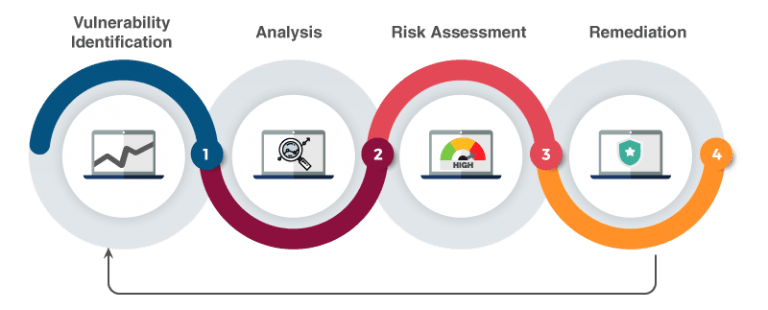
Team Reviewer provides an effective vulnerability discovery & tracking, by continuously identifying threats, monitoring changes in your apps, discovering and mapping all your devices and software — including new, unauthorized and forgotten ones —, and reviewing configuration details for each asset.
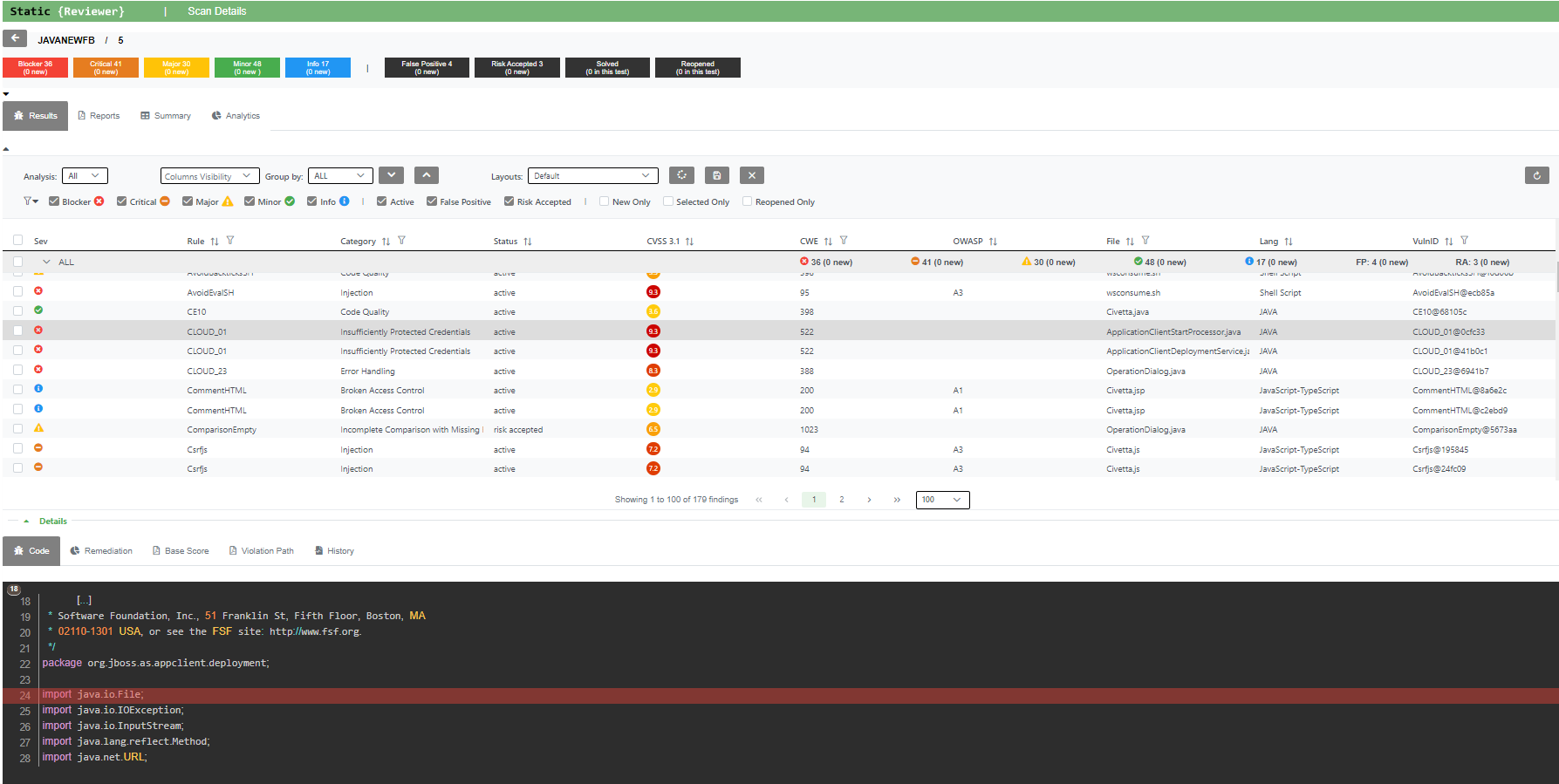
Team Reviewer allows y'all to deal your application safety program, hold production in addition to application information, schedule scans, triage vulnerabilities in addition to force findings into defect trackers. Consolidate your findings into source of truth amongst Team Reviewer.
Central Repository
Team Reviewer has the ability to maintain its own repository of internally discovered vulnerabilities (findings). The private repository behaves identical to other sources of vulnerability intelligence such as the OSS Index, VulnDB, NVD, etc.
This repository can be stored to MySQL, MariaDB, PostGres or Oracle (RAC included) DMBS, or to a Managed database service (AWS RDS).
There are three primary use cases for the private vulnerability repository.
Organizations that wish to track vulnerabilities in internally-developed components shared among various software projects in the organization.
Organizations performing security research that have a need to document said research before optionally disclosing it.
Organizations that are using unmanaged sources of data to identify vulnerabilities. This includes:
Change logs
Commit logs
Issue trackers
Social media posts
Vulnerabilities tracked in the private vulnerability repository have a source of ‘INTERNAL’. Like all vulnerabilities in the system, a unique VulnID is required to help uniquely identify each one. It’s recommended that organizations follow patterns to help identify the source. For example, vulnerabilities in the NVD all start with ‘CVE-‘. Likewise an organization tracking their own may opt to use something like ‘ACME-‘ or ‘INT-‘ or use multiple qualifiers depending on the type of vulnerability. The only requirement is that the VulnID is unique to the INTERNAL source.
Web App
Team Reviewer provides a unified interface for accessing all our tools, part of Security Reviewer Suite:
Static Reviewer
Dynamic Reviewer
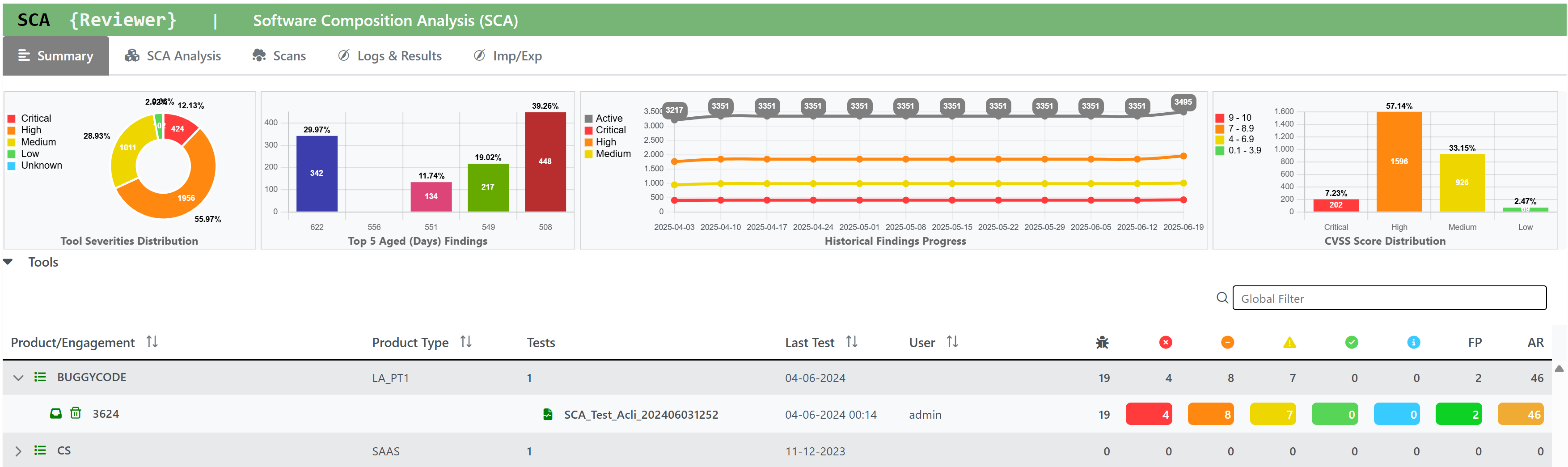
SCA Reviewer (Software Composition Analysis)
Mobile Reviewer
Team Reviewer provides Scalability through NGINX/UWSGI and Django as native application.
See Team Reviewer’s Integration Checklist.
Enhanced Features
Team Reviewer is 100% Web GUI app, based on OWASP Defect Dojo with a lot of enhancements:
Multi-language Kit is available for localization.
Direct execution of all features provided by Security Reviewer Suite (SAST, DAST, SCA, Mobile, Firmware)
Extended Workflow and Reporting features, GDPR Compliance Level included
Performant database, based on MariaDB 10.x Galera cluster. It can be changed to Oracle RAC 12 or any other Supported Relational Database
Secured Source code and Operation platform, due to an accurate Static Code Review and Dynamic Analysis made by Security Reviewer and Dynamic Reviewer tools
Encryption of DB Tables containing sensitive data (Users, Groups, Applications, Workflow, Policies, etc.)
Enhanced support for third-party SAST, SCA, IAST, DAST and Network Scans tools.
Mobile Behavioral Analysis integration (Mobile Reviewer)
Software Composition Analysis (SCA) integration
Software Resilience Analysis (SRA) Integration
Azure Active Directory Single Sign On
SQALE, OWASP Top Ten 2025/2021, Mobile Top Ten 2016/2024, CWE, CVE, WASC, CVSSv2, CVSSv3.1, CVSSv4 and PCI-DSS 4.0.1/3.2.1/2.0 Compliance
Triage
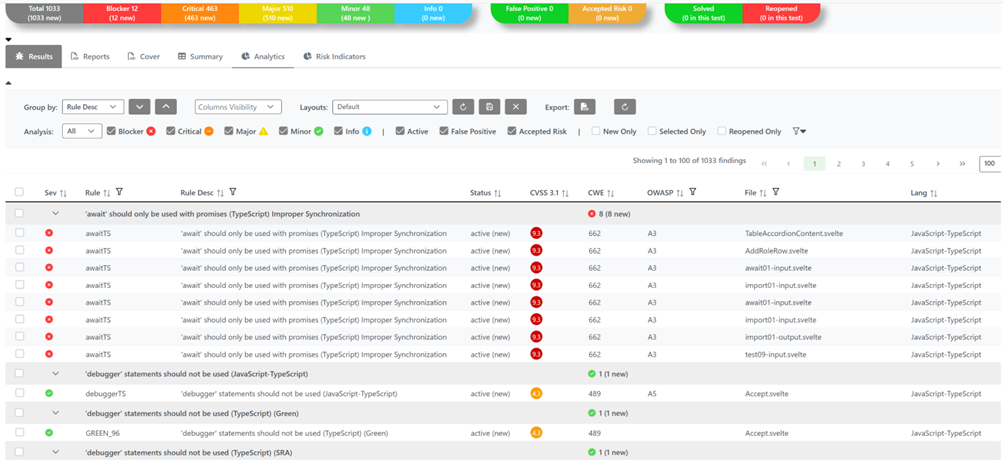
For Triaging, once you open the Findings:
Bulk Edit
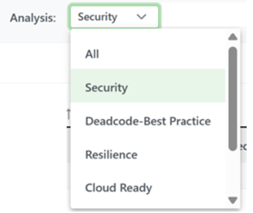
You can choose the Analysis Type (for example: Security) using the Analysis combo box:
You can select the finding(s) you want to triage one-by-one, or in bulk mode by collapsing per vulnerability group (usually Rule Desc or other criteria in the Group by combo box) using the Collapse all button:

You can select and entire vulnerability gruoup, or, by clicking on the > selector on the Sev column, you can re-open only the vulnerability group you want to triage first:

Then select one or more issue(s) using CTRL or SHIFT:
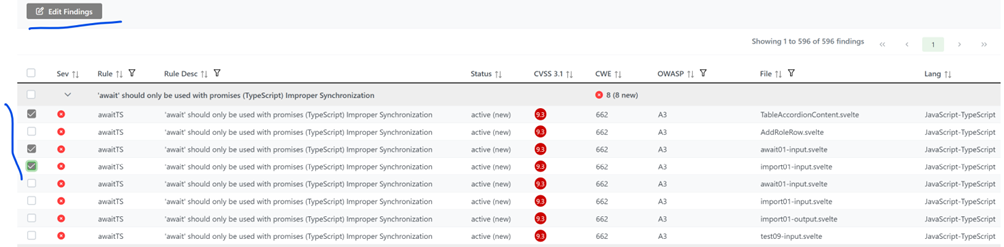
The Edit Findings button will appear. Press it:
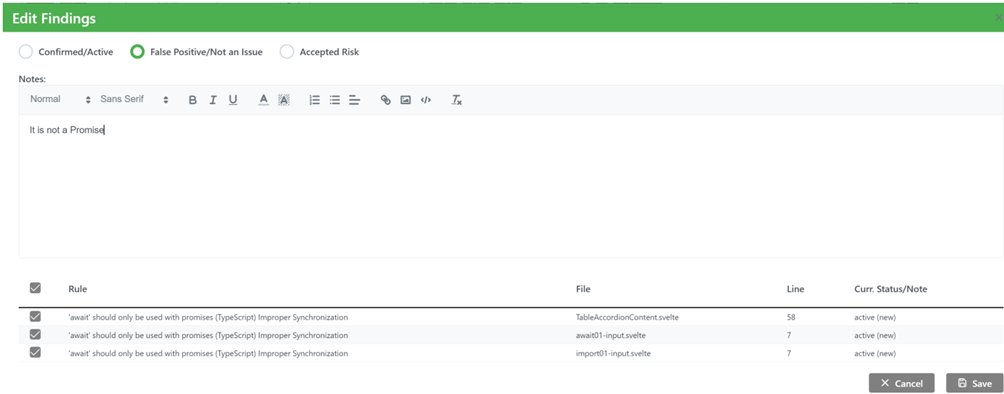
Always write a Note (a text explaining why you're marking FP or AR the issue(s)) and choose between FP (False Positive aka Not An Issue) or AR (Accepted Risk). This Note will be stored together your Username, and in case anybody else add other notes or update this one, his/her Username will be also stored.
You can always turn back to non-FP/AR by clicking on Confirmed/Active or re-select/deselect the marked issue(s) using the table Rule/File/Line/Curr.Status/Note in the low part of the windows. Press Save button.
The issue(s) you marked as FP or AR will be suppressed from the current Results and will be considered as suppressed on all the next Engagements/Versions scans of the same Product/Application.
To complete the Triage, you can also assign the vulnerabilities issue(s) to someone else using JIRA, if you authorized.
Re-Scan
Following your first scan, as you fix issues you can scan the same Product/Application again multiple times.
This executes either a completely new scan on your current source code, or an Incremental Analysis.
Incremental Analysis functionality allow to perform a quick analysis taking in consideration only the files added or changed in the source code, compared to a previous other Engagement/Version.
When scanning the same Product/Application with a new Engagement/Version, doesn’t matter if full or incremental scan, the new scan automatically inherits all settings from the previous ones, Analysis/Language/Framework Options, False Positives, Accepted Risks and Exclusions included.
The Findings Summary Bar resumes the status of the findings based on the current view. It shows the total number of Findings, their number divided by Severity and the numbers of False Positives, Accepted Risks and the Solved and Reopened issues compared to the previous analysis. Clicking on the boxes, you can filter the data in the Findings list to see the the findings related to that box only

You can still manually import a Custom False Positive/Accepted Risk or Exclusion List from a different Engagement/Version than the previous one.
Reports
Team Reviewer stores reports generated with:
Static Reviewer Desktop
Static Reviewer CI/CD plugins for Jenkins and GitLab
SCA Reviewer Destkop
SCA Reviewer CI/CD plugins for Jenkins and GitLab
Dynamic Reviewer
Mobile Reviewer
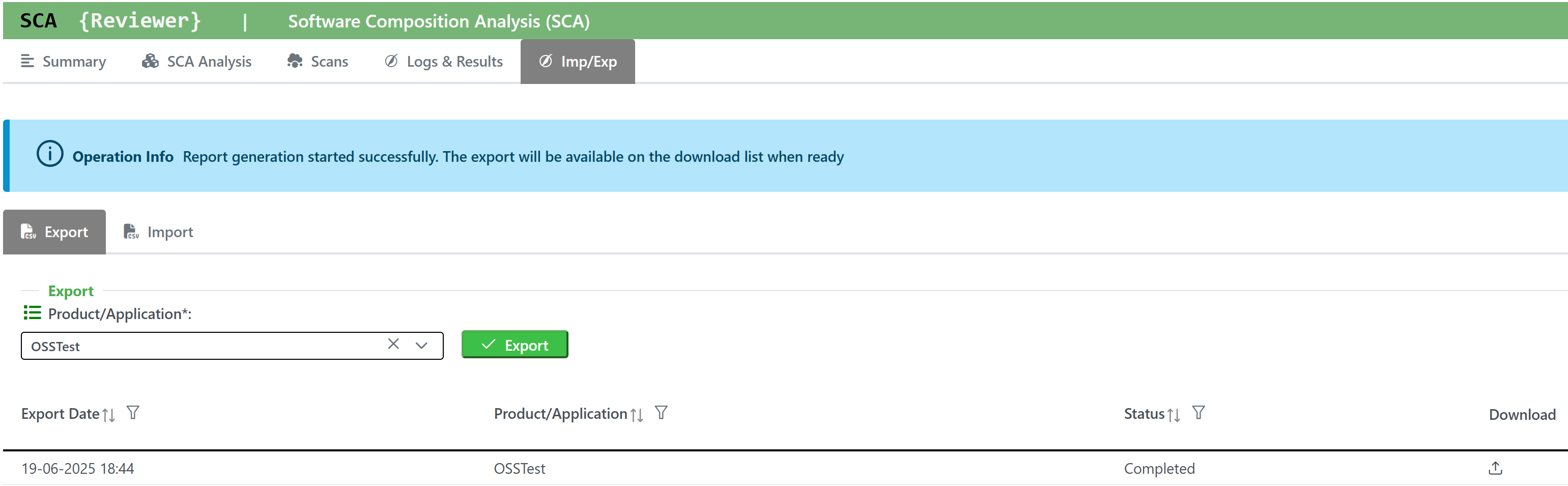
Further, you can create your own custom reports by using Team Reviewer Report Generator.
Team Reviewer custom reports can be generated in Word, Excel and PDF. If you need different formats, open the Word reports and choose Save As…
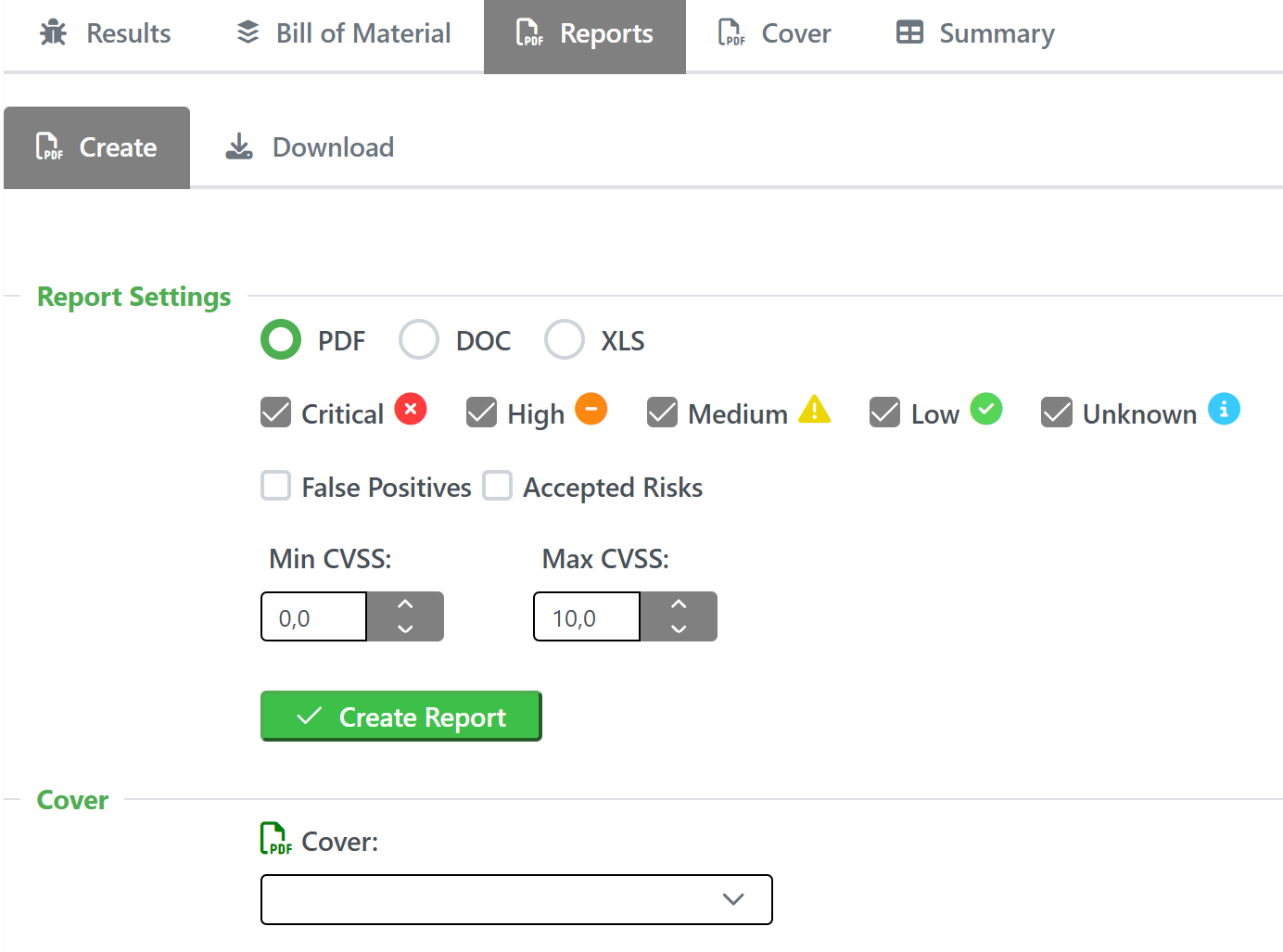
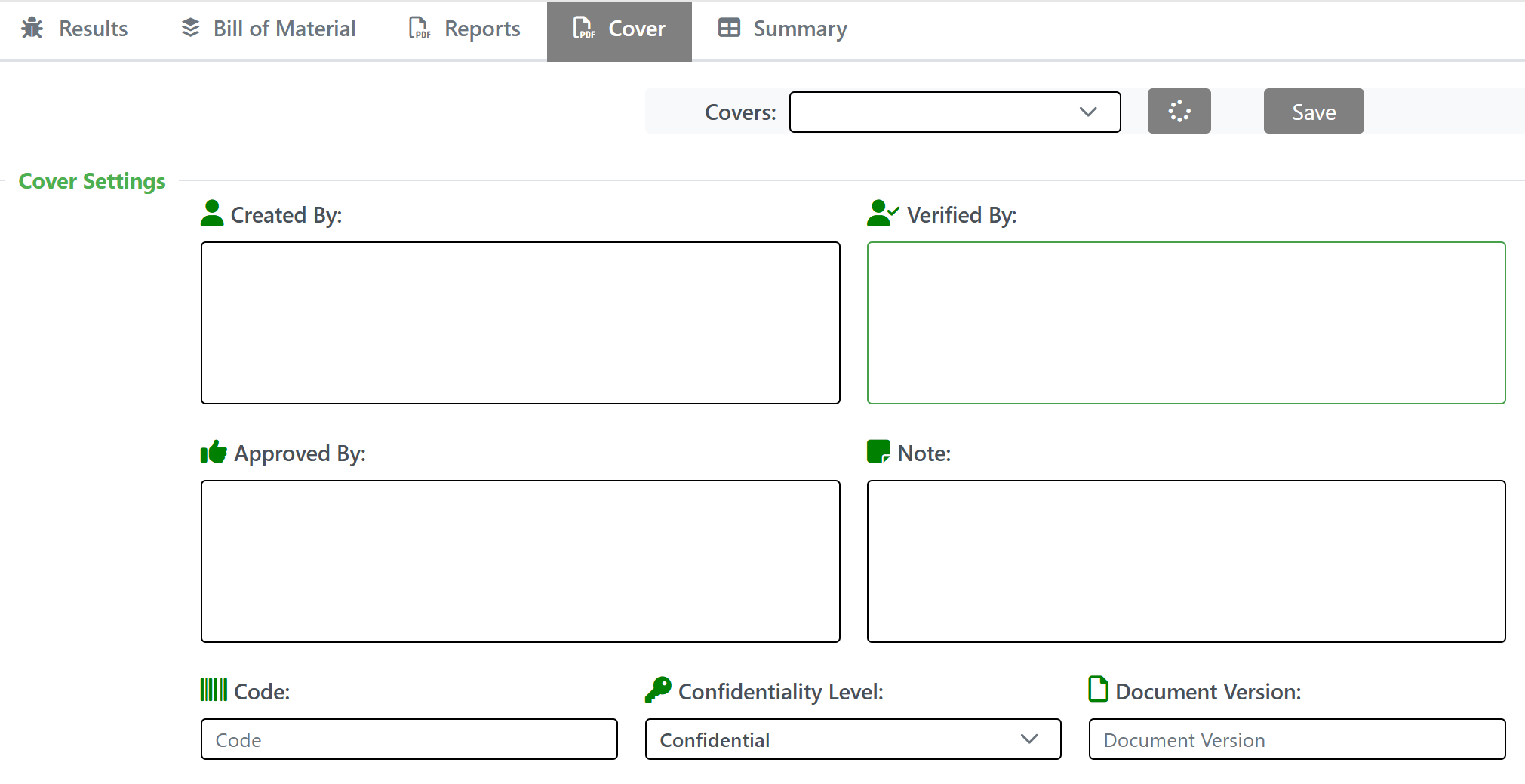
Custom reports allow you to select specific ISO 9001 cover to the report. These include:
Notifications
Team Reviewer can inform you of different events in a variety of ways. You can be notified about things like an upcoming engagement, when someone mentions you in a comment, a scheduled report has finished generating, and more.
The following notification methods currently exist: - Email - Slack - HipChat - WebHook or Alerts within Team Reviewer
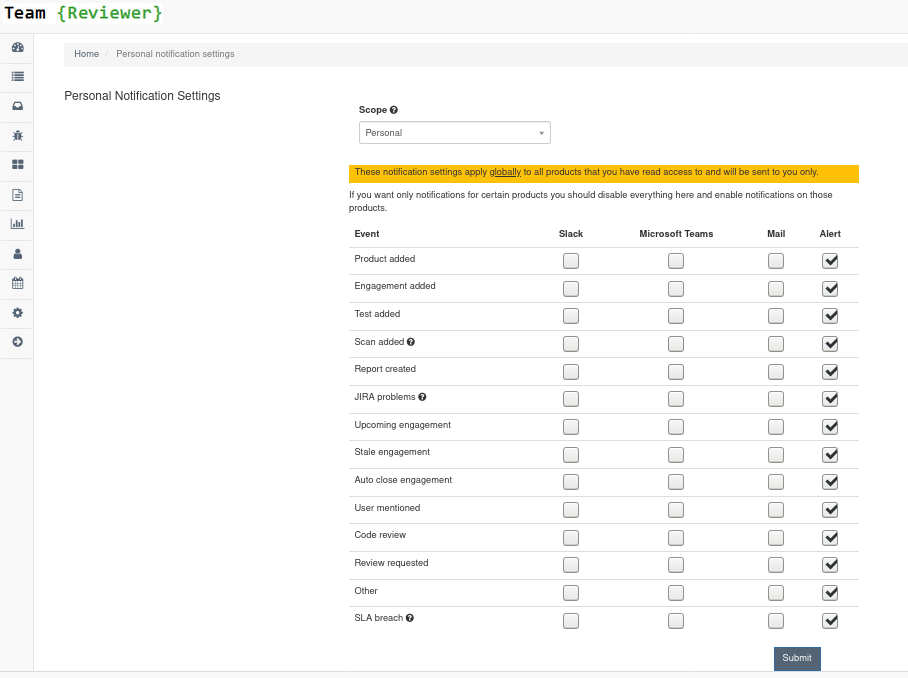
You can set these notifications on a system scope (if you have administrator rights) or on a personal scope. For instance, an administrator might want notifications of all upcoming engagements sent to a certain Slack channel, whereas an individual user wants email notifications to be sent to the user’s specified email address when a report has finished generating.
In order to identify and notify you about things like upcoming engagements, Team Reviewer runs scheduled tasks for this purpose.
Attached Documents
Products, Engagements and Tests permit to attach one or more documents, like Requirements docs, Project Docs, Evidences, Certifications, Risk Acceptances and any correlated docs you need.
It accepts PDF, Word, Excel and Images file formats.
Security Reviewer’s Security, Deadcode-Best Practices, Resilience and SQALE reports are uploaded as Engagement’s Attached Documents to Team Reviewer using REST APIs.
Results Correlation
Team Reviewer can import and correlate results from the following tools:
>SAST (AppScan, CheckMarx, CodeQL, Contrast Scan, Coverity, Fortify, GitHub SAST, GitLab SAST, Kiuwan SAST, ParaSoft, SemGrep, SonarQube, Veracode SAST, and many OSS tools)
>SCA/SBOM (CheckMarx OSA, GitHub Bundler-Audit, GitLab Dependency Scan, JFrog XRay, Kiuwan SCA, mend, OWASP Dependency Check, SBOM Radar, Sonatype, Snyk, Veracode SCA, and many OSS tools)
>DAST (Acunetix, AppScan DAST, Burp, Fortify WebInspect, Invicti, OWASP ZAP, Qualys, Rapid7, Veracode DAST, and many OSS tools)
>IAST (Acunetix Acusensor, AppScan IAST, CheckMarx CxIAST, Contrast, HDIV, Invicti Shark, Seeker)
>Threat Modeling (AWS ASFF, AWS Threat Composer, BugCrowd, DrHeader, DSOP Scan, HackerOne, huskyCI, IntSights, ORT evaluated model, Outpost24, riskRecon, SKF Scan, Threagile, TrustWare, Vulners)
>Infrastructure Scan (GitHub ssh-audit, Nessus, Nmap, Qualys Infrastructure Scan, RedHat Satellite, Scout Suite, SSLScan, Sslyze, SuSE NeuVector, Sysdig, Rapid7 Nexpose, Tenable Terrascan, Testssl, TFSec)
>Container/IaC Scanners (Anchore, ARMO, AWS Inspector, AWS Prowler, AWS Security Hub Scan, Azure Security Center Recommendations Scan, Checkov, Clair, CrowdStrike, Docker-bench security scan, Dockle, ecsypno, GitLab Container Scan, GitHub Klar, Grype, Hadolint, Harbor, KICS, kube-bench, kube-hunter, LaceWork, RedHat OpenShift Container scanner, SemGrep IaC, Trivy, Twistlock, Wazuh)
>Secret Scanners and CNAPP Tools (AWS Secrets Manager, Azure Key Vault scan, Doppler, GitHub Secret Scanning, GitLab Secret Detection, GitLeaks, GitGuardian, Git-Secrets, HashiCorp Vault scan, HawkScan, Legit Security, SentinelOne, Spectral Secret Scanning, Talisman, TruffleHog, Whispers, Yelp Detect Secrets)
>You can define a new Integration with our XML, JSON, SARIF, CSV Universal Importer.
Integration to third-party ASPM solutions
Team Reviewer can export correlated results to the following ASPM tools:
Aikido Security. Arnica, Amplify, Endor Labs, Jit, Kodem, Legit, Mobb, Orca Security, Phoenix Security. Via OpenGrep format
BlackDuck SRM. Via General SRM Input XML format
Invicti ASPM (formerly Kondukto). Via Kondukto Universal Importer
For integration to non-ASPM dashboards, see our EcoSystem.
Authentication via LDAP/AD
LDAP (Lightweight Directory Access Protocol) is an Internet protocol that web applications can use to look up information about those users and groups from the LDAP server. You can connect the Team Reviewer to an LDAP directory for authentication, user and group management. Connecting to an LDAP directory server is useful if user groups are stored in a corporate directory. Synchronization with LDAP allows the automatic creation, update and deletion of users and groups in Team Reviewer according to any changes being made in the LDAP directory.
Architecture
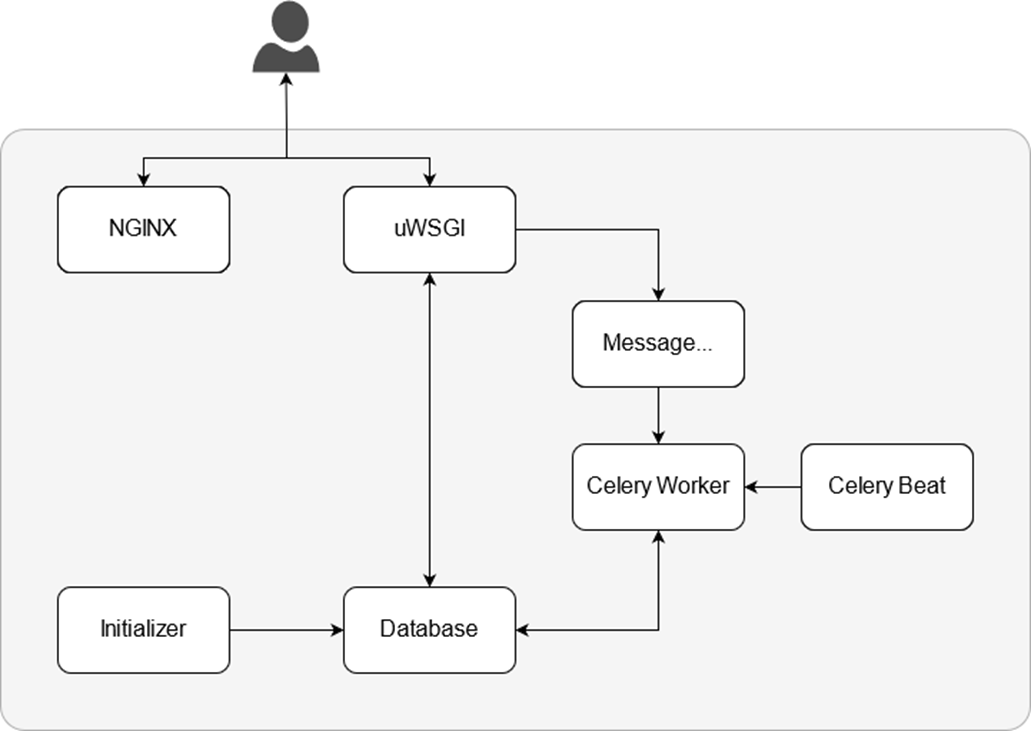
Team Reviewer inherits the Architecture from DefectDojo.
NGINX
The webserver NGINX delivers all static content, e.g. images, JavaScript files or CSS files. Because its roots are in performance optimization under scale, NGINX often outperforms other popular web servers in benchmark tests, especially in situations with static content and/or high concurrent requests.
uWSGI
uWSGI is the application server that runs the Dynamic Reviewer application, written in Python/Django, to serve all dynamic content.
Message Broker
The application server sends tasks to the Message Broker for asynchronous execution. RabbitMQ is our choice, an intermediary for messaging. It gives our applications a common platform to send and receive messages, and our messages a safe place to live until received.
Celery Worker
Tasks like deduplication or the JIRA synchronization are performed asynchronously in the background by the Celery Worker.
Celery Beat
In order to identify and notify users about things like upcoming Engagements, Team Reviewer runs scheduled tasks. These tasks are scheduled and run using Celery Beat. We have to ensure only a single scheduler is running for a schedule at a time, otherwise we’d end up with duplicate tasks. Using a centralized approach means the schedule doesn’t have to be synchronized, and the service can operate without using locks.
Initializer
The Initializer gets started during startup of Team Reviewer to initialize the database and run database migrations after upgrades of Team Reviewer. It shuts itself down after all tasks are performed. Migrations are Django’s way of propagating changes made to our models (adding a field, deleting a model, etc.) into our database schema. They’re designed to be mostly automatic. We should think of migrations as a version control system for our database schema. Initializer-makemigrations task is responsible for packaging up our model changes into individual migration files - analogous to commits - and Initializer-migrate task is responsible for applying those to our database.
The migration files for each app live in a “migrations” directory inside of that app, and are designed to be committed to, and distributed as part of, its codebase. We are making them once on your development machine and then running the same migrations on our colleagues’ machines, our staging machines, and our production machines.
Database
The Database stores all data of Team Reviewer. Currently MySQL is used. Postgres, Oracle RAC and MariaDB are also supported. Results are also maintained in the filesystem as XML, for facilitating the Upgrades. For Core Data Classes, Team Reviewer uses the OWASP DefectDojo Models, as described in the related section below. For large numbers of analyses per year, it is recommended to use a dedicated database server and not the preconfigured MySQL database. This will improve the performances.
Models
Team Reviewer attempts to simplify how users interact with the system by minimizing the number of objects it defines.
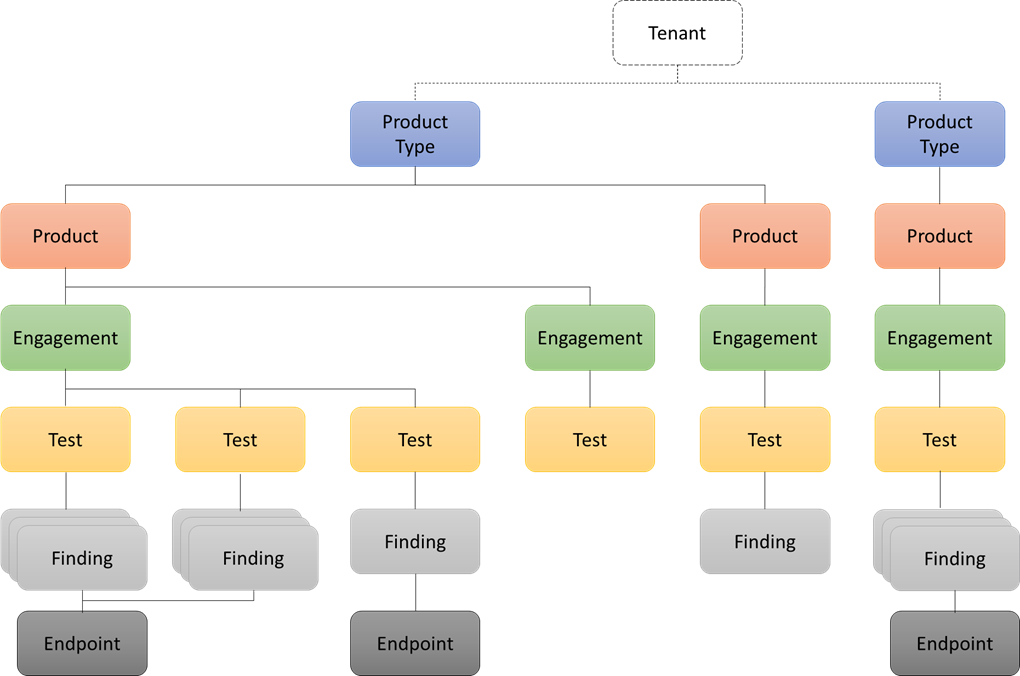
Product Type
Product type represent the top-level model. These can be business unit divisions, different offices or locations, development teams, or any other logical way of distinguishing different types of “organization”.
Examples:
· Dev Team / Test Team / Sec Team / Ops Team
· Internal / 3rd Party
· Main company / Acquisition
· San Francisco / New York offices
Product
This is the name of any Application, project, program, or product that you are currently testing.
Examples:
· MyApplication
· Internal wiki
· Slack
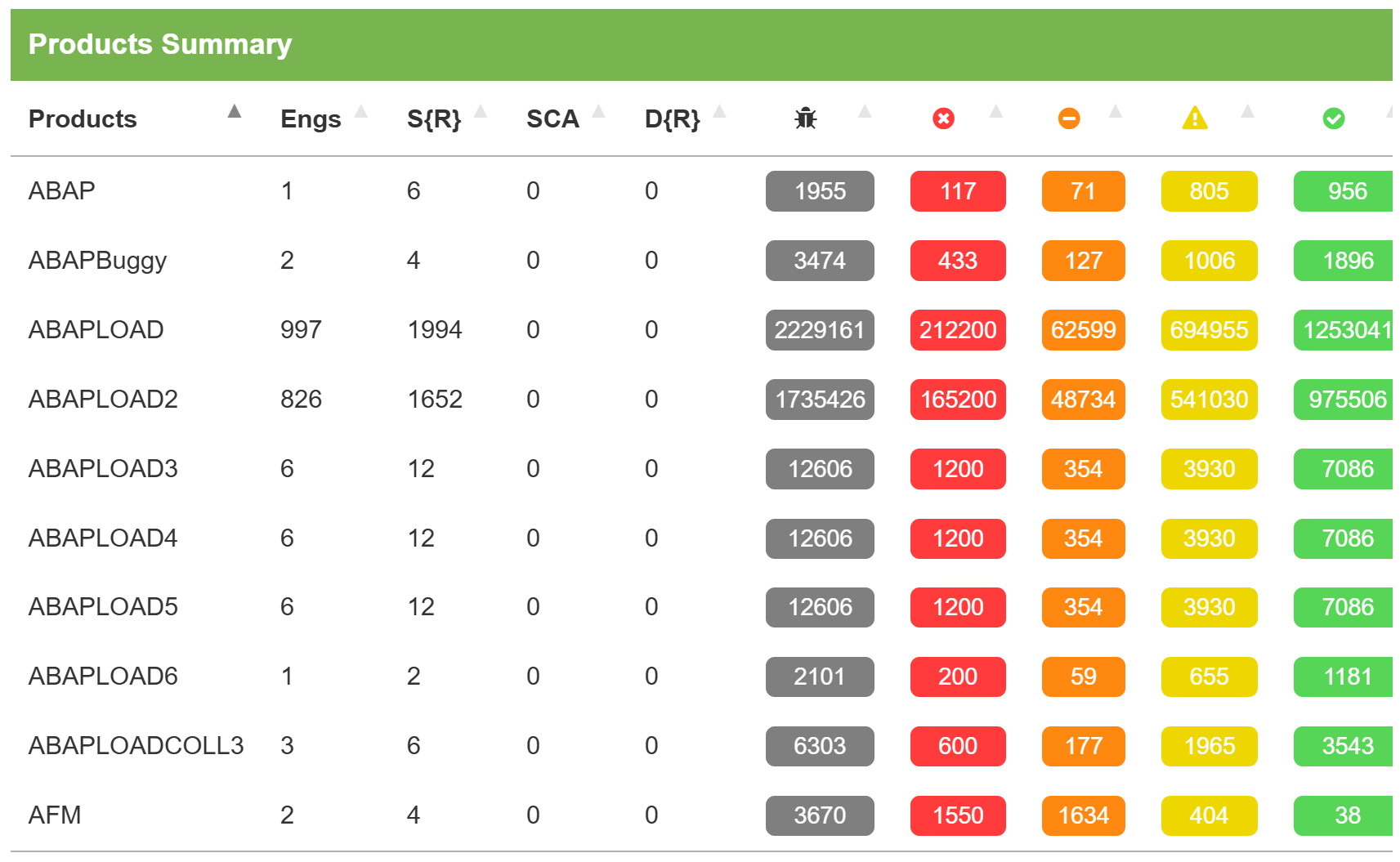
Engagement
Engagements are moments in time when testing is taking place. They are associated with a name for easy reference, a time line, a lead (the user account of the main person conducting the testing), a test strategy, and a status. Engagement consists of two types: Interactive and CI/C D. An interactive engagement is typically an engagement conducted by an engineer, where findings are usually uploaded by the engineer. A CI/CD engagement, as its name suggests, is for automated integration with a CI/CD pipeline.
Examples:
· Beta
· Quarterly PCI Scan
· Release Version X

Engagement consists of two types: Interactive and CI/CD.
An interactive engagement is typically an engagement conducted by an engineer, where findings are usually uploaded by the engineer.
A CI/CD engagement, as it’s name suggests, is for automated integration with a CI/CD pipeline
Each Engagement can include several Tests.
Test
Tests are the analysis performed by engineers to attempt to discover flaws in a product. Tests are bundled within engagements, have a start and end date and are defined by a test type.
Examples:
· Static Reviewer Scan from Oct. 29, 2015 to Oct. 29, 2015
· Nessus Scan from Oct. 31, 2015 to Oct. 31, 2015
· API Test from Oct. 15, 2015 to Oct. 20, 2015
Finding
A finding represents a flaw discovered while testing, a vulnerability. It can be categorized with severities of Critical, High, Medium, Low, and Informational (Info).
Examples:
· OpenSSL ‘ChangeCipherSpec’ MiTM Potential Vulnerability
· Web Application Potentially Vulnerable to Clickjacking
· Web Browser XSS Protection Not Enabled
A finding represents a flaw discovered while testing. It can be categorized with severities of Critical, High, Medium, Low, and Informational (Info).
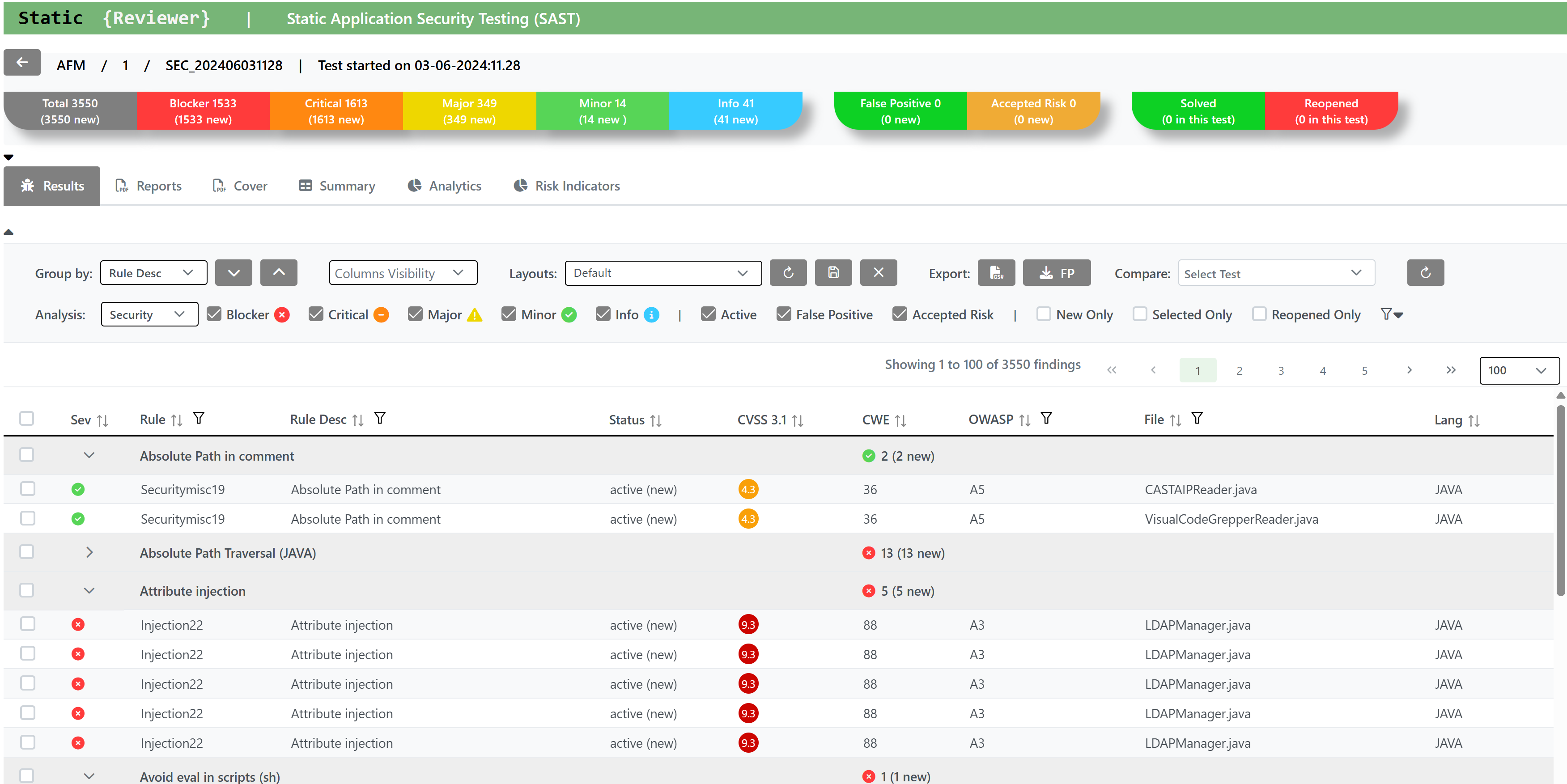
Each Finding get a Unique ID and a Status.
Findings are the defects or interesting things that you want to keep track of when testing a Product during a Test/Engagement. Here, you can lay out the details of what went wrong, where you found it, what the impact is, and your proposed steps for mitigation.
You can Force, if authorized, the Status, Severity, Risk Level. This operation will be tracked in a special log and can be viewed by authorized users.
You can Filter by: ID, Application, Severity, Finding Name, Date range, SLA, Auditor (Reporter, Found By), Status, Risk Level, N. of Vulnerabilities.
You can also Reference CWEs, or add links to your own references. (External Documentation Links included).
Templating findings allows you to create a version of a finding descriptor that you can then re-use over and over again, on any Engagement.
Endpoint
Endpoints represent testable systems defined by their IP address or Fully Qualified Domain Name.
Examples:
· https://www.example.com:8080/products
· 192.168.0.36
REST API
Team Reviewer is built using a thin server architecture and an API-first design. API’s are simply at the heart of the platform. Every API is fully documented via Swagger 2.0.
The Swagger UI Console can be used to visualize and explore the wide range of possibilities:
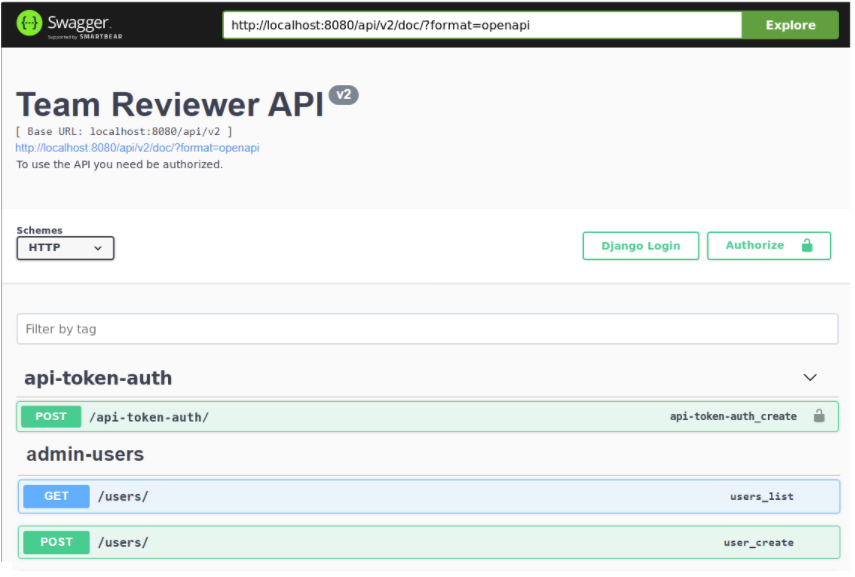
Prior to using the REST APIs, an API Key must be generated. By default, creating a Group (Team) will also create a corresponding API key. A Group (Team) may have multiple keys.
Team Reviewer’API API is created using Django Rest Framework. The documentation of each endpoint is available within each Team Reviewer installation at /api/v2/doc/ and can be accessed by choosing the API v2 Docs link on the user drop down menu in the header.
Each of main Swagger element provides different APIs for:
api-token-auth
The API uses header authentication with API key. To interact with the documentation, a valid Authorization header value is needed. If authorized, a user can also create a new API Authorization token.
admin-users
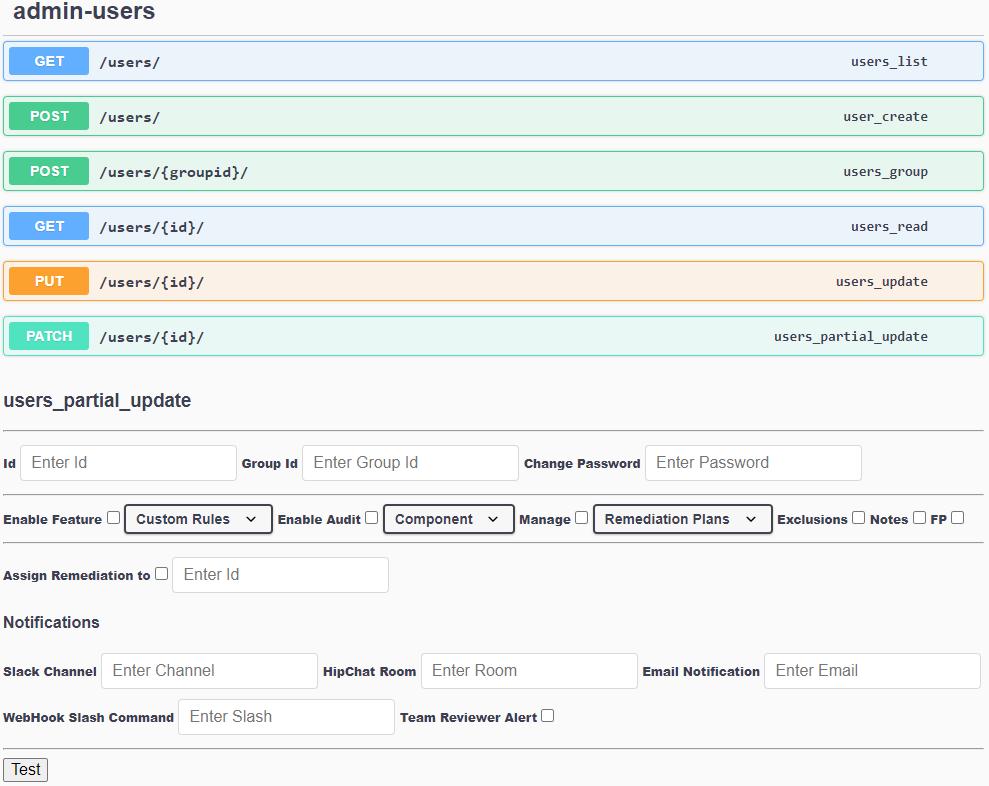
This API requires an admin-level token to run, and HTTPS connection. It handles users, in term of:
Users List
User Creation. Create Users with first Password and associate Users to at least one Group (Team). Groups must be created with Users Partial Update request. User create, delete, modify or suspend
Group (Team) create, modify or delete
Groups assign to Users, with quick User remove
User Update
Users Partial Update. It has plenty of parameters to modify the following user’s Attributes:
Attributes
Password settings (policy, expiration, change password)
Enabling/Disabling Users or Groups feature-by-feature
Enabling/Disabling Users or Groups to Audit analysis, Per Product, Per Component or Per Scan
Enabling/Disabling Users or Group to assign vulnerability remediations to other Users or Groups, Per Product, Per Component, Per Vulnerability (Finding) Category, Per Single Vulnerability (Finding) or Per Scan
Enabling/Disabling Users or Groups to Manage/Monitor Remediation plans Per Product, Per Component, Per Vulnerability (Finding) Category, Per Single Vulnerability (Finding) or Per Scan
Enabling/Disabling Users or Groups to Manage Custom Rules
Enabling/Disabling Users or Groups to create/modify/delete Vulnerability (Finding) Exclusions, Notes and False Positives
Enabling/Disabling Users or Groups to create, modify or delete Components
Adding/Remove Users to/from Admin role, for setting above permissions
Enabling/Disabling Notification for a user/group using Slack, HipChat, Mail, WebHooks or Team Reviewer Alerts for: Product/Engagement/Test/Results/Report added, Jira Update, Upcoming engagement, User mentioned, Code Review involvement, Component Review requested. Notification other than the above can be achieved by WebHooks.
Multiple Users Partial Updates can be done to set more Attributes.
endpoints
To be used for DAST and IAST.
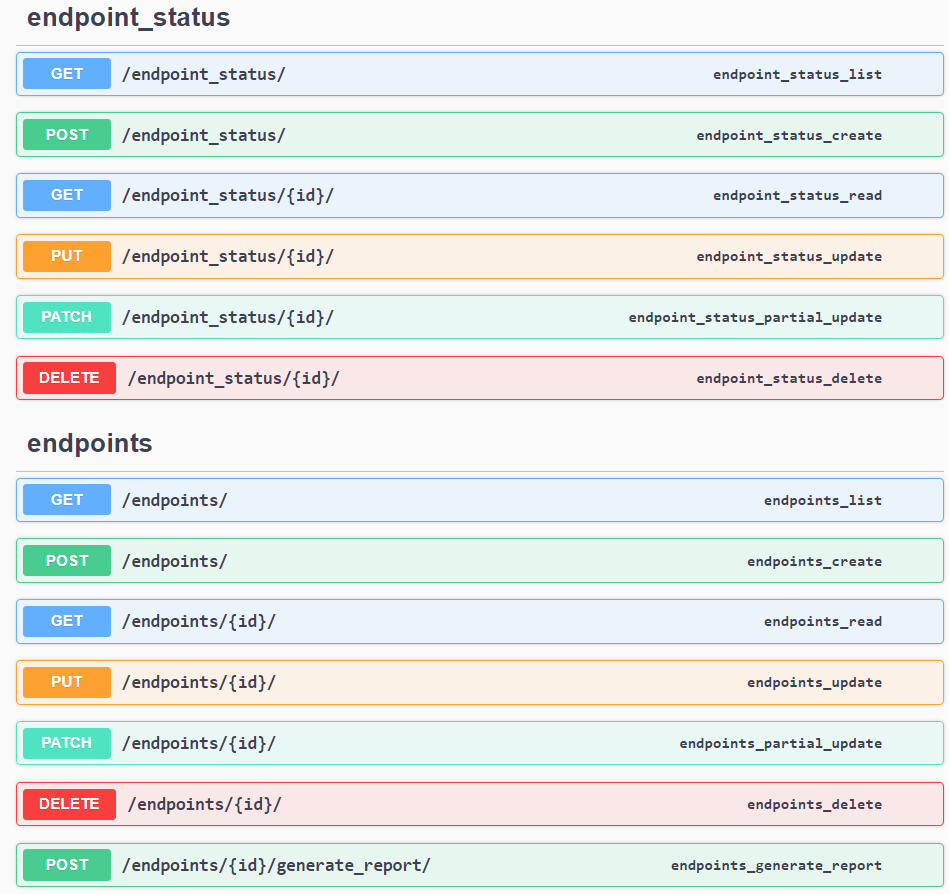
Currently the following endpoints are available:
Engagements (Start, Suspend, Delete and Close an Audit)
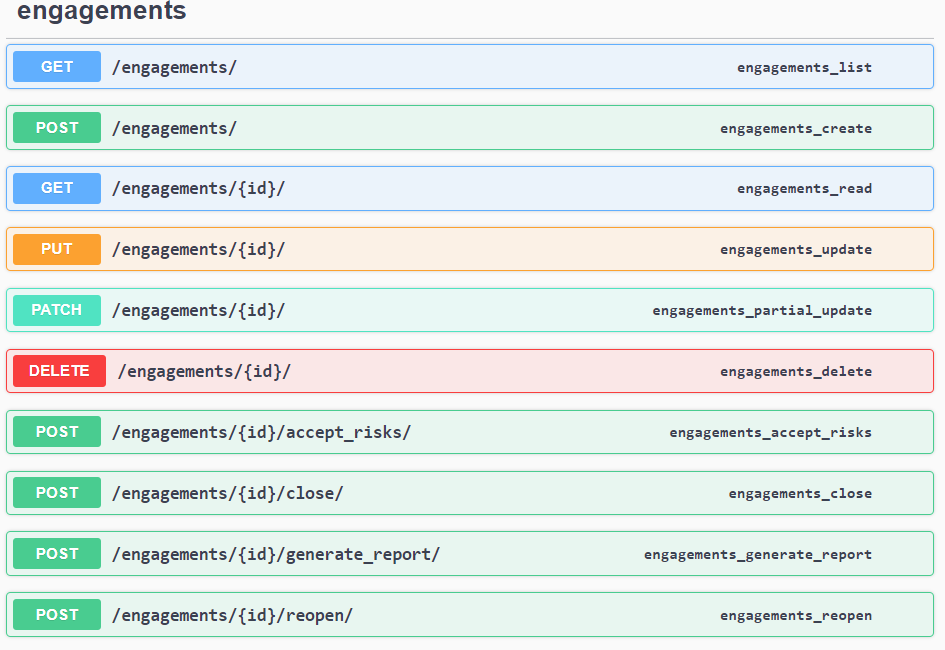
Findings (Vulnerability Management APIs)
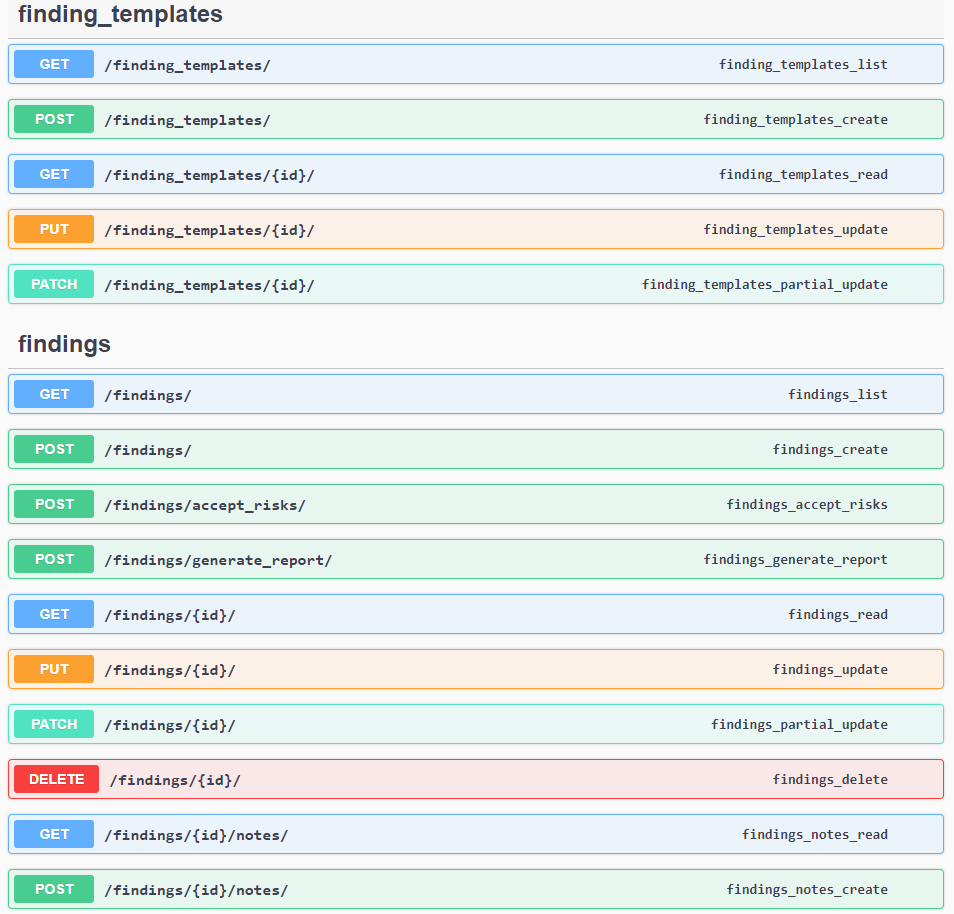
Products (Application Groups)
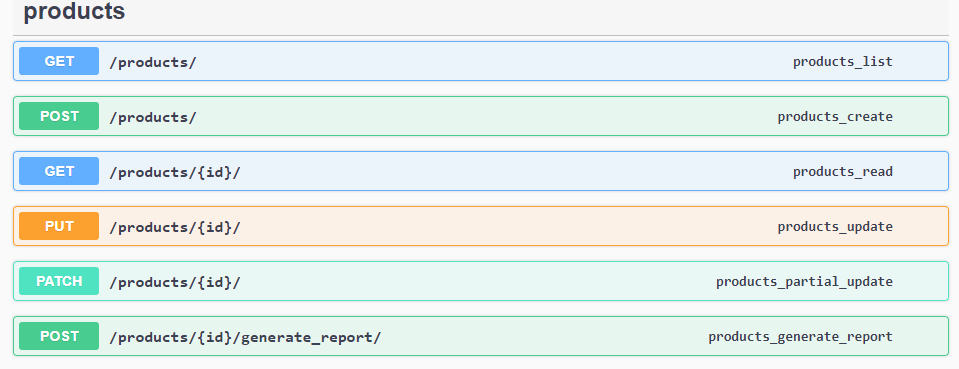
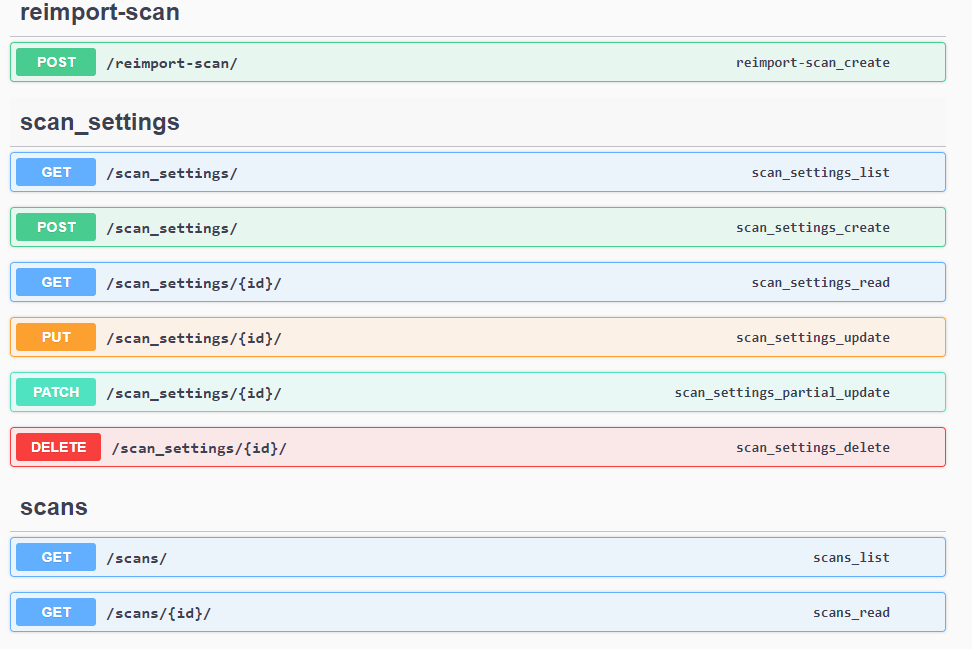
Scan Settings
Scans
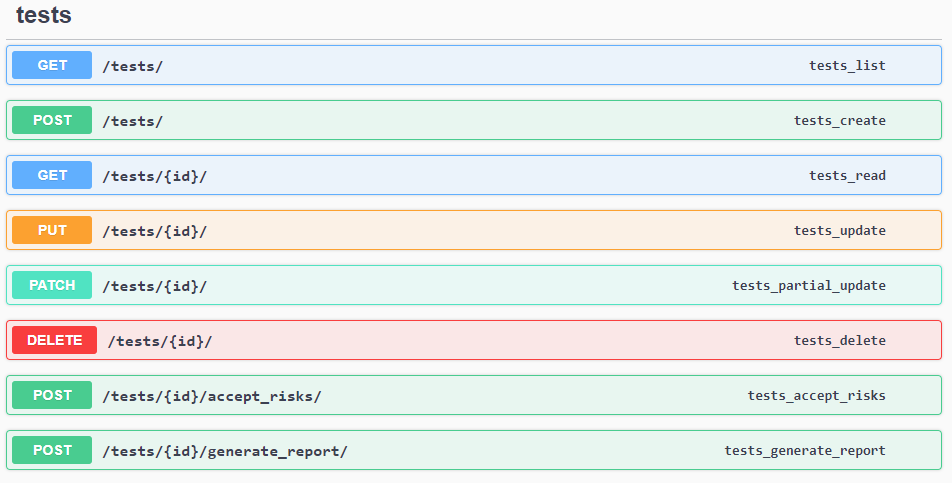
Tests/ Reports
Further, a bunch of additional APIs are available, like: Development Environments, Tools/Plugin Configuration, Jira Configurations, Metadata, Systems Settings, Technologies, Views
Last, there is a Command API for: System Status, Start/Restart/Stop/Suspend scan tasks, Execute Queries. This API requires an admin-level token.
Custom RuleSet
You can create your Custom RuleSet by enabling or disabling the existing Rules:
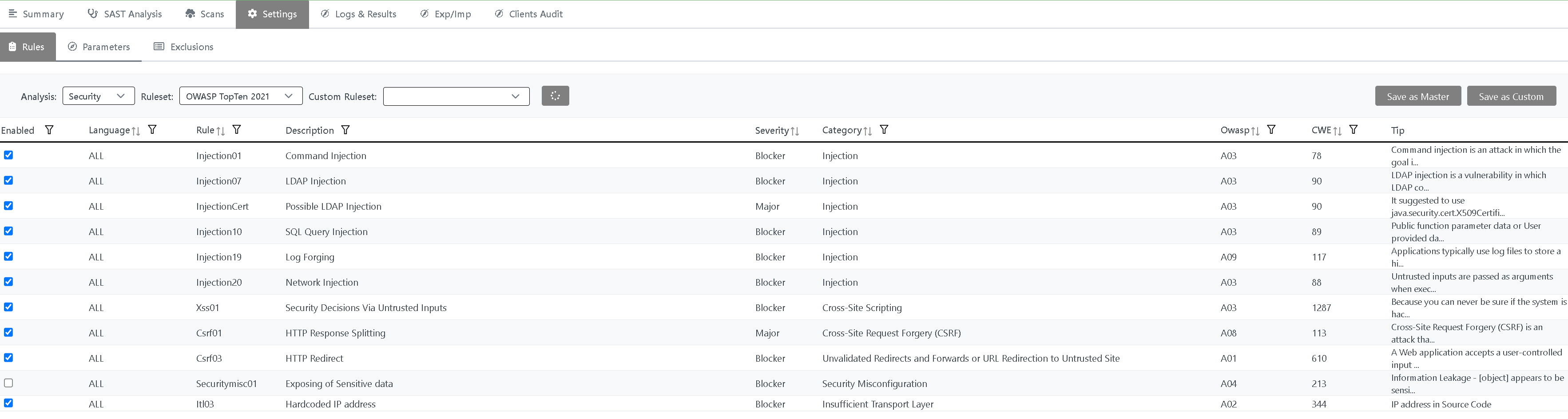
You can:
Choose the Application type: for example Mobile
Choose the Analysis type: Security, Deadcode, Resilience, ISO 5055, Cloud-Ready, Green Software
Choose the Language, Severity or Rule Set. Click on Filter when you’ve chosen
Enable / Disable existing Rules and create your own Custom Rule Set, by clicking Save As button
Export Rules to a CSV File. It will be located on Settings folder
Press Save if you want to make this Custom Rule Set as default
In RuleSet combo box, choose Custom if you want to modify a Custom Rule Set, you previously saved with Save As button
Restore the default Rule Set by clicking on Restore button
Admin Kit
The Security Reviewer Admin Kit allows to add Custom Rules to be executed during the Static Analysis (Security or Dead Code - Best Practices) as well as to change some aspects of Static Analysis Reports.
This can be done in three steps:
Limit access to a single or a group of Static Reviewer features
Change Rules priority (Severity)
Add suggestions to reduce recurring False Positives by Evidence
Add a new Rule to the Static Reviewer’s Rules XML File
Add a Report File for replacing an existing one.
We decide to give a limited access to our Admin Kit, reserved to Certified Users. A typical User can only select group of existing rules to be applied in a specific analysis, or to all analyses.
A Certified User, once purchased the Admin Kit, will receive a 1-day training by us, concerning how to design a Custom Rule properly.
Personnel using this Admin Kit should have the following Professional Profile:
At least 3 year of experience on using Security Reviewer as Auditor. At least 100 Audits per year are required
At least 5 years of experience in Secure Coding with Microsoft®NET
In-depth knowledge of OWASP and CWE Compliance standards, and CVSS Risk methodology, all applied to at least 5 programming languages
At least 5 years of experience in executing Static Analyses compliant with OWASP Top Ten 2013 to 2025, Common Weakness Enumeration (CWE) 4.19 or newer, Web Application Security Consortium (WASC) and PCI-DSS 4.0.1 or newer
Developing at least 3 projects for each of 5 different programming languages, during the last 5 years
“Security Reviewer Certified Professional – Master Rule Programming” Certified
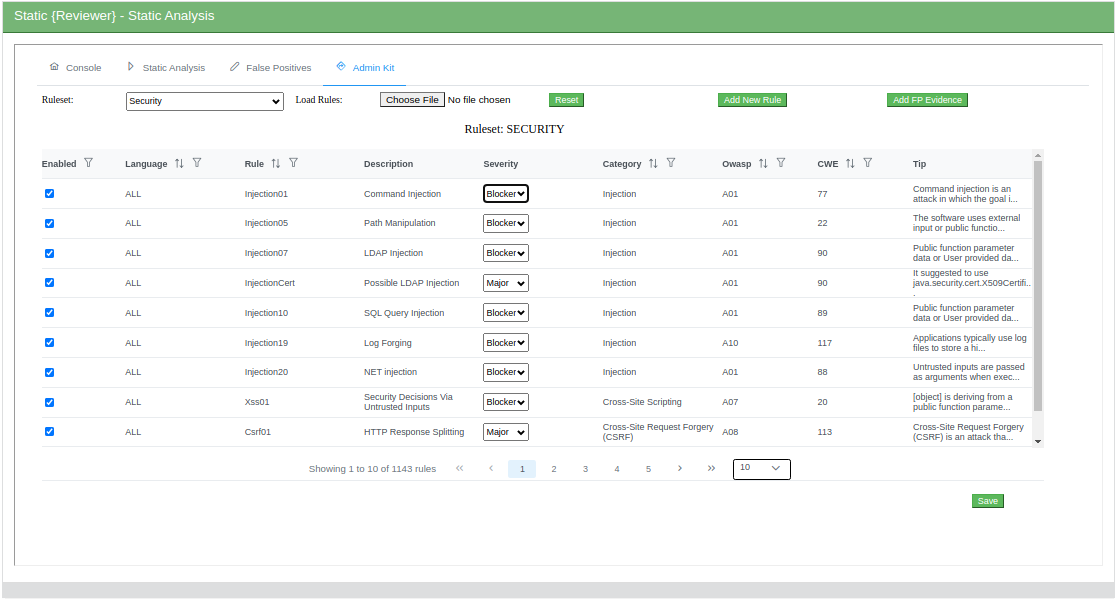
You can Enable/Disable and change Severity of existing Vulnerability Detection Rules (authorized users only):
You can create your Custom Rules (authorized users only):
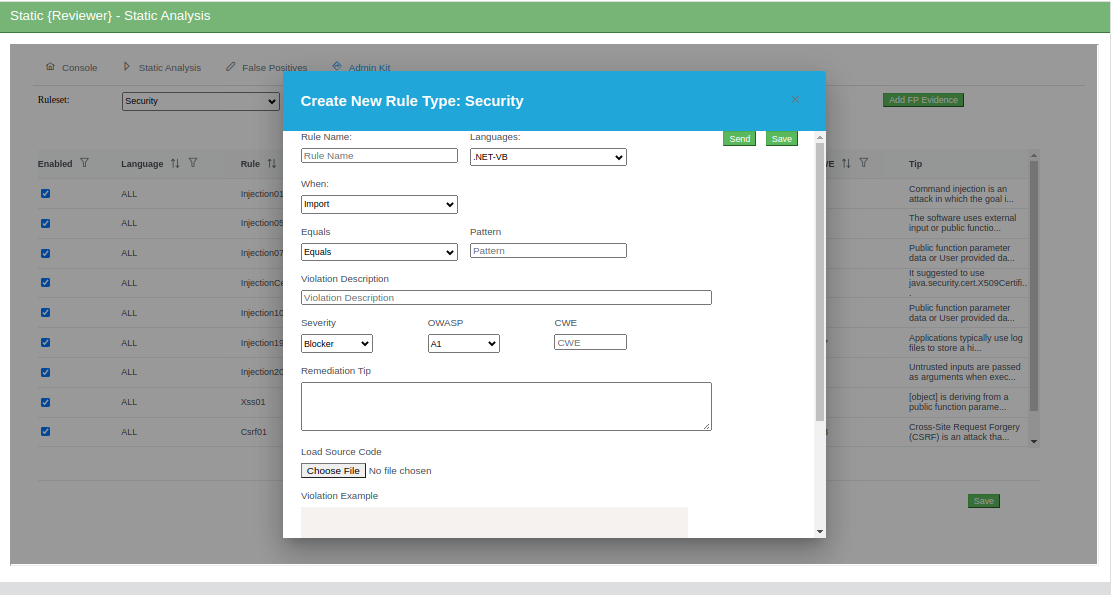
Once you created your own Rules, you must submit them all to us, using the Send button.
You can decide either to share your Custom Rules with the Community, or to reserve those Custom Rules to your company only.
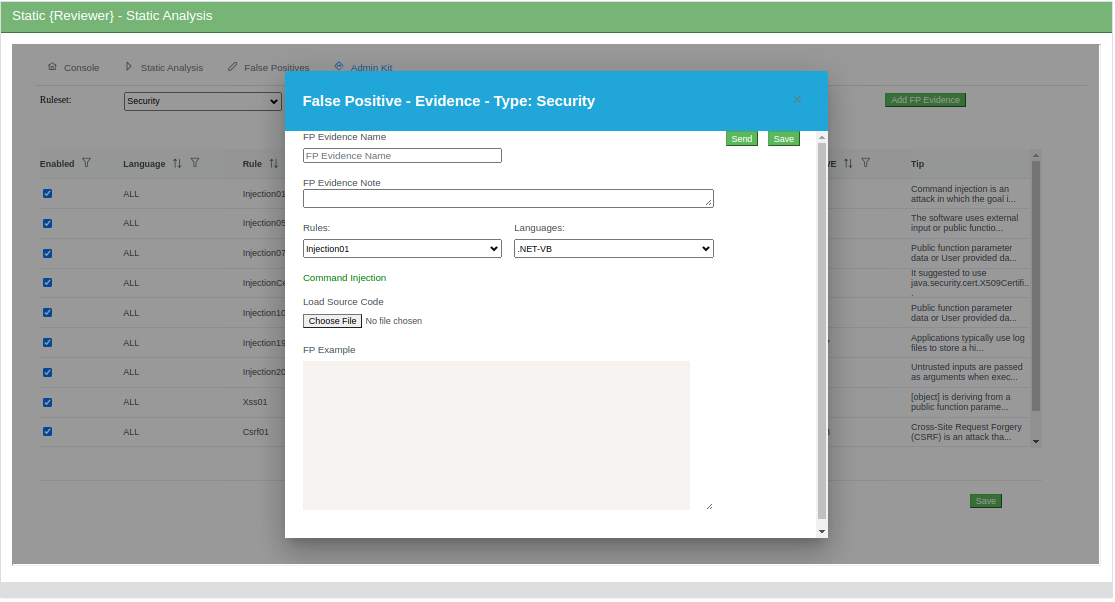
You can declare Recurring False Positives by Evidence (authorized users only):
DevOps CI/CD Integration
See: SDLC Integration
TOOL INTEROPERABILITY STANDARDS
Team Reviewer supports the following Tool Interoperability Standards:
FPF
Team Reviewer has a native format that can be used to share findings with other systems. The findings contain identical information as presented while auditing, but also include information about the project and the system that created the file. The file type is called Finding Packaging Format (FPF).
FPF’s are json files and have the following sections:
Name | Type | Description |
|---|---|---|
version | string | The Finding Packaging Format document version |
meta | object | Describes the Dependency-Track instance that created the file |
project | object | The project the findings are associated with |
findings | array | An array of zero or more findings |
SCARF
We adopted a unified tool output reporting format, called the SWAMP Common Assessment Results Format (SCARF). This format makes it much easier for a tool results viewer to display the output from a given tool. As a result, we have fostered interoperability
among commercial and open source tools. The SCARF framework includes open source libraries in a variety of languages to produce SCARF and process SCARF. In addition, we have produced open source result parsers that translate the output of all the SCARF-based tools to SCARF. We continue to work towards tool interoperability standards by joining the Static Analysis Results Interchange Format (SARIF) Technical Committee. As a participating member, we contribute to creating a standardized, open source static analysis tool format to be adopted by all static analysis tool developers.
You can use SCARF Framework yourself using the libraries:
Available libraries | XML | JSON |
|---|---|---|
Perl | ||
Python | ||
C/C++ | ||
Java |
SARIF
We are also compliant to OASIS SARIF (Static Analysis Results Interchange Format). Some SDK are available:
.NET SARIF SDK
Java Lycan
Other SARIF Interfaces
CEF-LEEF-SysLog
Common Event Format (CEF) and Log Event Extended Format (LEEF) are open standard SysLog formats for log management and interoperabily of security related information from different devices, network appliances and applications.
We use those formats for output-only, to export Team Reviewer correlated results to a number of SIEM tools, like:
OpenText ArcSight
IBM QRadar
Splunk
Exabeam
Securonix UEBA
LogRhythm
STG RSA NetWitness
Rapid7 InsightDR
LogPoint
McAfee Enterprise Security
They are Logging and Auditing file formats and are extensible, text-based formats designed to support multiple device types by offering the most relevant information.
CEF Field Definitions
Field | Definition |
|---|---|
Version | An integer that identifies the version of the CEF format. This information is used to determine what the following fields represent. Example: 0 |
Device Vendor Device Product Device Version | Strings that uniquely identify the type of sending device. No two products Dec use the same device-vendor and device-product pair, although there is no central authority that manages these pairs. Be sure to assign unique name pairs. Example: JATP|Cortex|3.6.0.12 |
Signature ID/ Event Class ID | A unique identifier in CEF format that identifies the event-type. This can be a string or an integer. The Event Class ID identifies the type of event reported. Example (one of these types): http |email| cnc| submission| exploit| datatheft |
Malware Name | A string indicating the malware name. Example: TROJAN_FAREIT.DC |
Severity/Incident Risk Mapping | An integer that reflects the severity of the event. For the Juniper ATP Appliance CEF, the severity value is an incident risk mapping range from 0-10 Example: 9. |
External ID | The Juniper ATP Appliance incident number. Example: externalId=1003 |
Event ID | The Juniper ATP Appliance Event ID number. Example: eventId=13405 |
Extension | A collection of key-value pairs; the keys are part of a predefined set. An event can contain any number of key- value pairs in any order, separated by spaces. Note: Review the definitions for these extension field labels provided in the section: CEF Extension Field Key=Value Pair Definitions. |
LEEF also has predefined attributes.
MegaLinter
MegaLinter is an Open-Source tool for CI/CD workflows supporting 65 languages, 23 formats, 20 tooling formats and ready to use out of the box. Team Reviewer SAST and SCA plugins support a bi-directional integration with MegaLinter. SAST analyses resulting from Static Reviewer both Desktop, CLI and Team Reviewer SAST can be imported by MegaLinter and viceversa. Software Composition Analyses, Secrets scans, IaC scans and Container Image Scans produced by SCA Reviewer Desktop, CLI and Team Reviewer SCA can be imported by MegaLinter and viceversa.
The integration is done via https://megalinter.io/latest/json-schemas/descriptor.html
Developers
Team Reviewer provides other unique capabilities specifically designed for Software Developers.
Reduce Vulnerabilities and Weaknesses, and Increase Quality. Software developers can use the our tools in to assess their software for weaknesses and fix these problems before releasing their software. Eliminating security and quality issues early in the development process reduces development costs and increases the return on investment (ROI), whereas, fixing a bug or security issue after a release reduces the ROI and could potentially lead to a negative reputation.
Simplify the Application of Software Assurance Tools. There are large human costs associated with selecting, acquiring, installing, configuring, maintaining, and integrating a software assurance tool into the development process. These costs can increase exponentially when using multiple tools. Using Team Reviewer eliminates this overhead, as Team Reviewer providers manage the tools, and automates the application of the tools. A software package developer simply makes software available for assessment in Team Reviewer and then selects the desired tools for the analysis. Results from multiple tools can be displayed concurrently using Team Reviewer results viewer.
Enable Continuous Software Assurance. Team Reviewer supports continuous software assurance for developers by scheduling software package assessments on a recurring basis, for example, nightly. Before each assessment begins, the current version of the software package is associated with the assessment run and assessed using a pre-configured set of tools. Users can quickly check the status of their upcoming, ongoing, and completed assessments along with results of successfully completed assessments. Users can also choose to be notified via email when an assessment run finishes. By comparing results from one assessment to another, the software package developer can easily detect regressions or improvements between versions.
Infrastructure Managers
Infrastructure managers bring new technologies into their organizations. Increasingly, this means incorporating open-source software into a networked environment where bugs, defects, or vulnerabilities can create a window of opportunity for unintentional and malicious attacks. Assessing the quality and security of software before it is deployed is a critical step in reducing security risks. Infrastructure managers can use Team Reviewer as an evaluative tool before deploying new technologies or to assess existing software packages for security problems prior to being released.
Since Team Reviewer supports the selection of multiple software analysis tools and simultaneous assessments, infrastructure managers could experience significant time savings. The human cost to conducting software assurance is the effort required to select, acquire, install, configure, maintain, and run these tools on the software prior to deployment. Team Reviewer manages most of these tasks, making it possible for infrastructure managers to simply view the results of software that others assessed in Team Reviewer. Team Reviewer lowers the costs of software assurance, increasing the return on investment.
Team Reviewer offers other incentives for infrastructure operations.
Help Manage Risks Associated with Deployed Software. Infrastructure managers can evaluate the risks of using certain software by using the results of software assurance tools to determine the software’s security and quality. Results from Team Reviewer can also provide metrics to encourage software suppliers to improve the quality and security of their software.
Leverage Community Input to Improve Software Quality. Commonly deployed software can be assessed by the software developer or user community. Team Reviewer gives outside developers the capability to test open-source code prior to incorporating it into their own code.
Improve Visibility to Changes in Deployed Software. Continuous software assurance is the automated, repeated assessment of software by software assurance tools. As new tools are added to Team Reviewer, deployed software will be analyzed with improved rigor, identifying potential problems that need to be addressed by the software provider. As new versions of software are released, Team Reviewer will quickly identify changes in deployed software that will better inform infrastructure managers about key areas of interest impacting their organization.
Machine Learning
Rather than doing specific pattern-matching or detonating a file, machine learning, emdedded in Team Reviewer, parses the file and extracts thousands of features. These features are run through a classifier, also called a feature vector, to identify if the file is good or bad based on known identifiers. Rather than looking for something specific, if a feature of the file behaves like any previously assessed cluster of files, the machine will mark that file as part of the cluster. For good machine learning, training sets of good and bad verdicts is required, and adding new data or features will improve the process and reduce false positive rates.
Machine learning compensates for what dynamic and static analysis lack. A sample that is inert, doesn’t detonate, is crippled by a packer, has command and control down, or is not reliable can still be identified as malicious with machine learning. If numerous versions of a given threat have been seen and clustered together, and a sample has features like those in the cluster, the machine will assume the sample belongs to the cluster and mark it as malicious in seconds.
Only Able to Find More of What Is Already Known
Like the other two methods, machine learning should be looked at as a tool with many advantages, but also some disadvantages. Namely, machine learning trains the model based on only known identifiers. Unlike dynamic analysis, machine learning will never find anything truly original or unknown. If it comes across a threat that looks nothing like anything its seen before, the machine will not flag it, as it is only trained to find more of what is already known.
Layered Techniques in a Platform
To thwart whatever advanced adversaries can throw at you, you need more than one piece of the puzzle. You need layered techniques – a concept that used to be a multi-vendor solution. While defense in depth is still appropriate and relevant, it needs to progress beyond multi-vendor point solutions to a platform that integrates static analysis, dynamic analysis and machine learning. All three working together can actualize defense in depth through layers of integrated solutions.
DISCLAIMER: Due we make use of opensource third-party components, we do not sell the product, but we offer a yearly subscription-based Commercial Support to selected Customers.
Team Reviewer is based on open source software developed by Aaron Weaver (OWASP Defect Dojo Project)
Hardware and Software Requirements
The following are the Hardware and Software requirement for on-premises Team Reviewer Dashboard and REST API:
Any Operative System supporting Docker
16 GB RAM (32GB RAM suggested for 100+ Users)
6 cores (10 cores suggested and 16 cores for large-scale installations)
256 GB Hard Disk (1 TB suggested for large-scale installations)
See Scalability
For Desktop and CLI (DevOps) tool see: Static Reviewer