The Security Reviewer products suite can be installed in various modes across on-premises or cloud environments with:
Integration with development tools, CI/CD pipelines, and other tools is native, and interoperability with new application services is guaranteed.
Desktop & CLI
Keep code close to the workstation. Desktop focuses on local preprocessing and a fast operator experience for teams that want everything on premise or cloud dashboards, without pushing raw source outside the endpoint.
Based on .NET core 10, it is available in the following OS:
Windows
Linux
macOS
For the following scan types:
SAST. 80+ Supported programming languages. Scans source code, compiled code, mobile code, low code, IaC and related configuration files.
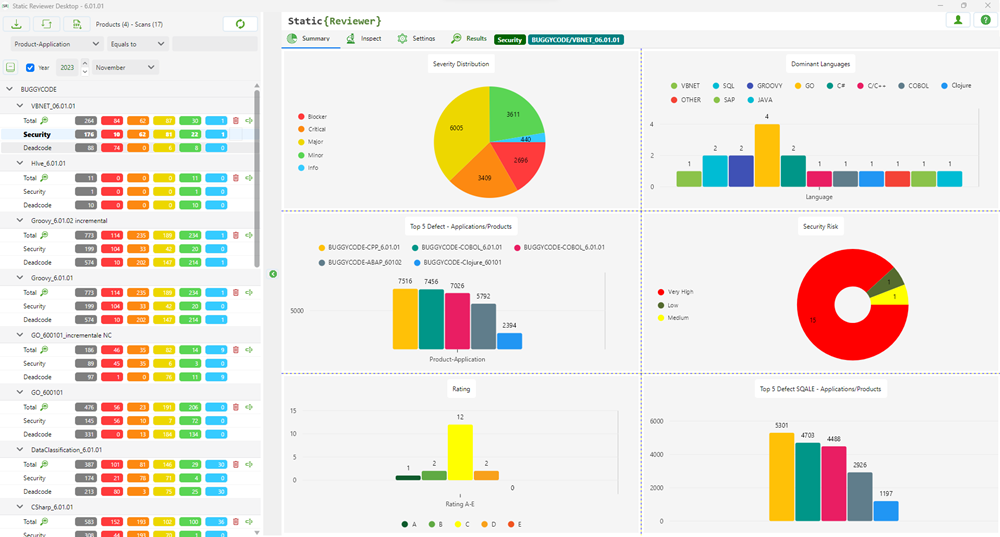
>Provides Findings details, Risk Indicators, Compliance, Scan Policies configuration, Reports Customization. Can scan Folders or Repositories.
>For further details see: Static Reviewer.
SCA. Scans libraries, frameworks, scripts, SBOM and related package files. Detects Vulnerable libraries/frameworks, Outdated Libraries, Discontinued Libraries, Secrets, IaC Misconfigurations, License Risks. Creates 7 different SBOM formats.
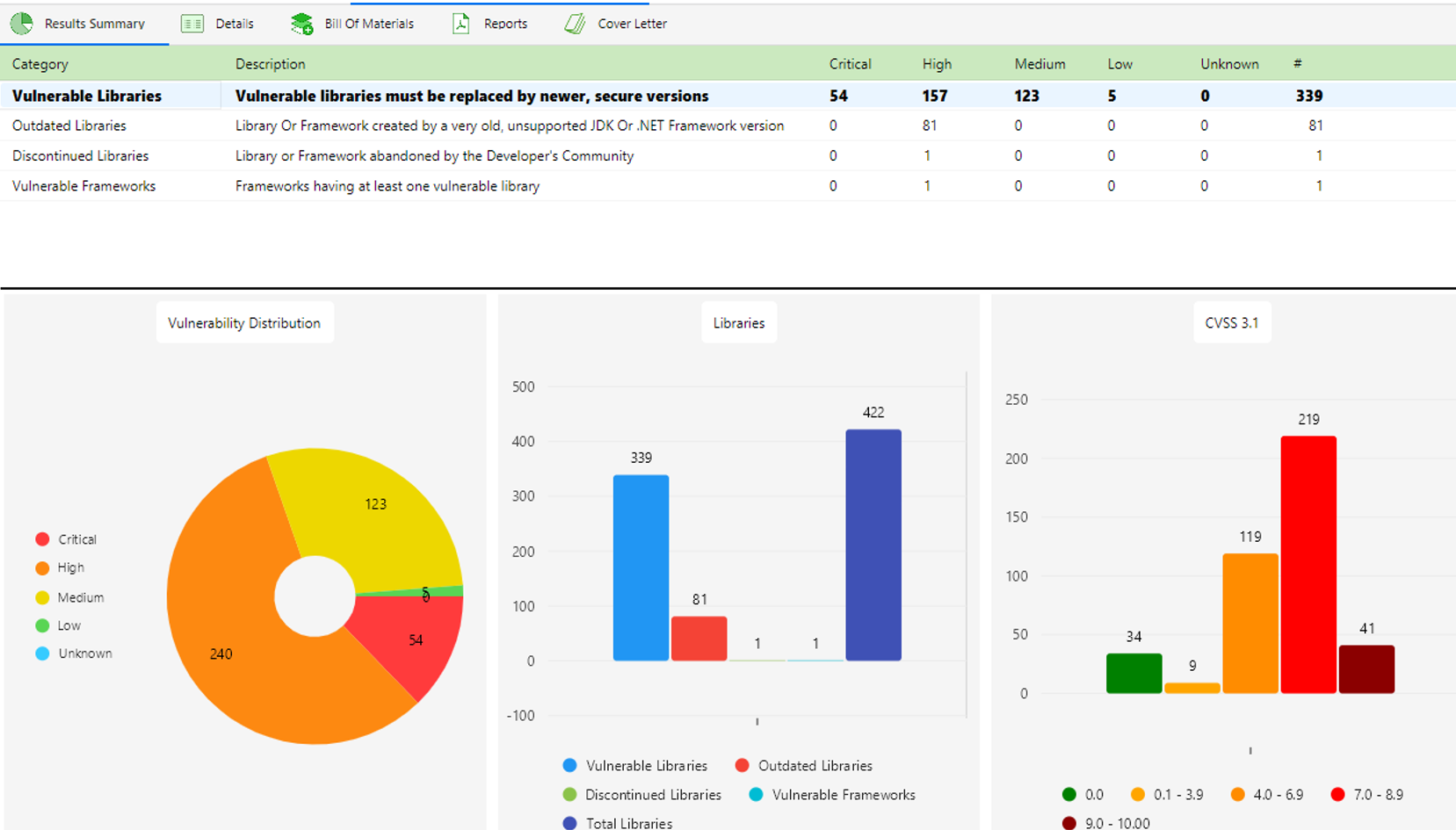
>For further details see: SCA Reviewer.
CLI. Can scan both in SAST and SCA mode, locally or remote (dashboard required).
>Local scan uses same languages engines than Desktop and is available on Windows, Linux and macOS.
>Remote scan can run in every OS supporting JAVA 17+, like Windows, Linux, macOS, OS/400, z/OS, AIX, Solaris and HP-UX.
>For further details see: CLI Interface.
DOCKER
Package scanning capabilities are available also into a clean container footprint for build servers, platform teams, and enterprise DevOps pipelines that want reproducible delivery.
It is composed by two modules: Docker CLI (optional) and Docker Server.
Docker CLI
It is the client-side module for being used inside your DevOps pipelines, without installing software rather than Docker itself. You can run local SAST and SCA scans using simply Docker run commands, and submit the results to the Docker Server (on premises) or to Cloud.
Docker Server
It is the on premise version of the dashboard. Features all functionalitis of Cloud platform, but locally.
For further details, see Team Reviewer.
KUBERNETES
Run the platform as a scalable service across teams, business units, and environments with tenant-aware operations, resilient orchestration, and clear enterprise boundaries.
You can install the dashboard at your premises, inside your own Kubernetes cluster, simply starting from our Helm Chart.
CLOUD
Cloud Reviewer brings managed, multi-tenant application security together with SAST, SCA, DAST, MAST, XDR, ASPM and broad DevOps integrations in a service-led operating model.
For further information, see Cloud Reviewer.
System Requirements
Desktop & CLI Minimum Configuration
2-Core CPU
8 GB RAM
256 GB Free space on Disk
.NET Core 10
See: Supported Hosts
Desktop & CLI Resources Usage
Every running analysis will take about 700MB RAM. You can run up to 10 analyses on the same middle-range desktop, and 20 with 4 cores/16GB RAM, further ones will be queued.
No DBMS is needed in Desktop version.
IDE
IDE integrations differ depending on the target.
Please refer to your preferred IDE requirements, like Eclipse, Visual Studio, JetBrains, NetBeans.
DevOps
You can use our CLI or Docker CLI interfaces in your preferred DevOps.
For DevOps CI/CD integration please refer to Jenkins or Bamboo requirements.
Docker
For installing Team Reviewer on premise.
See: Architecture and Scalability
Docker Resources Usage
Each user can run up to 20 simultaneous analyses on same server. Over 20 will be automatically queued. With a middle-range server you can handle 300+ users.
For 30 simultaneous analyses you need 10 cores and 32GB RAM.
Server architecture is scalable, you can add as servers as you want.
Server host can be any Docker-compatible Linux distro, including Linux on POWER 64-bit Little Endian, Linux on IBM® Z.
macOS High Sierra or newer hosts are also supported.
Static Reviewer and SCA Reviewer support running in the below listed infrastructures:
Supported Hosts
Windows Workstation 11/10
Windows Server 2008/2012/2016/2019/2022/2025
Red Hat RHEL 7, 8, 9, 10
Oracle Linux 7, 8, 9, 10
SuSE Linux Enterprise 12, 15, 16
CentOS 7/8
Centos Stream 9/10
Ubuntu 20.04_2 LTS, 22.04.6 LTS, 24.04.3 LTS
Fedora 21.x or newer
Debian 9 or higher
Alpine Linux v3.18 or newer
Rocky Linux 8.10, 9.7, 10.1
AlmaLinux 9.2, 10.0
macOS 10.13 High Sierra or newer
Virtualization Platforms
Oracle VirtualBox 6.0.0 or newer
Microsoft Hyper-V for Windows 11 and Windows Server 2008/2012/2016/2019/2022/2025
Red Hat Enterprise Virtualization 3.6 or newer
KVM (Kernel-based Virtual Machine) kvm-44 or later