Cyber Reviewer is a super-powered Extended detection and response (XDR), an emergent cybersecurity technology that monitors and mitigates cyber security threats in real-time, providing a strong protection for endpoints and cloud workloads.
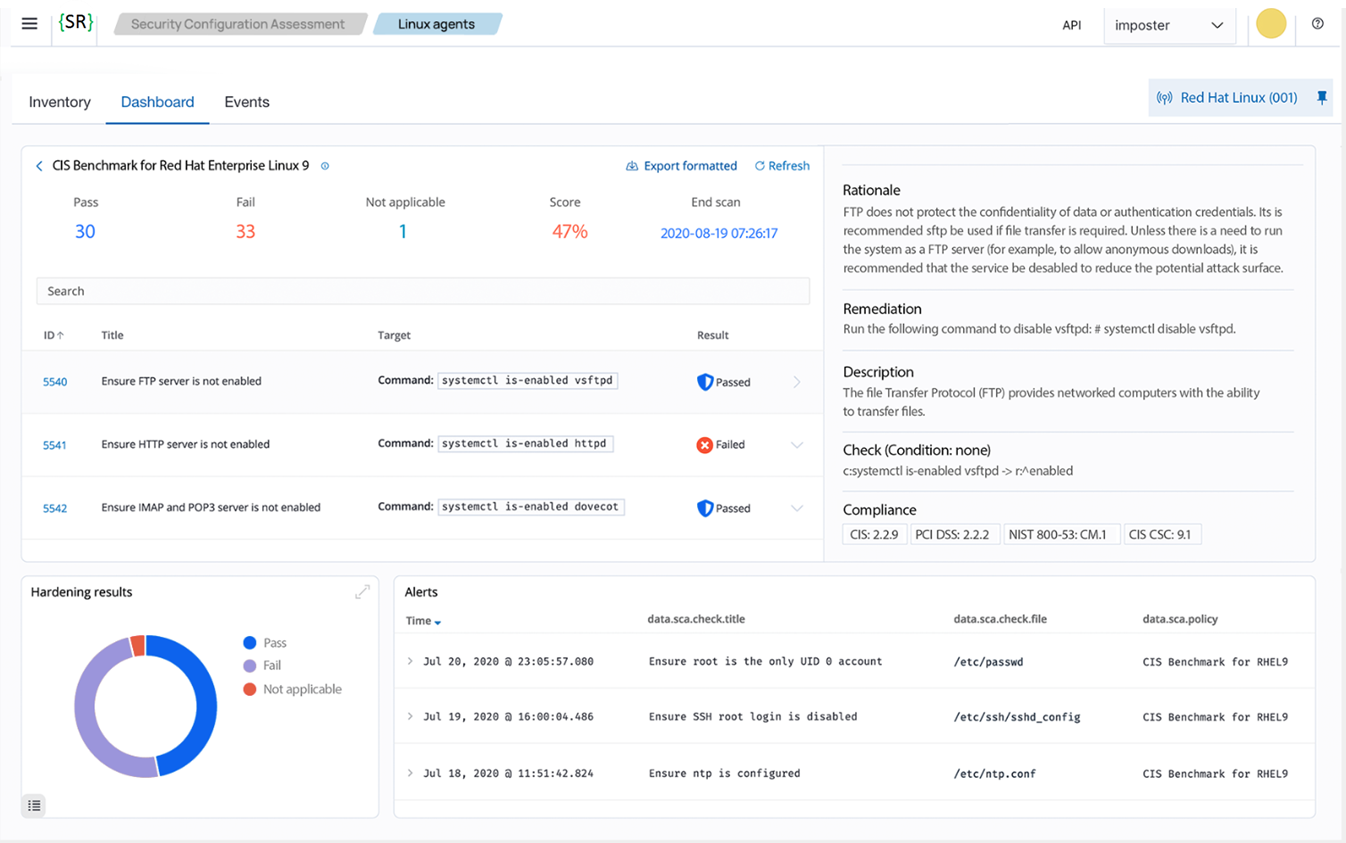
Cyber Reviewer’s extensive functionality and integrated platform allow users to replace most of existing cyber security products and integrate all of its features into a single platform to get the most out of a complete security solution. Cyber Reviewer provides features such as:
Security analytics
Intrusion detection (IDS)
Log data analysis
File integrity monitoring
Network Security monitoring, ensuring the integrity, confidentiality, and availability of computer networks and data by preventing unauthorized access, misuse, or disruption
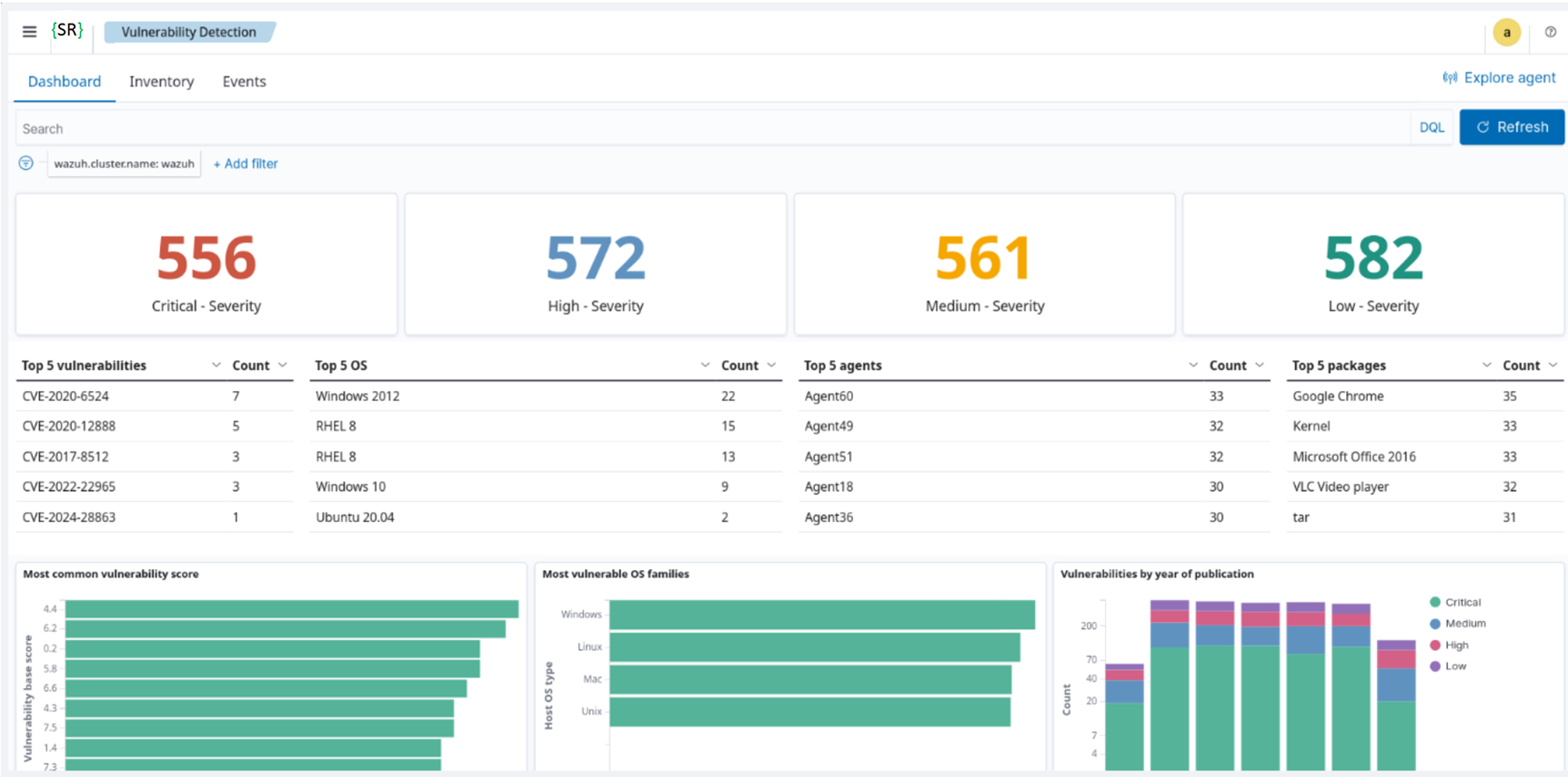
Vulnerability detection (CVEs known and unknown, Malware/MaaS, Ransomware, 0Day, AI attacks)
MITRE ATT&CK, CIS Benchmarks
Configuration assessment
Incident response
Regulatory compliance (GDPR, NIS2, PCI-DSS, NIST 800-53, TSC, GPC-13, HIPAA)
Cloud security monitoring (Azure, Amazon AWS, Google Cloud)
Container security (Kubernetes, Docker)
Data Sources
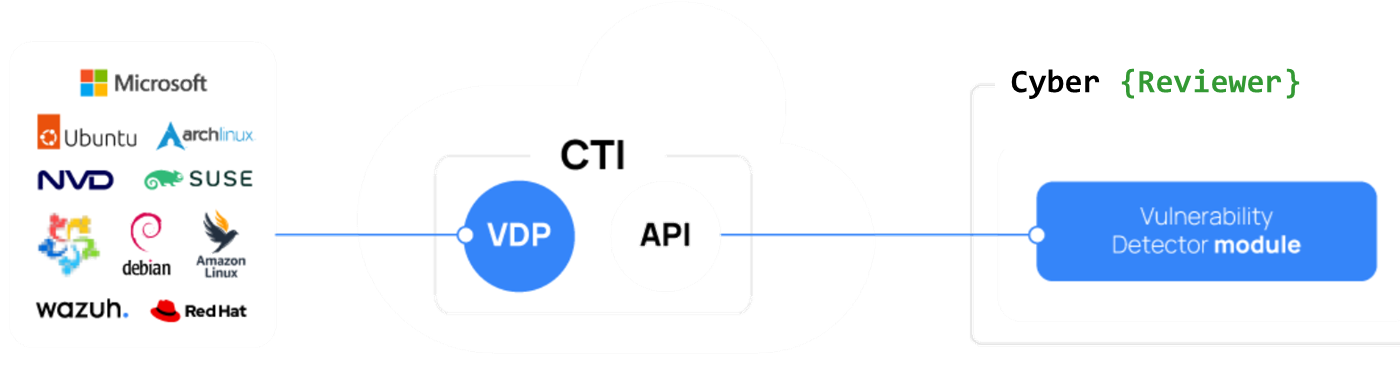
This tool, in addition to collecting data from multiple sources (e.g., agents, APIs, syslogs, JSON files) and already featuring many default decoders and rules to adapt to various data sources, including Canonical, Debian, Red Hat, Arch Linux, ALAS, Microsoft, and the NVD, into a unified Cyber Threat Intelligence (CTI) repository. A core component of the CTI platform is the Vulnerability Detector Provider (VDP). The VDP organizes vulnerability data from multiple vendors into a standardized format and produces consistent, high-quality intelligence. This ensures the Vulnerability Detection module can identify vulnerabilities across various operating systems.
Dashboards
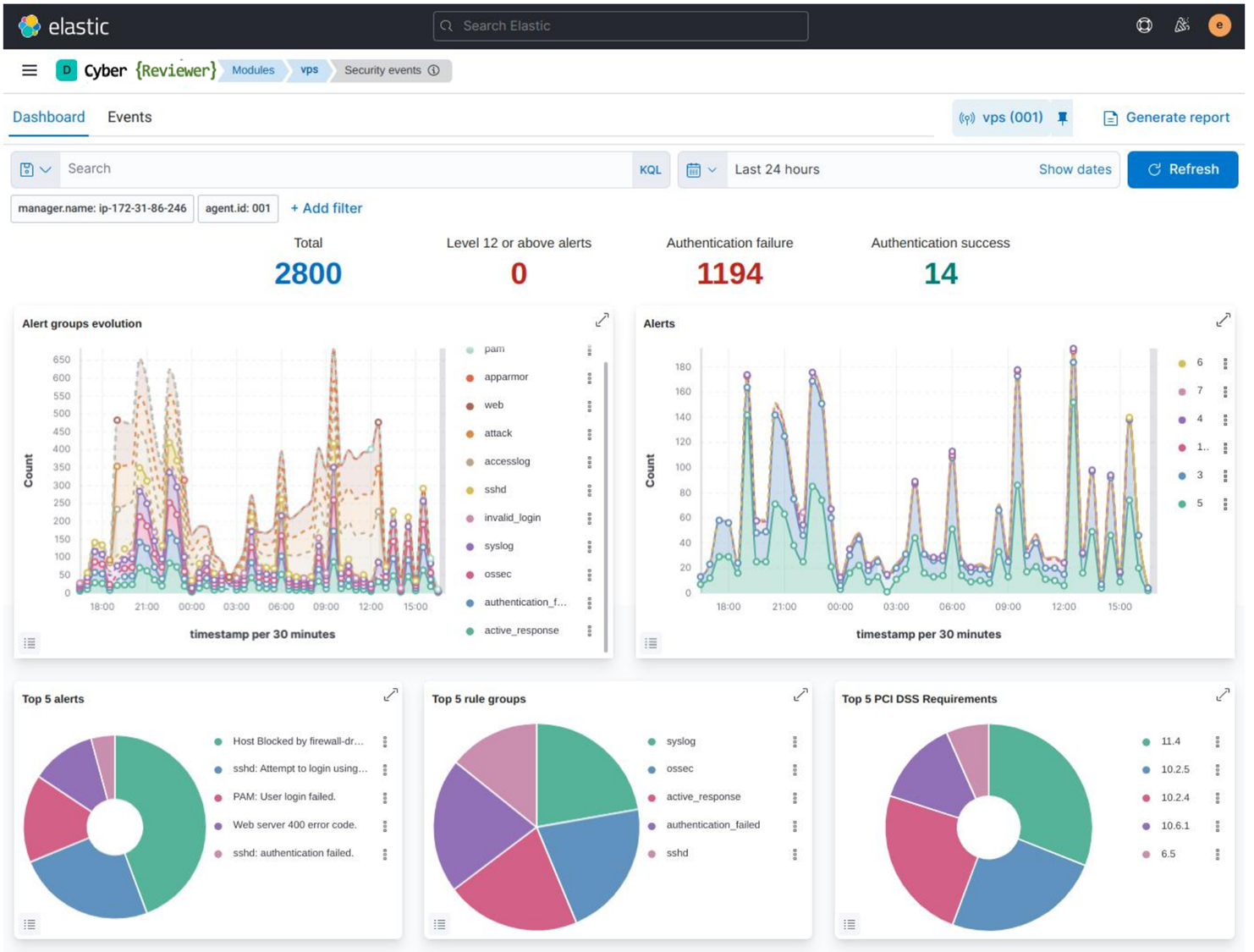
It can also build custom dashboards with a multitude of widgets based on specific events, and is also an XDR. It's possible to configure and customize a response (such as isolation via firewall rules or custom scripts) based on specific events.
Supported dashboards:

Example of ElasticSearch dashboard:
Can Cyber Reviewer protect my systems from cyber attacks?
Yes. It provides a security solution that can monitor your infrastructure and detect all types of threats, intrusion attempts, system anomalies, misconfigured applications, and unauthorized user actions. It also provides a framework for incident response and regulatory compliance. As cyber threats become increasingly sophisticated, real-time monitoring and security analytics are essential for rapid detection and remediation.
Can Cyber Reviewer be used for compliance requirements?
Yes. It helps organizations meet numerous compliance and certification requirements. Cyber Reviewer supports the following standards:
Credit Card Industry Data Security Standard (PCI DSS)
General Data Protection Regulation (GDPR)
Network and Information Systems (NIS2)
NIST Special Publication 800-53 (NIST 800-53)
Good Practice Guide 13 (GPG13)
Trusted Services Criteria (TSC SOC2)
Health Insurance Portability and Accountability Act (HIPAA)
Does Cyber Reviewer support major operating systems?
Yes, it supports all major operating systems, including Linux, macOS, Windows, Solaris, AIX, and HP-UX.
Deployment modes
You can deploy Cyber Reviewer in three ways:
On-premises, managed entirely by you
In your own cloud environment, under your control
As a fully managed SaaS service operated by Security Reviewer, part of Cloud Reviewer offer.
The Cloud versions host and manage all central components in a unified, secure environment. The service provides fast provisioning, automated scaling, ongoing updates, and operational management, so you can focus on security operations rather than infrastructure.
Encrypted Communications
The communication between the agent and the server takes place through a secure channel (TCP or UDP), providing data encryption and compression in real time. Additionally, it includes flow control mechanisms to avoid flooding, queueing events when necessary, and protecting the network bandwidth.
Communications are fully encrypted, using AES, irreversible without the key, and it uses keys that are unbreakable through guessing or brute-force attacks. AES-512 (XTS mode) represents a safe and secure way to hide data from unwanted third-parties. It provides robust post-quantum security by utilizing a 512-bit key, offering an effective 256-bit security level against quantum attacks using Grover's algorithm.
Encryption of data flowing between agents and manager is very important to prevent sensitive data leaks if our network environment is compromised.
Sniffers, Man-in-the-middle attacks and other network exploits can use unencrypted communications to their advantage. AES encryption also provides a means of proving that information is authentic and comes from the point of origin it claims to come from. It is also able to confirm that information hasn’t been altered during transmission.
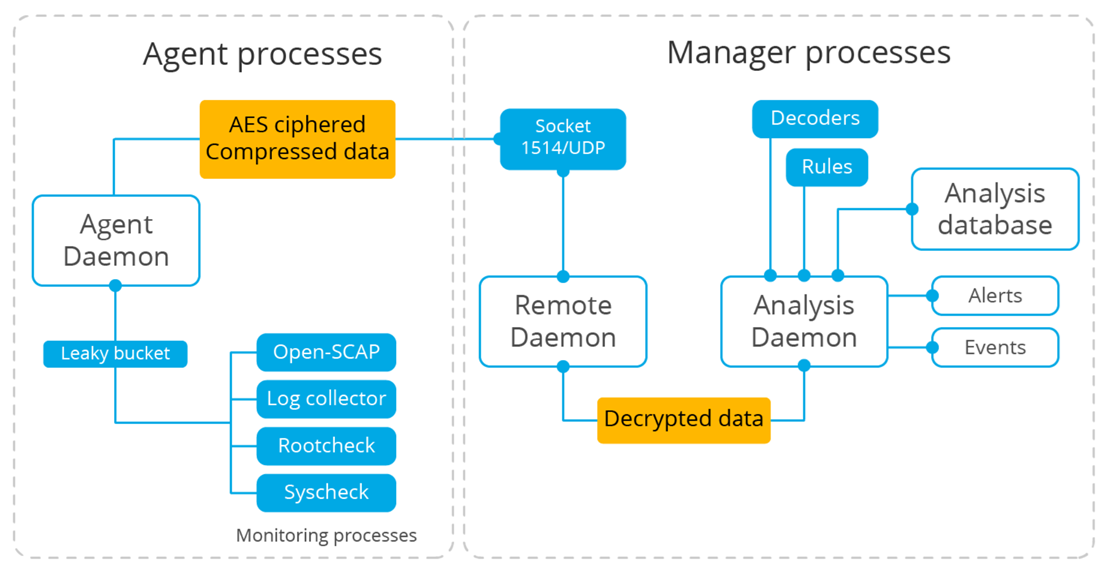
After the events are generated, they are encrypted on the agent side and sent to the manager. The Remote daemon on the manager receives and decrypts the ciphered messages sent by the agents and sends them to the Analysis daemon for further processing.
Agent Architecture
All agent modules are configurable and perform different security tasks. This modular architecture allows you to configure each module according to your security needs. The following list summarizes the purposes of the Cyber Reviewer agent modules.
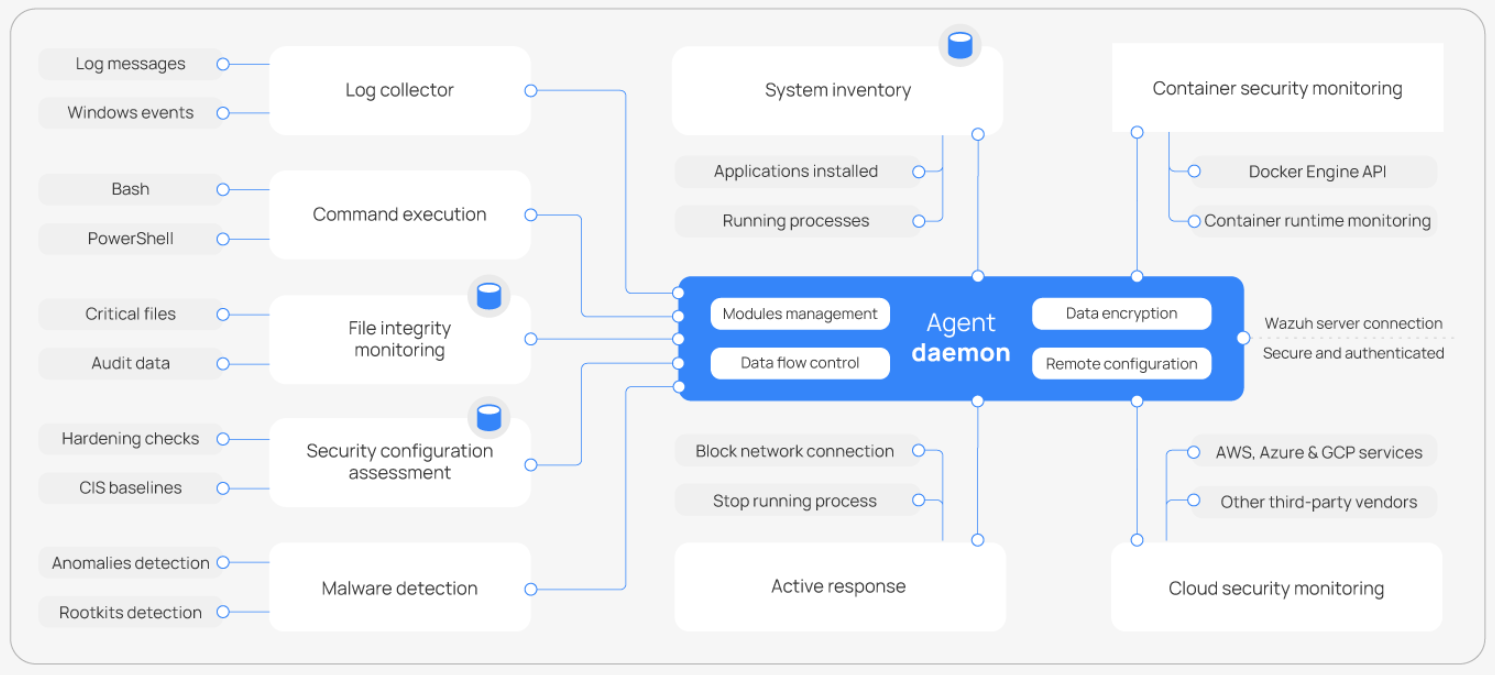
Log collector: Reads flat log files and Windows events, collecting operating system and application log messages. It supports XPath filters for Windows events and recognizes multi-line formats like Linux Audit logs. It can also enrich JSON events with additional metadata.
Command execution: Runs authorized commands periodically, collecting their output and reporting it back to the Cyber Reviewer server for further analysis. You can use this module for different purposes, such as monitoring available disk space or getting a list of recently logged-in users.
File integrity monitoring (FIM): Monitors the file system, reporting when files are created, deleted, or modified. It keeps track of changes in file attributes, permissions, ownership, and content. When an event occurs, it captures who, what, and when details in real time.
Security configuration assessment (SCA): Provides continuous configuration assessment, utilizing out-of-the-box checks based on the Center of Internet Security (CIS) benchmarks. Users can also create their own SCA checks to monitor and enforce their security policies.
System inventory: Periodically runs scans to collect inventory data such as operating system version, network interfaces, running processes, installed applications, and a list of open ports. Scan results are stored in local SQLite databases that can be queried remotely.
Malware detection: Uses a non-signature-based approach to detect anomalies and the possible presence of rootkits. It also looks for hidden processes, hidden files, and hidden ports while monitoring system calls.
Active Response: Runs automatic actions when threats are detected, triggering responses to block a network connection, stop a running process, or delete a malicious file. Users can also create custom responses when required, for example, responses for running a binary in a sandbox, capturing network traffic, and scanning a file with an antivirus.
Container security monitoring: Integrates with the Docker Engine API to monitor changes in a containerized environment. For example, it detects changes to container images, network configuration, or data volumes. It alerts about containers running in privileged mode and about users executing commands in a running container.
Cloud security monitoring: Monitors cloud providers such as Amazon Web Services, Microsoft Azure, or Google GCP, communicating natively with their APIs. It detects changes to the cloud infrastructure, for example, when a new user is created, a security group is modified, or a cloud instance is stopped. Additionally, it collects cloud services log data such as AWS CloudTrail, GCP Pub/Sub, and Azure Active Directory.
Shared Responsabilities
Using the Cloud or SaaS solutions, responsibilities are divided between the service and the customer.
Managed by Security Reviewer
Hosting, deployment, and maintenance of Cyber Reviewer core components.
Infrastructure monitoring, scaling, and high availability.
Security of the underlying platform.
Service updates and version upgrades.
Managed by Customer
Deploying and configuring Cloud Reviewer agents on your endpoints.
Defining custom detection rules, alerting policies, and integrations.
Managing access control for your users.
Responding to incidents detected in your environment.
Single Sign-On
Cyber Reviewer supports the Security Assertion Markup Language (SAML) standard for Single Sign-On (SSO) in addition to the internal user database used for authentication. This allows organizations to use their existing Identity Providers (IdP) to manage access to the platform.
Supported Identity Providers
Kubernetes Cluster Monitoring
Kubernetes offers a high degree of control over applications and services running in its clusters, making Kubernetes environments attractive targets of cyberattacks.
Kubernetes auditing provides a security-relevant, chronological set of records documenting the sequence of actions in a cluster. The cluster audits the activities generated by users, by applications that use the Kubernetes API, and by the control plane itself.
Auditing allows cluster administrators to answer the following questions:
what happened?
when did it happen?
who initiated it?
on what did it happen?
where was it observed?
from where was it initiated?
to where was it going?
To audit a Kubernetes Cluster, Cyber Reviewer needs the following simple steps:
Create a webhook listener on the Cyber Reviewer server to receive logs from the Kubernetes cluster
Enable auditing on the Kubernetes cluster and configure it to forward audit logs to the Cyber Reviewer webhook listener
Create rules on the Cyber Reviewer server to alert about audit events received from Kubernetes.
To enable Kubernetes audit logging, we create an audit policy file that defines which events the cluster records and the level of detail captured for each event type. We also create a webhook configuration file that specifies the webhook address where the audit events will be sent.
We apply the newly created audit policy and the webhook configuration to the cluster by modifying the Kubernetes API server configuration file. The Kubernetes API server exposes the Kubernetes API and processes all cluster requests. We log all user requests to the Kubernetes API by adding the audit policy and webhook configuration to the API server.
Finally, we create custom rules to detect Kubernetes audit events received via the webhook listener:
Rule ID
110002is a base rule that matches all Kubernetes audit events.Rule ID
110003is triggered for Kubernetes “create” events.Rule ID
110004is triggered for Kubernetes “delete” events.Rule ID
110005is triggered for Kubernetes “patch” events.Rule ID
110006is triggered for Kubernetes “update” events
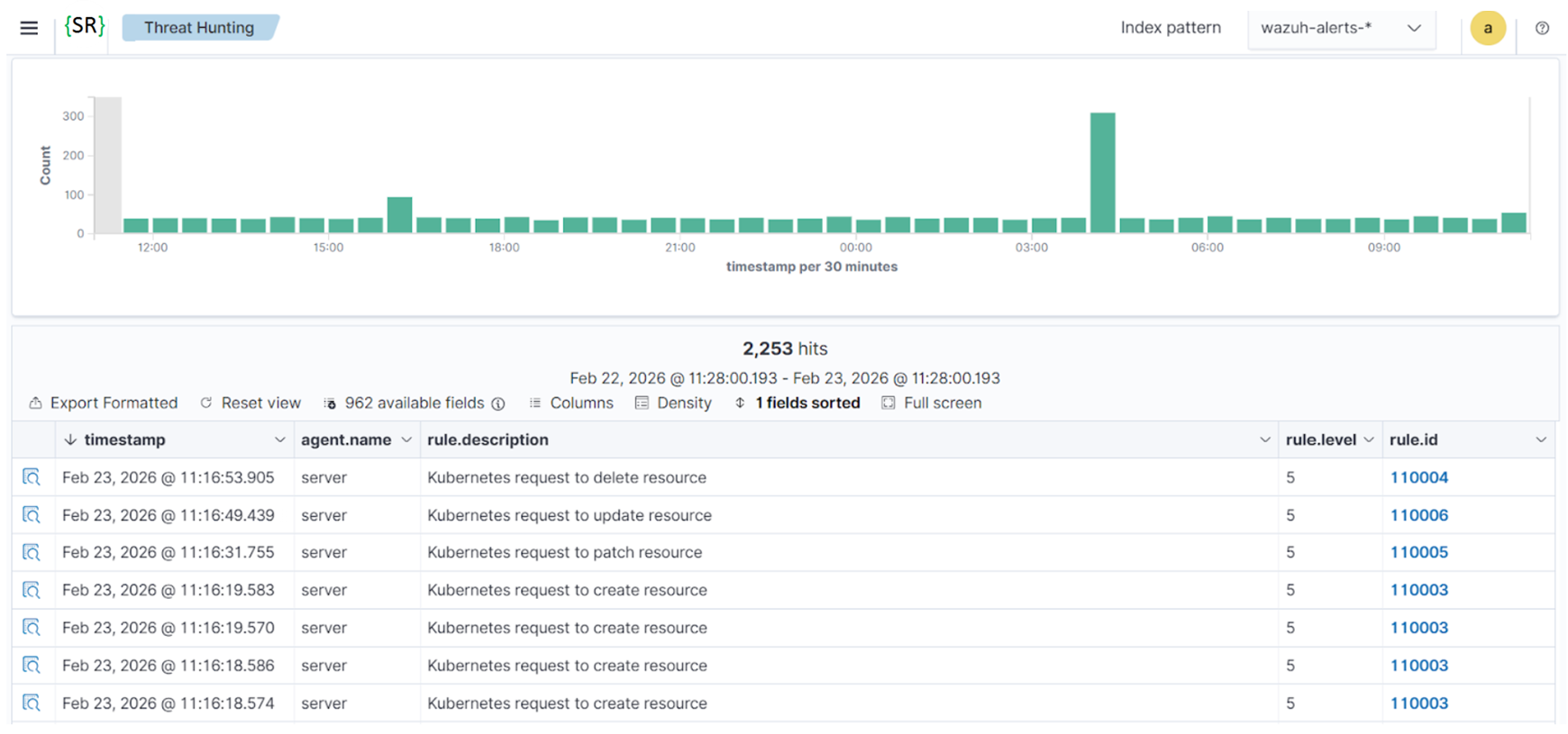
Kubernetes audit logging provides visibility into control plane activity by recording all interactions with the Kubernetes API server. Monitoring these events helps to detect unauthorized access, privilege escalation, and configuration changes that may impact cluster security. By forwarding Kubernetes audit logs to Cyber Reviewer, organizations gain centralized visibility and enhanced detection capabilities across their containerized environments.
IT hygiene
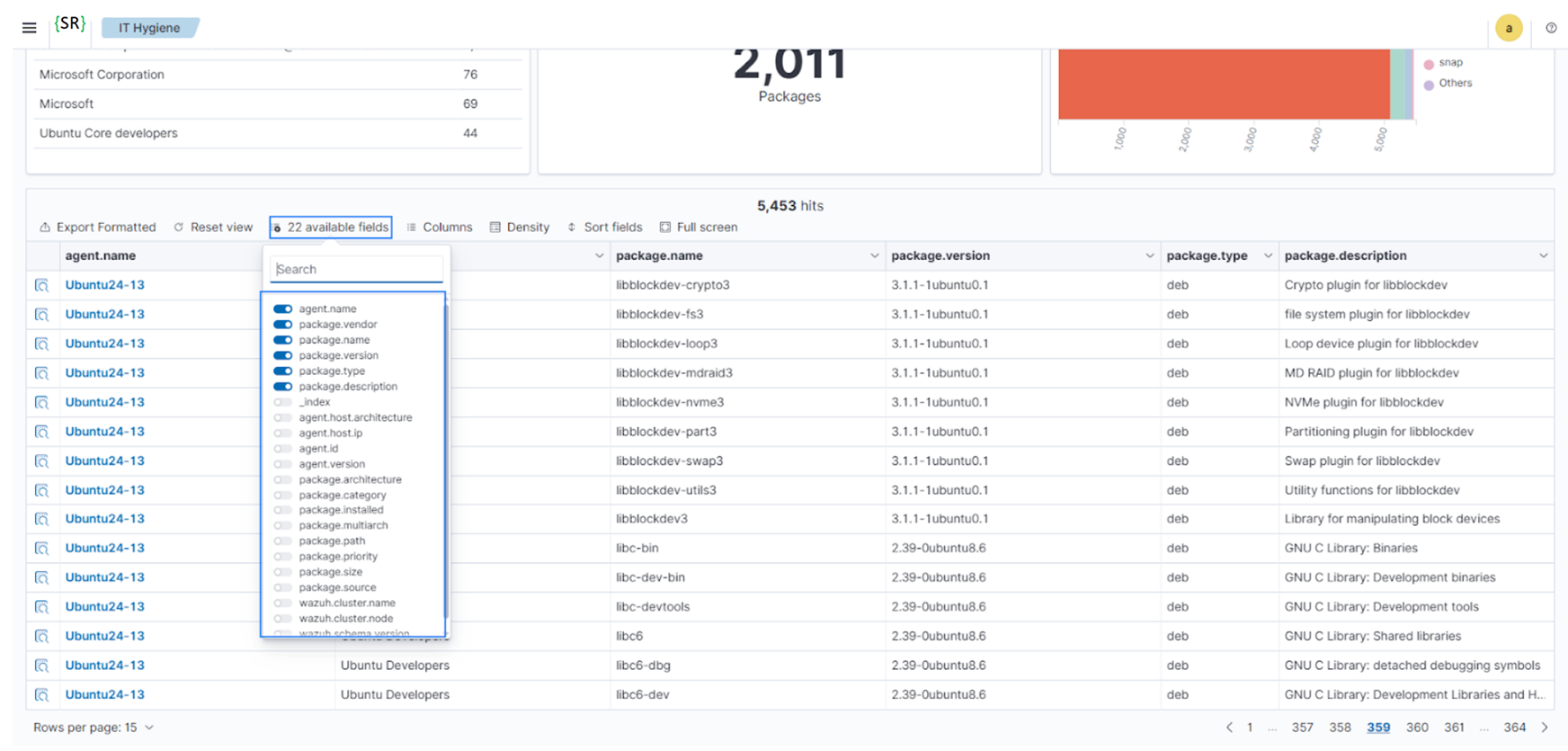
Access and utilize inventory data across multiple endpoints simultaneously using the Cyber Reviewer IT hygiene module on the Cyber Reviewer dashboard. The Syscollector module collects and aggregates system inventory data, enabling near real-time visibility into system states.
Follow these steps to explore and query system inventory data on the Cyber Reviewer dashboard:
Navigate to Security operations > IT Hygiene to view the sections for System, Software, Processes, Network, Identity, Services, and an overview Dashboard. Every section offers an aggregated view of system inventory data from all monitored endpoints. For example, the System section provides details on hardware and operating systems across all monitored Cyber Reviewer endpoints.
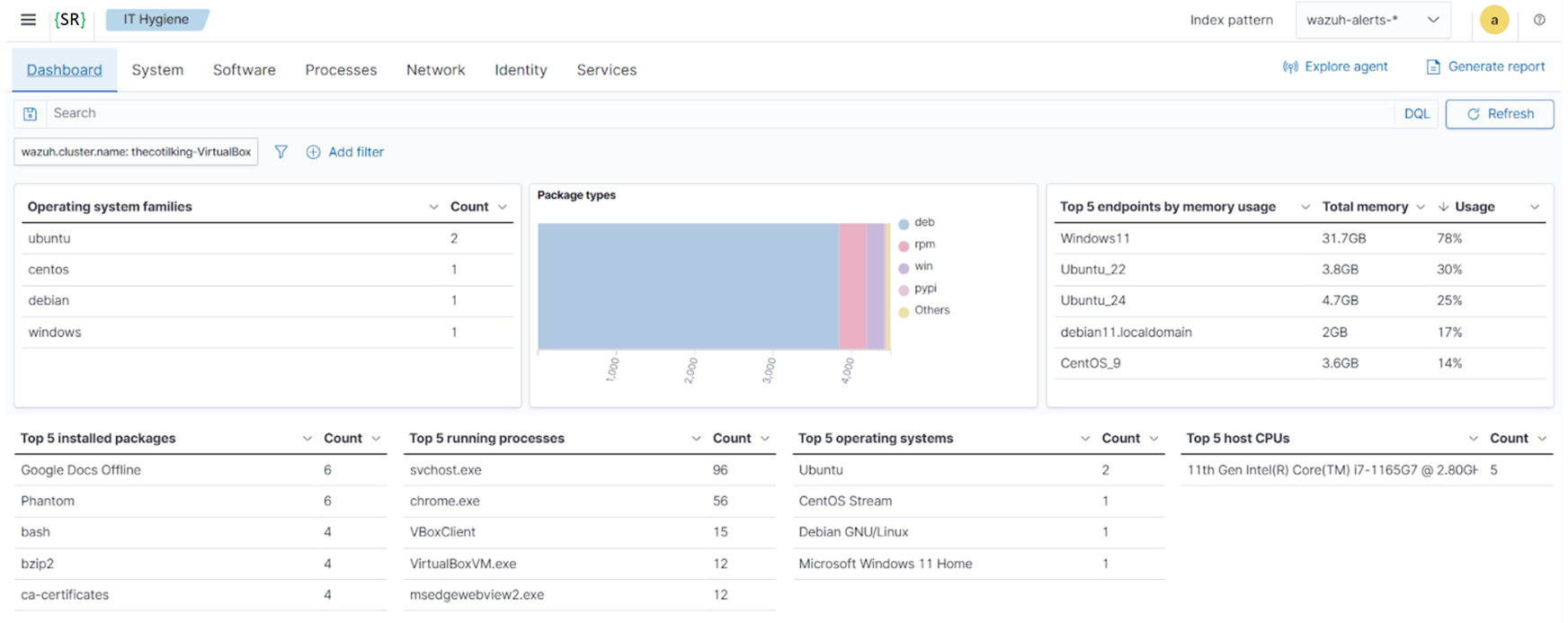
Apply filters via the dropdowns to focus on specific subsets within a section. You can also select filters from available fields by clicking on + Add filter, highlighted below.
Enable advanced filtering on System, Software, Processes, Network, Identity, and Services sections by toggling the Advanced filters to use the search bar.
On each tab, you can select additional fields to display by clicking the available fields dropdown.
Supported Network devices
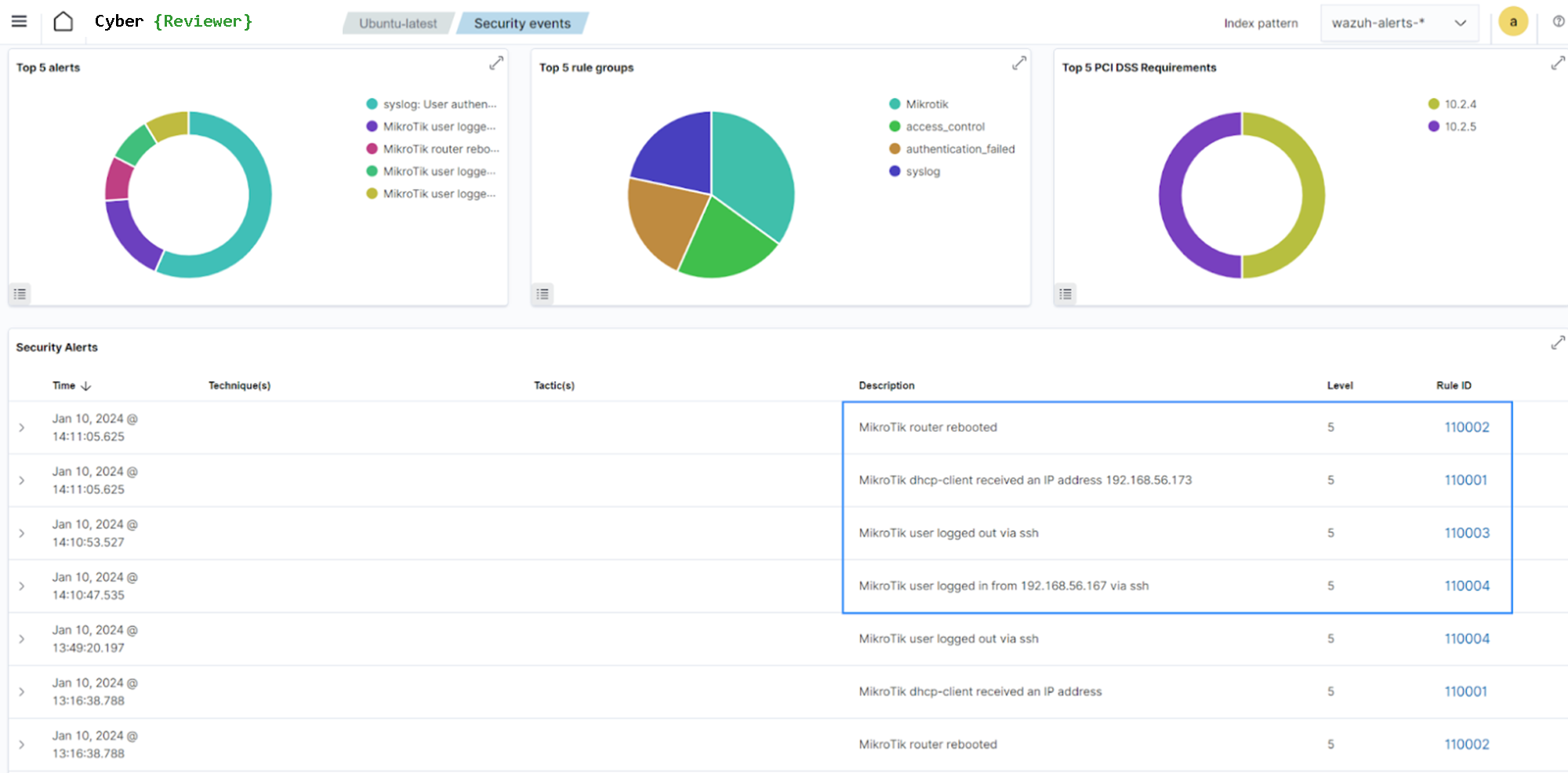
Cyber Reviewer supports monitoring in Agentless mode of: Firewalls, Routers, Switches, and Access Points (e.g., Cisco, Juniper, Palo Alto, Fortinet) that can send logs via Syslog or SSH.
Further, the following network devices are supported by providing out-of-the-box rules and decoders:
Cisco PIX, ASA, and FWSM (all versions)
Cisco IOS routers (all versions)
Juniper Netscreen (all versions)
SonicWall firewall (all versions)
Checkpoint firewall (all versions)
Cisco IOS IDS/IPS module (all versions)
Sourcefire (Snort) IDS/IPS (all versions)
Dragon NIDS (all versions)
Checkpoint Smart Defense (all versions)
Bluecoat proxy (all versions)
Cisco VPN concentrators (all versions)
VMWare ESXi 4.x
Huawei USG
MikroTik devices
pfSense
Junos devices
Timely remediation
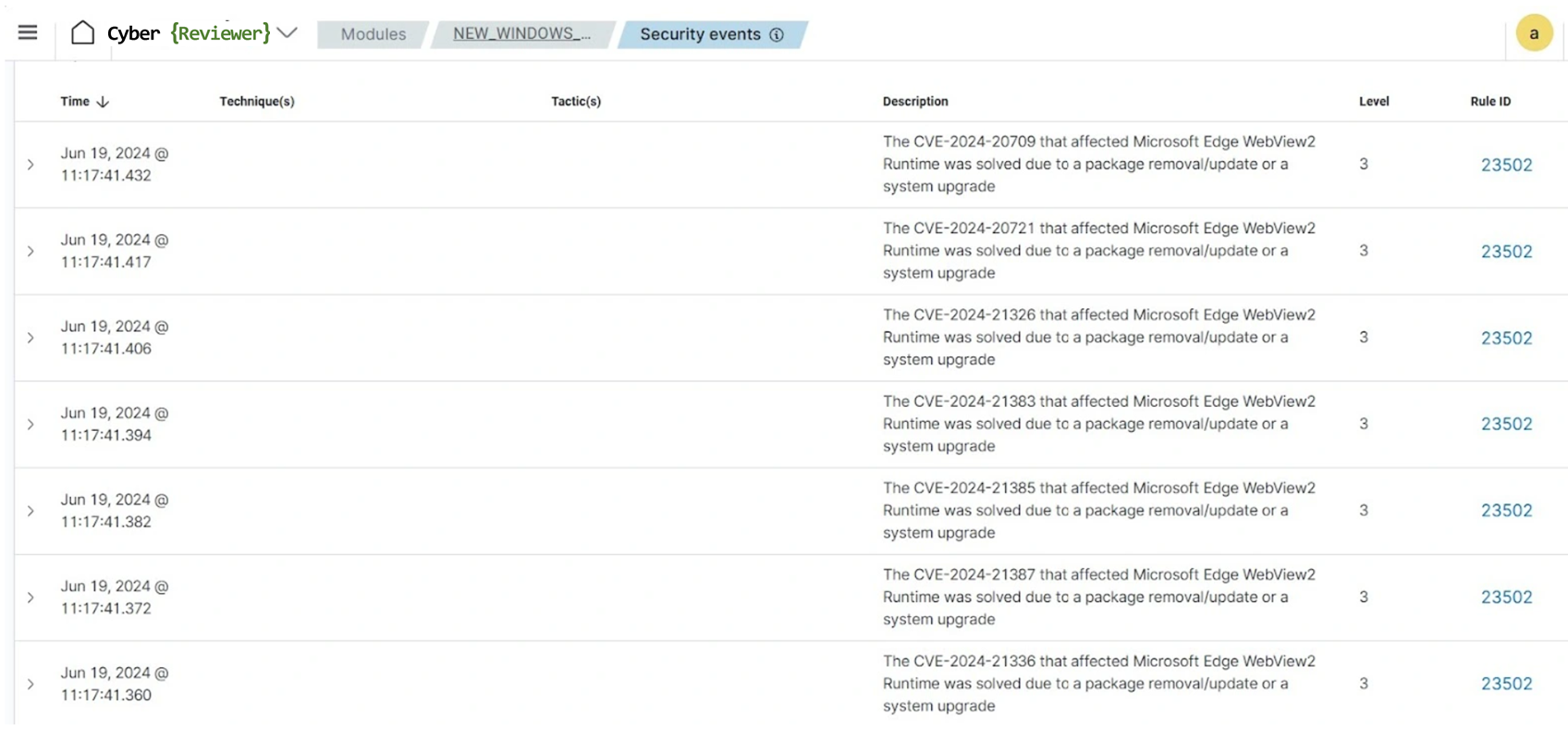
Prioritizing remediation efforts helps to ensure that resources are allocated in the most effective manner and allows organizations to address issues in a timely manner. Cyber Reviewer facilitates timely remediation by generating alerts and reports when vulnerabilities are detected. Cyber Reviewer assigns severity levels to the detected vulnerabilities and provides detailed information about the vulnerabilities, enabling security teams to prioritize and address critical issues promptly. In addition, Cyber Reviewer helps organizations to track remediation of identified vulnerabilities and report status.
Generate Compliance Reports
Generate detailed reports to aid compliance efforts and demonstrate adherence to industry standards. Cyber Reviewer includes preconfigured reports that showcase your level of compliances to various standards. You can customize the reports to fit specific data elements, fields, or criteria.
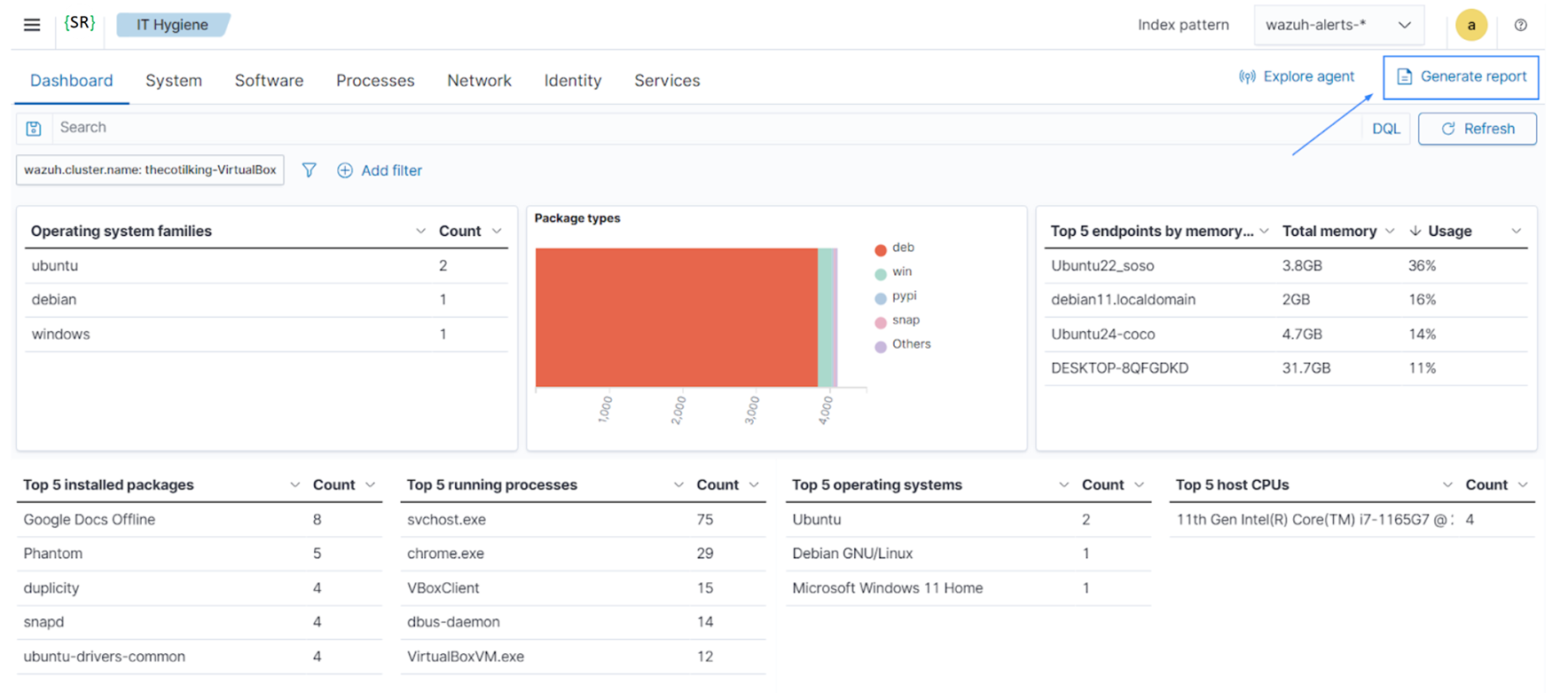
Is it possible to generate PDF reports on a regular basis (e.g. 1 report per day for each customer).
Notifications
Also, is it possible to schedule the automate sending of generated PDF report to specific email addresses or email groups, as wel as choose the notification channel types such as Slack, Chime, Amazon SNS, Microsoft Teams, email, or any other, using a custom WebHook.